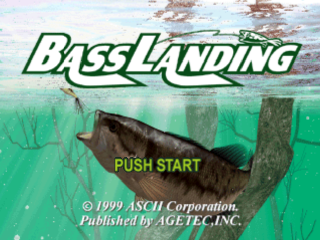
Title Screen
Press the START button to begin the game.
From the TITLE Screen, you can start a new game, continue a game, or adjust the game options.
•
Start: Start a game from the beginning.
•
Continue: Continue a saved game.
•
Option: Adjust various game settings.
Name Screen
Enter the name and gender of the player here. Enter the information by following the on-screen instructions.
Next, select a mode. Here you can load game data from a MEMORY CARD and continue a previously saved game. If there is no game data, NEW will be displayed. If so, enter your name and then start the game from the beginning.
Option Screen
The various settings for the game can be changed freely. Pressing the button will confirm the settings.
Option Screen from Title Screen
Option Screen During Game
•
Time Scale: Sets the progression of time while fishing. Can be set from the TITLE Screen, and before beginning free fishing mode.
•
Time Setting: Adjust the time of day in the game. This can only be set during the game.
•
Vibration: Turn the vibration function of the DUAL SHOCK analog controller or the Fishing Controller On/Off.
•
Replay: Set whether or not the replay option will be available after landing a fish.
•
Rod Action: Sets the controls for the rod in the CASTING Screen.
•
Normal: Rod moves down when pressing up on the controller, and up when pressing down on the controller (Flight Controls).
•
Reverse: Rod moves up when pressing up on the controller, and down when pressing down on the controller.
•
Indicator: Sets the format for the message displays and gauges in the CASTING and AFTER CASTING Screens.
•
Gauge + Message: All gauges/messages are displayed.
•
Gauge: Message displays are turned off.
•
OFF: Messages, the tackle set, the depth of the lure, the line meter, and the line tension meter are not shown on screen.
•
BGM: Sets whether or not to use Background Music during the game.
•
Natural: Natural environment sounds are heard.
•
OFF: Only sound effects are heard.
•
Sound: Select between Stereo and Monaural.
Terms
•
Landing: Bringing in a fish.
•
Tackle set: The fishing equipment available for use.
•
Line tension: The load placed on a line when a fish is caught or an object is snagged.
Mode Select Screen
•
Tutorial Mode: The Tutorial Mode is a step-by-step introduction to fishing to be used before either the B.A.S. Pro Tournament Mode or the Free Fishing Mode.
•
Free Fishing Mode: In the Free Fishing Mode, you can freely select the lake, season, weather, and time, and then enjoy some bass fishing as your mood dictates.
•
B.A.S. Pro Tournament Mode: In the B.A.S. Pro Tournament Mode, you can compete in six tournaments sponsored by the B.A.S. (Bass Angler's Society) organization, fulfilling specific conditions in each and aiming for the final "B.A.S. All-Star Classic".
•
Record Mode: In the Record Mode, you can view the record fish caught in either the B.A.S. Pro Tournament or Free Fishing Modes, as well as view any saved replays.
Tutorial Mode
The Tutorial Mode is a step-by-step introduction to fishing, to be used before the B.A.S. Pro Tournament Mode or the Free Fishing Mode. It is particularly useful as a way for first-time users and casual users to enjoy the game quickly without reading the manual.
Even for people who have never actually gone bass fishing, this mode will give you a feel for the experience. It is not only useful for this game, but may also enhance your actual fishing experiences. Exit the Tutorial by pressing the Start button.
•
You begin by entering the fishing school.
•
You move through classes step by step.
•
After each lecture, there is a practical exam.
•
Follow the on-screen directions and try to do well.
Terms
•
Basser: A person who fishes for bass.
Free Fishing Mode
In the Free Fishing Mode, you can freely select the lake, season, weather, and time of day and then enjoy bass fishing as your mood dictates. Here you first select the lake where you will fish, the season, the day's weather, and the starting time for your fishing trip, as well as the time scale. Then you go fishing in the environment you have customized.
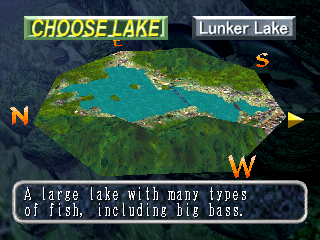
Choose Lake
Select the lake where you will fish.
Setup the Environment for the Lake Where You Will Fish
•
Setup Lake Environment: Make your choices from the available SETTINGS.
•
Random: The available SETTINGS are chosen at random, and the game moves to Tackle Box Screen 1.
Config Lake Settings
The following items can be set when configuring the lake environment.
•
Pressure: The level of pressure for the lake can be selected from: None, Low, Medium, High, and Random.
•
Season: The season in which you are fishing can be selected (by month; then by beginning, middle, or end of the month).
•
Weather: The weather can be selected for the day before and the day of your fishing at the selected lake. The symbol (/) indicates "
.png)


.png)
_1.png)
 (Demo).png)
.png)



_1.png)