GETTING STARTED
•
Turn OFF the power switch on your Nintendo Game Boy® Color. Never insert or remove a Game Pak when the power is on.
•
Insert the Game Pak of MTV Sports™: Pure Ride™ into the slot on the Game Boy Color. To lock the Game Pak in place, press firmly.
•
Turn ON the power switch. The credit screens will appear (if you don't see them, begin again at step 1).
•
When the title screen appears, press START to proceed to the Main Menu.
MAIN MENU
Access all of the options, riders, boards, and game modes from the Main Menu. Use the Control Pad to highlight an option and press START or the A Button to select it. Press SELECT or the B Button at any time to return to the previous menu.
•
Game Menu - Begin a new game!
•
Select Your Rider - Before hitting the slope, choose which rider to use.
•
Choose The Board - Select a snowboard to ride on.
•
Option - Customize your game.
OPTIONS MENU
From the Options Menu, you can load a saved game with a Password, or access the Music options. Press LEFT/RIGHT to highlight an option, then press the A Button to select. Press the B Button to return to the Main Menu.
•
Password - Enter a previously earned password to return to a game in progress.
•
Music - Toggle the music ON or OFF by pressing the A Button.
PLAYING A GAME
To hit the slopes immediately, select GAME MENU from the Main Menu. Now choose a game mode to begin. To customize MTV Sports™: Pure Ride™ before hitting the slopes, select a rider and a board.
Rider/Board Selection
From the Main Menu, choose either SELECT YOUR RIDER or CHOOSE THE BOARD. Now press LEFT/RIGHT on the Control Pad to find the rider and the board that are best for you. The color of the meter shows how high each ability is – more green represents a higher ability. Press SELECT or the B Button to return to the Main Menu.
The Riders
•
Stamina - How long each rider can last on the slopes before tiring out.
•
Weight - A rider's weight affects his ability to gain speed and maneuver.
The Boards
•
Speed - Select a board based on how fast it can take you down the mountain.
•
Brake - A board with a high brake setting will be able to slow down and make sharper turns quickly.
Game Menu
Now that you've chosen a rider and a board, select GAME MENU to begin a new game. Here you can begin your training or try the professional MTV TOUR.
TRAINING
When you begin, Canada will be the only area where you can train. Other training areas will become available when you can access that same area in the MTV or PURE RIDE TOURS. The further you advance in the two Tours, the more training modes will be available.
By completing each training area, you will be able to find a new board or rider to use in the MTV and PURE RIDE TOURS. Complete all of the training areas to gain access to the best boards and riders available.
In the Training Mode, you will have to finish each run within the given time limit. Some courses are littered with obstacles, some only have jumps, while others contain slalom courses. As you progress through the more difficult training areas, the courses will contain a combination of obstacles and jumps. Towards the end, you will be able to practice on the Halfpipe! A high score is not needed to complete a training mission – just beat the timer.
Note: You will have to complete the first qualifying round in the MTV TOUR mode to unlock some of the training missions.
MTV TOUR
Select MTV TOUR from the Game Menu to begin a new tour. If you have never gone through the Tour before, you will have to complete a qualifying round first. By completing the qualifying round, the MTV TOUR will become available, as well as all the training missions for the Tour.
In the MTV TOUR, you will need to complete each run within the given time limit. However, you will not be able to advance unless your point total is high enough. Complete phat tricks off the jumps and go through each Slalom Flag for big points.
Event Screen
Before an event, a screen will display your current status on the Tour. A flag of the country will be displayed, the style of the event will be listed (for example, "Slopestyle" or "Halfpipe"), and your total score for the Tour will be shown. Press the A Button to view information for the upcoming run.
•
Country, Event Style, Tour Score
Slope Information
The slope is shown on the right side of the screen, detailing where the Slalom sections are, as well as how long the course is. On the left, the goals for the run are listed in order, showing how many additional points can be earned by completing each goal. Press the A Button to head for the mountain.
On some runs, tricks will be listed under the Goals section. Complete each trick successfully to earn a higher score on the Tour.
•
Goals, Slope Slalom Section
Obstacles and Jumps
•
Slalom Flag - Ride around each flag, in the direction the flag is pointing, for a higher score.
•
Jumps - Hit the jumps for big air to pull off phat tricks.
•
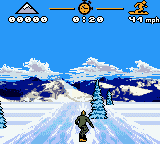
Obstacles - Debris and snowmen are scattered on some





.png)


_1.png)
