STARTING THE GAME
Set up your PlayStation® game console according to the instructions in its Instruction Manual. Make sure the power is off before inserting or removing a compact disc.
Insert the Fatal Fury: Wild Ambition™ disc and close the disc cover. Insert game controllers and turn on the PlayStation game console. Follow on-screen instructions to start a game.
GAME MODES
Pushing the Start Button at the title screen calls up the menu. Select a game mode using directional buttons and confirm by pressing either, or @ buttons.
Fight against the CPU with one character of your choice.
A two-player battle mode.
Practice special moves or serial moves.
Change various game settings.
VS MODE
Select a character and confirm choice.
Set a handicap.
•
LIFE: The amount of life gauge at the start can be set in four levels.
•
POWER: There are two kinds of power gauges you can choose to start with, [NORMAL] or [MAX]. (Once the power gauge is exhausted, it will build or drop accordingly.)
Setting controls.
If you want to start a game without setting a "Handicap Screen", push (or) button. If you want to set a handicap, push the Start button.
The "Handicap Screen" will appear when the Start button is pushed. Special moves and super special moves of each character are displayed in the "Handicap Screen." Select one move that you do not want your opponent to perform against you in a fight, using (or) button.
TRAINING MODE
Selecting [TRAINING MODE] allows you to set the condition and actions of a CPU character and practice special moves or serial moves against him.
Pushing the Start button during Training Mode calls out the menu screen and selecting [OPTION] allows you to change the following settings.
•
PLAY MODE: "Free Play" for free practice or "Special Arts" for practicing special moves only.
•
CPU ACTION: Movements of a CPU character can be set as follows:
•
STAND - Standing without guarding
•
CROUCH - Crouching without guarding
•
STAND GUARD - Standing position, but will guard if attacked
•
CROUCH GUARD - Crouching position, but will guard if attacked
•
ALL GUARD - Always guard in accordance with attacks
•
NORMAL - Attack and guard as usual
•
HP GAUGE: Select either "NORMAL" in which strength drops if attacked or "FULL" to keep the strength at "MAX" level all the time.
•
POWER GAUGE: Select either "NORMAL" to maintain the middle of the gauge all the time or "FULL" to keep the gauge at "MAX" level.
•
COMMAND: Display commands for special moves, etc. of characters.
•
KEY CONF: Key configuration settings can be changed.
•
CHARACTER CHANGE: Player's character can be changed.
•
RESET: Close Training Mode and return to the title screen.
OPTION MODE
•
Use Directional Buttons to select Option Mode, use any button to accept.
•
Press Start button to cancel menu.
•
Press Select button to go back.
•
Press Select and Start together to Reset game
When you choose [OPTION] the option menu will appear. You can then change the following game settings.
•
GAME LEVEL: Change levels of difficulty in the game.
•
TIME COUNT: Set the duration of time count in the game.
•
ROUND(S): Set a number of rounds for one match.
•
KEY CONF: Change key configuration settings.
•
MEMORY CARD: Save or load data during a match.
•
RANKING: Usage ratio or winning ratio of a character can be seen.
•
DEFAULT: Reset the item settings to the initial setting.
•
EXIT: Close Option Mode and return to the title screen.
POWER GAUGE
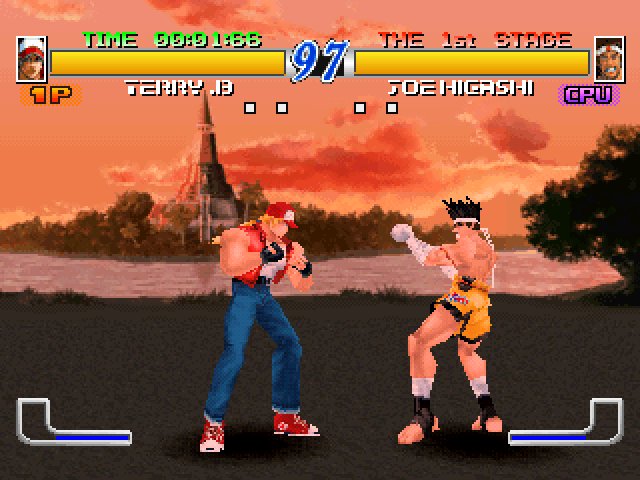
The Power Gauge displays the physical status of a character during a battle and has the following features:
The Power Gauge builds up whenever a normal move hits an opponent or a special move is performed. The Power Gauge drops when a character is attacked (If the gauge is exhausted, a character will be stumbling). The Power Gauge always tries to maintain a certain amount.
When the Power Gauge reaches MAX, Fierce Attack and Overdrive Power Attack are enabled.
SUPER DEADLY ATTACKS
Each character has common super deadly attacks in addition to the individual special moves.
Push buttons simultaneously. Makes a character invincible after activation and delivers attacks against an opponent who is unable to defend himself.
A move that exceeds special moves in destructive power.
From guard + D. Uses a certain amount of the power gauge to make a counter attack.
Has more destructive power than any other attack. (Try to find a command on your own!)
Super Special Moves can be performed only when the red Power Gauge flashes.
COMMANDS FOR SPECIAL MOVES
•
The following operation is for a character that is facing



_1.png)

.png)
.png)
_1.png)
_1.png)

