HOW TO PLAY
Insert your «ROADSTERS» Game Pak in your Game Boy and turn the power to the «ON» position.
Select the sound option: MONO/STEREO. Press START or the A Button to choose the language you desire, then press START or the A Button to see the first menu.
Game Start Options
You may enter a password by selecting the PASSWORD icon. This enables you to re-start the game where you had left it.
You may begin a new game by selecting the NEW GAME icon.
To select either one of these options, press SELECT or press the Control Pad up or down. Press START or the A Button to validate this choice.
Entering a Password
To enter a password, press the Control Pad left or right to move the cursor, then up or down to select a number or a letter, then press the A Button or START to confirm.
If you enter the right password, you will start with the same features you previously had, such as the amount of money, the league you had reached and the car parts you had bought. However, your vehicle's damage and your score will start at zero, so will your competitors'.
Passwords appear at the end of each race. If you have a Game Boy Printer, press SELECT to print out the password.
Selecting a Driver
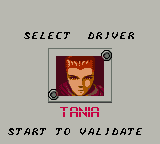
After selecting the NEW GAME option, you may select your driver (Tania, Cloe or Marvin) by using the Control Pad or SELECT, then press the A Button or START.
Controls
Control Pad
•
Changes icons in a menu.
•
Moves your car to the left or right during a race.
B Button
•
Quits a selection screen.
A Button
•
Confirms an icon in a menu.
•
Accelerates during a race.
START
•
Confirms an icon in a menu.
•
Pauses the game during a race.
SELECT
•
Changes icons in a menu.
•
Ignites the turbo-boost during a race.
Notes
•
To quit during a race, press START then SELECT (you will lose the race).
•
To reset your Game Boy, press START, SELECT, A and B Buttons simultaneously.
YOUR MISSION
Your mission in the game is to finish the first league. To do so, you will have to participate in many different races. Some will be in dry weather and against novice drivers, while others will be in the rain against expert drivers.
The police may be out to catch you if you exceed the speed limit. In each race you enter, you will encounter professional drivers as well as local drivers.
Professional Drivers
Professional drivers may bet against you, and their position in the race may affect your league ranking. Their pictures are shown before you start the race and their cars are indicated with a triangle during the race.
Local Drivers
Local drivers are regular drivers who do not appear in the league ranking. However, they may still be a threat when they drive aggressively.
Rewards
After winning a race, you will obtain a certain amount of money depending on your position and the amount you and the other participants have bet. You will also win points which are used to determine your league ranking. This ranking is updated after each race.
You will become a better driver as you progress, therefore, winning more races, and thus earning more money. If you buy enough equipment, your car's «vehicle class» will improve, which means that it will perform better (it will go faster, have better road-handling abilities, etc...).
Watch out because your competitors' vehicle class will also improve.
THE MAP
The main screen is divided into 2 parts. The Map appears on the left. You can scroll it by moving the pointer left or right with the Control Pad.
A selection panel is shown on the right. By pressing SELECT, the pointer will disappear. Use the Control Pad to pick one of the following options: DRIVERS, GARAGE, SHOP.
This panel also shows your league (DIV), the amount of money available (MONEY) and the damage your vehicle has suffered (DAMAGE).
DRIVERS Icon
When you select the DRIVERS icon, your competitors' rank appears. You may see each participant's information by pressing SELECT or up and down on the Control Pad.
Their skill level depends on their rank (which appears on the left of their picture), their vehicle's class (VEHICLE CLASS, which ranks from 1 to 4), the number of races entered (RACE) and won (WON) and the number of points (POINTS). Press START or the A Button to return to the map.
GARAGE Option
The GARAGE option indicates which league you are in (DIV), the amount of money available (MONEY) and your car's damage level (DAMAGE).
To fix your car, select the REPAIR icon by pressing SELECT or the Control Pad and press START or the A Button. A 10% repair will cost you $200. Select the DONE icon to leave the garage.
If damages reach 100%, your car will stop and the race will be lost, therefore, it is very important to go to the garage regularly.
SHOP Icon
The SHOP icon enables you to enter the part shop. The name, a picture and the price of the item appear on-screen.
The NEXT icon enables you to go to the next item and the BUY icon enables you to buy an item. Select the DONE icon and press SELECT or the A Button to leave the shop and return to the Map.





.png)


_1.png)
