STARTING UP
1. Connect the Genesis 32X to the Sega Genesis system, following the instructions in its manual. 2. Plug a game controller into Control Port 1. For 2 Player games, plug a second controller into Control Port 2.
3. Make sure the power switch is turned OFF.
Important: Always turn the power switch OFF before inserting or removing the game cartridge.
4. Fit the KOLIBRI game cartridge into the Genesis 32X cartridge slot and press it down FIRMLY.
5. Turn the power switch ON.
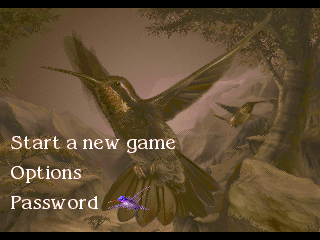
6. Soon you'll see the KOLIBRI Title screen, followed by the Main Menu. Kolibri is ready to fly!
Important: If nothing appears on your screen, turn the power switch OFF. Make sure the game cartridge is FIRMLY inserted in the Genesis 32X, and that the system is set up correctly. Then turn the power switch ON again.
USING THE MAIN MENU
Press the controller's D-Pad up or down to move Kolibri to any menu selection.
START NEW GAME
Press the Start button to begin a new challenge from Kolibri's home meadow.
OPTIONS
Adjust the game settings to match your play style. Press Button A, B or C to see the Options menu.
Press the D-Pad up or down to select an option. Press it left or right to change the setting. Press Start to return to the Main Menu.
•
Difficulty: Easy, Normal or Hard. Choose more difficult settings as your skill improves.
•
Player Mode: 1 or 2 Players. In 2 Player games, two hummingbirds cooperate to win the game.
•
Controller Assignment: Set the button controls to your own playing style. The default settings are A - Special, B - Weapon, C - Burst.
•
D-Pad Mode: With "Change direction..." Kolibri shoots left and right when you press the D-Pad while firing. With "Hold direction..." he flies backward and forward while firing in the same direction.
•
Bird Speed: Normal or Fast
•
Audio Mode: Turn the music and sound effects on or off, either separately or together.
PASSWORD
Use passwords to resume the game from any level you've already reached.
SOUND TEST
Listen to KOLIBRI's music and sound effects. Press the D-Pad left or right to change the selection, and press Button A, B or C to play it.
KOLIBRI'S MOVES
FIRING WEAPONS
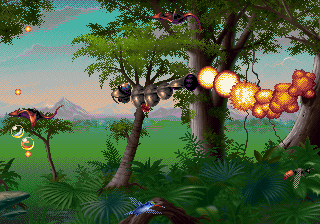
Press the Weapon button (default Button B) to attack malignant insects.
Set your D-Pad control on the Options menu to either "Hold direction while firing" or "Change direction while firing" for customized attack control.
CHANGING WEAPONS
Destroyed insects release Weapons pods. Fly over these to change weapons.
Earth crystals also release Weapons and Life pods. Locate the crystal in every level so you'll know where to go for immediate aid.
Different pods contain various weapons. Kolibri changes color, depending upon the weapon he's using.
Only certain weapons will defeat specific hazards and enemies. Figure out which weapons are most effective for the particular job at hand.
COLLECTING EXTRA LIVES
Life pods float up from destroyed insects and Earth crystals. Pick these up to store lives.
When Kolibri picks up a life pod, a burst of small hummers fans out around him. The number of small birds indicates how many lives Kolibri has left.
Get as many Life pods as you can, because Kolibri can lose many lives quickly in a fierce battle.
LOSING LIVES
Kolibri loses lives when he takes enemy hits. The burst of small birds shows the number of lives remaining.
If Kolibri loses all his lives, the level ends and you must play it again. Although the number of lives is finite, your Continues are unlimited.
USING RINGS
Fly into rings for temporary protection. Each ring shields Kolibri from one hit before vanishing.
SLOW-MOTION FLYING
When Kolibri flies over the large Slow-Mo pod, the screen flashes and both Kolibri and his enemies are temporarily slowed.
Use the time-delay action to wreak major damage on enemies as they swarm in clumps.
SIPPING NECTAR
Nectar is Kolibri's life source. Find blossoms that are dripping pollen and drink from them to release Life pods.
FINDING MILESTONES
Magnificent crystals glowing with health are milestones. These are progress markers. After you pass a milestone, Kolibri will appear at that point the next time you restart the level.
USING ENERGY FIELDS
•
Energy Fields are intelligent attack weapons that automatically target and destroy enemies.
•
Collect an Energy Field pod to gain its power.
•
A flowing Energy strand will encircle Kolibri's neck.
•
Press the Special button (default Button A) to activate and maintain the Energy Field.
•
Keep Energy Fields in reserve for when you need them most (for instance, in automatic scroll levels).
BREAKING BARRIERS
Kolibri can pass through some barriers by pushing on obstacles in his way.
Rock barriers are more resistant. Find the Wall Breaker pad and gain its power. Then attack the rock wall by pressing the Special button (default Button A).
STAYING TOGETHER IN 2 PLAYER GAMES
2 Players must move around the levels together. Your screen view won't scroll unless both hummingbirds are moving together into the new area.
In 2 Player games, find the Hummingbird pod. Fire on it


.png)


 (En,Fr,De,Es).png)