Starting Up
1. Set up your Genesis 32X System as described in its instruction manual.
2. Turn OFF the power switch on your Sega™ Genesis™.
Never insert or remove a game cartridge when the power is on.
3. Make sure a Control Pad is plugged into the port labeled Control 1 on the Genesis Console.
4. Insert the Toughman Contest cartridge into the slot on the console. To lock the cartridge in place, press firmly.
5. Turn ON the power switch. The EA SPORTS® logo screen appears (if you don't see it, begin again at step 1), followed by the High Score and Visual Concepts logo screens.
6. To advance directly to the Game Setup menu, press START. The Game Setup menu appears.
Customizable Tournament
Start a new customizable tournament with two, four, or eight fighters.
Restore From Password
Restore a saved Toughman Contest by entering the password that you wrote down and saved somewhere.
Before the Fight
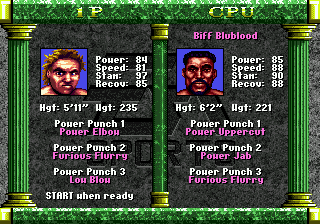
Before an Exhibition fight or the first fight in a Tournament or Toughman Contest, you can choose a boxer and assign his three Power Punches.
Boxer Select Screen
•
D-Pad left/right to select Boxer
•
D-Pad left/right to select Power Punches
1. Highlight the Boxer Name at the top of the screen. To scroll through the available boxers, D-Pad left/right.
2. To change a Power Punch, highlight POWER PUNCH 1, 2, or 3, and D-Pad left/right to cycle through the special punches.
Press START to proceed to the pre-fight introduction.
Power Punches
Hooks and jabs are pretty good, but there's more to Toughman Contest than that. You can only throw the three Power Punches that you select from the Boxer Select screen.
The directional arrows below correspond to the D-Pad on your controller.
•
Power Jab: Tap B, then ←↑
•
Back Handed Slap: Tap B, then →←
•
Power Elbow: Tap B, then ↓↓
•
Power Hook: Tap B, then ←←
•
Haymaker: Tap B, then ↑↑
•
Power Uppercut: Tap B, then ↓↑
•
Super Uppercut: Tap B, then ↓→
•
Low Blow: Tap B, then ↓←
•
Duck Body Blow: Tap B, then ←↓
•
Measured Hook: Tap B, then ↑←
•
Windmill Wind-up: Tap B, then →→
•
Head Butt: Tap B, then ↑↓
•
Popeye Punch: Hold ↑, then tap B eight times rapidly
•
Furious Flurry: Tap B eight times rapidly
Pre-Fight Introduction
The Fight Introduction screen shows the two boxers and the venue. To continue, press START.
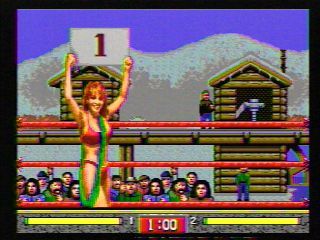
The ring announcer gives an overview of the fight, then a round girl displays a placard listing the next round of the fight. When you hear the bell, come out fighting!
You can press START to jump past the current animation sequence if you're in a hurry to start spillin' some blood.
Hittin' and Duckin'
You'll want to put a serious hurtin' on the other guy in the ring. Just imagine he said something about your mama, and bust him so hard that his wife and kids start crying.
Fight Format
•
Stamina Bars (red portion represents damage taken)
•
Controller 2 or CPU boxer
In the Ring
Each fight has three one-minute rounds.
When a fighter's Stamina Bar turns completely red, he's sure to hit the canvass, and the other fighter automatically moves to his corner. The ref starts to count out the boxer who's down. A fighter cannot be saved by the bell.
If a fighter is knocked down three times in a single round, he loses the fight by T.K.O. (technical knock out).
If there is no T.K.O. or K.O., the three judges decide the winner using a ten point must scoring system. Each judge awards ten points to the fighter who he thinks won the round and nine or eight points to the loser. The fighter with the most points at the end of the fight is the winner.
Offense
It's simple—if you punch that other guy harder and more times than he punches you, you're gonna win the fight. That's all that really matters, right? You're not up there in that ring just to look pretty, are you?
El Socko!
To move your boxer to the left or right, press B and D-Pad left/right.
When you are fighting against the computer, left/right movement is controlled automatically. You can only move left/right manually when two human players are fighting.
•
To throw a quick jab with your left hand, tap A. To throw a right jab, tap C.
•
To throw a hard hook with your left hand, hold A. To throw a right hook, hold C.
•
To throw head punches, press D-Pad up. (If you don't press the D-Pad, you automatically throw body punches.)
•
To throw an uppercut, hold B.
Defense
You might want to consider ways to avoid taking damage when that other big, hairy guy's paws are coming at ya.
EA Tip
In general, you'll be better off if you block punches with your gloves instead of your face.

.png)