Getting Started
Set up the 3DO system as described in the system's operations manual. Open the CD tray and insert the CREATURE SHOCK CD. Close the tray and press the A button to launch the game.
Flight Levels
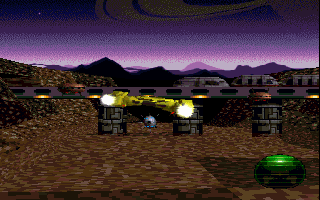
All flight missions are shown to you in a third person perspective. This means that your ship will be visible to you at all times.
Use your direction pad to control the bearing of your ship by moving up, down, right, or left. Your speed is constant.
The B button fires your weapon. In the lower right corner of your screen will be the SHIELD ICON, showing the strength of the protective shield surrounding your craft.
When the shield icon completely disintegrates, you will be unprotected and any hit to your ship will cause your destruction.
Walking Exploration Levels
While on foot patrol, you will see a cursor/security drone. Move the drone to the area in which you wish to explore and press the B button.
When a combat situation arises, your weapon will automatically be drawn and the cursor will switch to a shield/crosshair. Use this crosshair to aim your shots.
When the crosshair is activated, the B button fires your weapon. No movement options are available when shooting. You will know that your aim is on target when an inward arrow appears on each antennae.
During the walking exploration levels, press the A button to activate the Smart Bomb.
In the lower right-hand corner of your screen, you will see a communications link that will provide you with necessary information. The left-hand circular section is a compass screen.
This will assist you in plotting your map of explored areas. (An area for you to plot your map is provided in each level mission briefing on the following pages.)
To the right of the compass will be a status report. In this area, you will see alternating icons for your WEAPON, BODY ARMOR, and the PROBABILITY OF ALIEN PRESENCE, each with a percentage rate to the side.
The gun icon will give you an indication of the power available in your weapon. The body armor icon is an indication of the power left in your body armor.
The revolving DNA strand gives you a probability rate of alien presence. The percentage rises the closer you are to an alien. While in battle, refer to this percentage as an indication of the being's remaining strength.
Pressing the C button while firing a weapon activates a shield which will temporarily protect you from alien attack. Whenever you use your protective shield, the health percentage of your body armor will decrease.
When using the shield, the compass will switch to a body armor icon to indicate that it is activated.
The key to surviving each mission is carefully balancing your protective shield and weapon power. If you simply charge into a situation with weapons blazing, your weapon may run out of power at a critical moment.
If you use all of your shield power too soon, you may not have it at a crucial point. The trick is to find a proper balanced use of the two.
Pausing A Game
To pause the game, press the PLAY/PAUSE button. Hit it again to restart.
Exiting The Game
To exit a game, press the STOP button, and choose quit. The STOP button also gives you a choice of both OPTIONS and CONTINUE.
OPTIONS allows you to change the volume of sound effects and music. CONTINUE allows you to go back and resume play.

.png)
 (Disc 1).png)
 (Disc 2).png)

.png)
.png)