Getting Into the Game
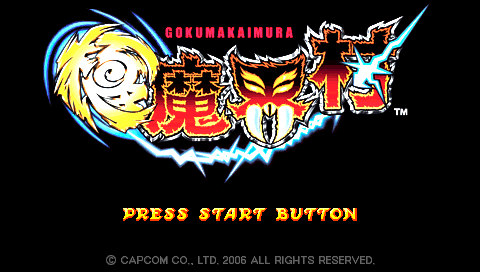
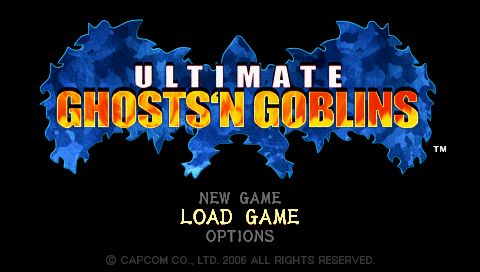
Insert the game UMD into your PSP and turn on the power. After the intro movie the Title screen will appear. Title Screen
Press the START button on the Title screen to display the Main Menu.
•
NEW GAME: Start a new game from the beginning.
•
LOAD GAME: Resume a previous game.
•
OPTIONS: Adjust game settings.
Game Modes
Three main gameplay modes become available when you select NEW GAME from the Main Menu.
Novice Mode
Recommended for newcomers to the G&G series.
•
Start the game with more lives.
•
Arthur is knocked back less when hit by enemies.
•
Weapon is powered up when you come back to life.
Standard Mode
Play with the standard settings and difficulty level.
•
Start the game with two lives.
•
Spawn from the point of death.
Ultimate Mode
For series fans and gamers who want a challenge.
•
Armor breaks after one hit.
•
Spawn from the beginning of the stage.
Loading Data
Load a previous save file and resume the game from where you left off. Follow on-screen instructions to load a file. See page 14 for instructions on saving your progress.
Notes About Saving and Loading
•
A Memory Stick Duo (sold separately) is required to save your progress. Insert the Memory Stick Duo before attempting to save.
•
This game requires at least 400KB of free space to save your progress.
•
Please do not connect or remove the Memory Stick Duo while saving or loading, as this could corrupt your saved data.
Options Menu
Adjust the volume of the game's music and sound effects, and customize the button layout.
Button Config
Customize the button layout.
•
Highlight the button you want to change and press the X button to confirm selection.
•
Select a new function from the list and press the X button.
•
Select DEFAULT to restore the controls to their default settings.
BGM Volume
Adjust the game's music volume.
SE Volume
Adjust the game's sound effects volume.
•
Highlight the volume bar and use the directional keys to adjust the volume.
Default
Restore the default settings.
Game Goal
As the brave knight Arthur, you must travel to the depths of the Demon Realm and rescue the Princess from the clutches of the evil Dark Lord!
Along the way hordes of evil creatures will try to stop you, so you must use weapons you find to defeat them and march on.
The road that leads to the Dark Lord is blocked by a number of of giant doors. You must defeat the guardians of these doors to get the keys necessary to open them.
This is a battle to the death! Do you have what it takes to make it through alive?
Basic Rules
Arthur can equip armor to protect himself from enemy attacks. As the armor takes damage, it wears down and finally breaks apart, leaving Arthur in his underwear. When he's without any armor, a single hit will kill him. Arthur must also keep from falling into giant pits, rivers of fire, or worse!
This is what happens when your armor wears down!
Game Over
You can keep going as long as you have remaining lives. But if you die when you don't have any more lives left, it's Game Over.
•
CONTINUE: Resume the current game.
•
LOAD: Load a save data file (see page 13) and resume play.
•
TITLE: Return to the Title screen.
Game Screen Layout
Armor Meter
You lose a mark each time you take damage. Once you lose all the marks, the armor breaks. If you take damage with no armor, Arthur dies.
Note: Not displayed in Ultimate Mode.
Score
Your current score. Get 1-UPs by reaching certain scores.
Timer
Remaining time left in the stage. Once the timer runs out, Arthur loses a life no matter where he is.
Remaining Lives
Every time Arthur dies, it takes one life to continue. If Arthur dies when he doesn't have any lives left, it's Game Over.
Weapon
Your currently equipped weapon. You keep the same weapon, even when you die, until you pick up a new kind of weapon.
Magic
Your currently equipped magic type. You can change to a different magic type from the Sub Menu.
Magic Gauge
Shows your current amount of magic. The yellow portion shows how much magic power you need to use your magic one time.
Sub Menu / System Menu
While controlling Arthur, press the START button to open the Sub Menu, which is made up of various screens.
Sub Menu Layout
•
PAGE: Select a command to perform.
•
AREA NAME: Name of current stage.
•
MENU WINDOW: Shows Sub Menu contents.
•
DETAILS WINDOW: Shows details for selected item.
Sub Menu Commands
•
STATUS: View information on the magic, weapon, and armor currently equipped. Move the cursor to view information for another item.
•
ARTHUR'S STATUS: View Arthur's status.
•
CURRENT WEAPON: View the weapon currently equipped.
•
LIGHT RING: Check how many Light Rings you have.
Shield Status
View the shields you have or equip
.png)

.png)
.png)





_1.png)

