GETTING STARTED
1. Set up your Sega Genesis 32X System™ as described in its instruction manual.
2. Make sure the power is off, then insert this cartridge into the Genesis 32X Console.
3. Turn the power switch on. In a few moments the title screen will appear.
4. Press the START Button on the Genesis Control Pad to advance past the title sequence and begin play.
5. If the title screen doesn't appear, turn the power switch off. Make sure your system is set up correctly and the cartridge is properly inserted. Then turn the power switch on.
Important
Always make sure the power switch is turned off when inserting or removing your cartridge.
HANDLING YOUR SEGA 32X CARTRIDGE
•
The Sega Genesis 32X Cartridge is intended for use exclusively with the SEGA Genesis 32X System™.
•
Do not bend it, crush it, or submerge it in liquids.
•
Do not leave it in direct sunlight or near a radiator or other source of heat.
•
Be sure to take an occasional recess during extended play, to rest yourself and the Sega Cartridge.
MAIN MENU
Press START to reach the game's Main Menu. Press the D-Pad UP or DOWN to highlight the option you want, then press START to select.
The Main Menu displays the following gameplay options:
1 Player
Select this option to accept Nazrac's tournament challenge and battle solo versus three top computer opponents. As long as you win each battle, you'll continue to move onward to other battle arenas. After you select this option, you'll go to the Identification Screen.
2 Player
Select this option if you wish to challenge a "friend" in the battle. You'll both play on a split screen, but remember, you won't be friends in the arena. In two player mode, you can continue to play TMEK as long as you want.
After each bout, the winner of the first match will have the option to select any arena and another MEK if you wish. When this option is selected, you'll go to the Select Game Type Screen and select from one of these two options:
•
Challenge Mode - If you select this option, both players will join two other computer controlled MEKs in the battle arena. In this mode don't trust anyone, the computer MEKs will be out to shatter your MEK, and so will your buddy.
•
Duel Mode - It's just you against your "so called" friend. You can continue to play as long as it takes to decide who is the mightiest warrior.
Note: To switch to two player mode, reset the game and select the other mode.
After you select the 2 Player option, you'll go to the Identification Screen. You'll then go to the MEK Select Screen.
GAME OPTIONS MENU
This option also appears on the Main Menu. Press the D-Pad UP or DOWN to highlight the option you want. Press the D-Pad LEFT or RIGHT to toggle the options in green or press START to select the yellow colored options. The available options are as follows:
1P Difficulty
Select Easy, Medium or Hard gameplay.
1P Game Mode
This option lets you choose from 4 different game modes. These options allow you to extend the length of the tournament and add difficulty:
•
Arcade The tournament levels in this mode are set up just like the arcade game (12 levels). •
Arcade+2 This arcade option adds two extra levels to the tournament. •
Arcade+4 Adds four extra levels to the tournament. •
Arcade+6 Adds six extra levels. 2P Difficulty
If you are planning to play a two player game, select from these five levels of difficulty for the computer controlled enemy MEKs: Very Easy, Easy, Medium, Hard, or Very Hard.
Game Time
You can use this option to set each battle's time. Select from 30 to 360 seconds (in increments of 30 seconds).
Sound Test
You can listen to the game's various game sounds. Cycle through each numbered sound, then press the A Button to hear the sound.
Clear Score Tables
Select this option to reset the 2 Player Win/Lose/Draw Score. Make sure you want to do this before you select it as you will lose all high scores currently posted.
Joypad Options
Select this option to configure your controller to your own specifications. From here you'll go to the Joypad Configure Screen.
When you've made changes in the Options Menu, press START to enter them and return to the Main Menu.
IDENTIFY YOURSELF!
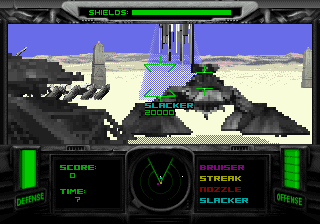
After you've made your selections at the Main Menu, the Identification Screen will appear. Press the D-Pad UP, DOWN, LEFT or RIGHT to move the cross hairs over the letter you want, then press the A Button to select it.
Repeat the process to enter up to eight characters, then select "END." As you select letters, you'll notice the red timer moving inward at the bottom of the screen. The timer resets after each letter is selected.
If you don't select a letter before the red disappears, the game will accept


.png)

_1.png)

.png)
_2.png)
_1.png)


-Back-cover.png)