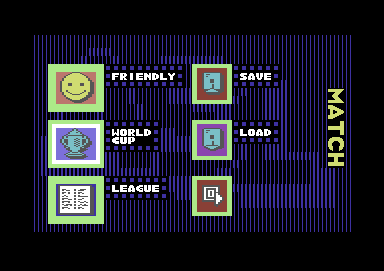
Main Menu
Use the joypad to move the cursor and press button B to select your desired option.
•
International Friendly: A single game between two International teams of your choice for one or two players.
•
World Cup: 16 teams from all over the world compete for the World Cup.
•
League Game: Select 3 to 8 teams from the 16 available to compete in a round robin tournament.
•
Team Editing: Customise your team by changing team names, team strip, player names, and physical attributes.
International Friendly
This is a single game for one or two players. The result of this game does not affect other competitions. Select 2 teams out of 16 available on the screen by using the joypad to highlight their emblems.
Once 2 teams have been selected, the Options Menu will be displayed. You can change the game environment, adjust the attributes of each squad member, and select whether to play against the computer, play against another player, or watch the game.
Options Menu
The Options Menu provides you with the following setup choices:
Play Mode
To change from computer to player or vice versa, move the cursor button to the team emblem and press button B. There are three modes of play available:
•
Computer Vs. Computer (Demo)
Game Environment
•
Skill Level: Select from 1 (standard) to 7 (very difficult).
•
Wind Force: Choose between None, Light, Medium, or Strong.
•
Length of Game: Choose 5, 10, 15, 20, 40, or 80 minutes.
•
Pitch Type: Choose Standard, Muddy, or Hard.
The Squad
You have the facility to select your squad and customise it.
Kick Off
Select the icon of the rugby ball to take you straight to the match.
You can quit the match at any time by pressing the START button to Pause the game and then pressing the X button. To re-start the game after a Pause, press button B.
World Cup
Sixteen International teams compete in the World Cup competition. The competition is organised in two parts.
In the first instance, 4 pools with 4 teams each are organised. Each pool is a mini league where each team plays other teams once. The winner and runner up proceed to the quarter finals. The rest of the competition is played on a knock out basis.
World Cup Password
A screen with 12 clock faces is displayed at the start of the World Cup. If you are playing for the first time, skip the password section by selecting the SKIP icon at the bottom left hand corner of the screen.
If you wish to leave the competition at any stage, note the setting of the clock faces displayed at the end of the match. To resume the game, you must set the clock faces to the same time as when you left. Move the cursor to a clock face and use the L and R buttons to move the hands.
World Cup Options Menu
•
Game Environment: Set the match conditions (Skill Level, Wind Force, Length of Game, Pitch Type).
•
Player Mode: Choose between Computer and Player control options.
•
Fixtures: The fixture list is shown on a rolling basis, with the current fixture at the top of the list.
•
Table: Displays the standings for Pools 1 to 4.
•
The Squad: Select and customise your squad.
•
Watch Game: Watch the game or predict the result.
•
Kick Off: Start the match.
World Cup Table Legend
•
P: Number of matches played (Total 3)
•
W: Number of matches won (3 points for a win)
•
D: Number of matches drawn (2 points for a draw)
•
L: Number of matches lost (1 point)
•
PTS: Total number of points
Watch Game Options
This option allows you to either watch the game or predict the result. If you wish to predict the result, move the cursor to the icon and press button B. A cross will appear on top of the icon.
•
Icon + cross: Predict Result
•
Icon only: Watch (Computer Vs. Computer) or Play (if you select one or both teams as a player)
World Cup Caution
If you wish to leave the competition and resume at a later date, you must note the setting of all the clock faces at the end of a match. You can then continue the game by setting the clocks when you wish to resume play.
The League
Between 3 to 8 teams can participate in the league competition. You can leave the competition at any time and resume at a later date by using a password.
To select teams, move the cursor over the emblem of a country and press button B. When you have selected the required number of teams, move the cursor to the EXIT icon at the bottom right hand corner and press button B. All other options are the same as for the World Cup.
Penalty Rules
A penalty is awarded if you commit an Off Side or Tackling foul. A goal scored by a penalty kick is awarded 3 points.
Note that a goal scored by a Drop Kick, Free Kick, Tap Kick, etc. scores 2 points. Only a penalty kick scores 3 points.
Penalty Control
If your opponent commits a
.png)

.png)
.png)
.png)
.png)

_1.png)
.png)
_1.png)
.png)
 (En).png)
.png)
.png)
.png)


.png)
_1.png)