Modes of Transport
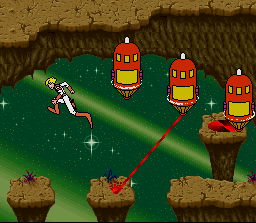
Most levels involve Dexter running and jumping, but there are some special levels.
•
Starpak: In the SPACE MAZE, guide Starpak through a rotating maze, destroying the asteroids along the way. In the FIGHTER CHASE ESCAPE, Starpak is flown vertically up the screen. •
Flying Saucer: Fly a flying saucer through the dangerous POWER TUBE.
•
Rocket Skates: Using rocket skates, Dexter must steer through a ROCKET SKATE maze. Dexter can now steer in mid-jump, but not if he hits a ramp and does a mega jump.
•
Motorcycle: Zoom through the MOTORCYCLE MAZE with wheelies and ramps.
•
Aquaboom: Survive the UNDERWATER CAVERN with permanent laser fire.
Weapons and Power-Ups
While energized, Dexter can fire his laser gun. Note that on some of the later levels he is permanently energized.
There are also several power-ups that can be collected:
•
Green Disk: Increase laser power. This means that your shots do greater damage.
•
Blue Disk: Faster Sight. This means you can "lock-on" to targets more quickly.
•
Red Disk: Time Warp. This allows you to practice any level that you have reached at the end of the game.
•
White Disk: Extra Life. You start with 5 but you may need more!
Space Maze
The second level that you reach is the SPACE MAZE, which has several unique aspects. This level contains entrances to 6 new levels immediately, with a seventh one opening when the 6 have been completed in whatever order you like. You just have to find them. There are three types of warp gates in the maze:
•
RED: Active warp to another level.
•
BLUE: Inactive warp to another level.
•
GREEN: Recharge shields (This will cost you points).
Starpak has four shields which protect it from some collision. Beware of the hypercharged blue walls which drain all shield energy and the green asteroids which cannot be blocked by shields.
TV Watch
The watch displays your score, remaining lives, and power statistics. The watch will also display action clips from the laser disk original. The columns E, S, and P represent:
•
E: Extra Tries (Time Warps)
•
S: Speed Up (Faster Moving Sight)
•
P: Power Up (More Powerful Weapon)
Options Screen
The Options Screen can be entered from the title screen by pressing SELECT and this allows you to customize the controls. All of the buttons except START can be redefined by the user. Press SELECT again to return to the title screen.
The default option selections are:
.png)


.png)



.png)

.png)
 (Rev 1).png)


.png)