Starting a Game
Properly insert the game cartridge into the Game Boy® Advance unit and turn on the power. Press START on the Title Screen, select either New Game or Load Game, and press START.
To load saved data, use Up or Down to select the file and press the A Button. This is only possible when there is previously saved data.
Use the L and R Buttons to enter the player's name. Use the Control Pad to select letters, the A Button to input, and the B Button to cancel. After completing name entry, select END and press the A Button. A confirmation message will appear; choose OK if correct or NO to make changes.
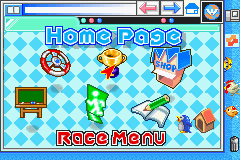
Use the Control Pad on the Menu Screen (Home Page) to select a menu to go to and press the A Button.
•
License Center: Take a test to obtain a license (pg. 13)
•
Race Menu: Move to the Race Menu Screen (pg. 9)
•
Item Shop: Purchase items, set items (pg. 15)
•
Rumor Billboard: Get a variety of information about the game (pg. 13)
•
Save: Move to the Save Screen (pg. 13)
•
Exit: Finish the game and return to the Title Screen
*Data will be erased if the Title Screen is returned to without saving.*
Race Menu
Krazy GP
This is the menu selection for the Grand Prix races, in which the player's goal is to place 1st overall in each of the cups. Finishing in 3rd place or higher in a race allows the player to advance to the next race.
If the total number of player points at the end of 4 races ranks the player 1st overall, the player will be able to take a license test.
How to begin the Grand Prix race
1. Use the Control Pad to select Krazy GP on the Race Menu Screen and press the A Button.
2. Use Up or Down to select the game level and press the A Button.
3. Choose your favorite character on the Character Selection Screen using the Control Pad and press the A Button to confirm selection.
4. Use Left or Right on the Cup Selection Menu to choose the cup to race in and press the A Button to confirm and begin the race.
•
Of the 4 available cups, the only one that can be chosen at first is the Krazy Cup.
•
In order to participate in other cups, the player must obtain licenses.
•
An increase in game level makes player rivals stronger and raises the limit on maximum speeds, making the game more difficult overall.
Game Over
When the player finishes in 4th place or lower in any of the races in the Grand Prix, they may continue, but will lose 1 player. When there are no remaining players left to continue with, and a player places in 4th place or lower once again, the game will be over.
Time Attack
This is the menu selection for the player to race against the clock on their favorite course. There are no rivals to interfere with the player from breaking course records!
How to begin a Time Attack
1. Select Time Attack from the Race Menu Screen and press the A Button.
2. Use the Control Pad to choose your favorite character and press the A Button.
3. Use Up and Down to select the course to race on within the Course Selection Screen and press the A Button to confirm your choice.
Free Run
Use this menu selection to race on your favorite course. This is the place to practice for the Grand Prix races.
How to start a Free Run
1. Choose Free Run from the Race Menu Screen and press the A Button.
2. Use Up and Down to set the game level and press the A Button.
3. Select your favorite character with the Control Pad and press the A Button to confirm.
4. Finally, choose the course to be raced within the Course Selection Screen and press the A Button to confirm your choice.
*In Time Attack and Free Run modes, the player can only select 12 of the 16 courses. The remaining 4 courses can be selected once the player has advanced to the Krazy Grand Prix Cup.*
VS. Mode (Multi-Player Race)
Refer to the description on p.18 for how to connect the Game Link® Cable to multiple Game Boy® Advance systems. Once this step has been completed, both players who want to join in a multi-player race should select VS. Mode from the Race Menu and press the A Button to confirm.
Once VS. Mode has been entered, a message will be sent to confirm the number of player entrants. If this number is correct, press the A Button. Next, select the menu for the VS. race and press the A Button to confirm your selection.
The multi-player race and battle are played like a normal race, except that the player's rivals are the other connected players. Once all the players are connected in VS. Mode, any player can select the Race Menu.
VS. Mode Options
•
Free Run: Just like a normal Free Run, except with the connected players as rivals.
•
Match Race: A VS. race between players.
•
Mini-Battle: Just like a normal mini-battle, except with the connected players as rivals.
Pause Menu
Press START during a race or battle to pause the game. Press START, or the B Button, to return to the game.
**During

_2.png)
 (En,Fr,De,Es,It).png)
 (Beta).png)
.png)

.png)
.png)

.png)
.png)

.png)