Cooperative Menu
Select this menu to play in two-player Cooperative mode. You can choose from the following options:
•
Training: A special mission to learn the basics of the Co-op mode.
•
Campaign: A series of Co-op missions.
•
Options Menu: Adjust the sound, video, and Controller settings.
•
Hall of Fame: Where the best scores are kept.
•
Quit: Return to Main Menu.
Sam's Actions and Movements
Some of Sam's moves are described below. Your play style will determine which moves are most useful in different situations. Sam may be capable of more than you expect!
Basic Moves
Crouching
Press the X Button to crouch. Movement is slower but quieter, and Sam is less visible while crouched.
Mantling
Press the Y Button and push forward into low objects like crates or tables. Sam will crawl, or "mantle," onto them.
Climbing
To climb a pipe, ladder, vertical cable, or fence, simply walk into it. Press the X Button to jump off.
Close Attack
In Splinter Cell Chaos Theory, you can choose between lethal (R Button) and non-lethal (L Button) attacks when you're close to the enemy. Back to Wall
Press the A Button and/or Z Button + A Button (both methods will work) when standing or crouched to put Sam's back to the wall. Sam is less visible with his back to a wall.
Shimmying
Jump by pressing the Y Button to grab and hang from ledges above Sam's head. Sam can move left and right, as well as pull himself up if there is room. Press the X Button to let go of a ledge.
Hand-over-Hand
Jump by pressing the Y Button to grab and hold a horizontal pipe. Bring Sam's legs up to clear obstacles by pressing the Y Button.
Inverted Neck Snap
When holding onto a horizontal pipe with legs up, move to a position above a non-player character (NPC). Once the interaction window appears, press the R Button for a lethal attack or press the L Button for a non-lethal attack that will leave the NPC unconscious. Press the X Button once to return to a hanging position and press it a second time to let go of the pipe.
Water Kill
When in water, get close to an NPC. When the interaction window appears, press the A Button to perform a lethal attack.
Zip Line
Jump by pressing the Y Button to grab hold of a sloped wire or zip line. Sam will slide down automatically. Raise Sam's legs by pressing the Y Button. Press the X Button to let go.
Grabbing
Grab an enemy by sneaking up close to him undetected and selecting the Grab Character interaction.
Human Shield
While holding an enemy, you can press the B Button to equip your sidearm and fire at other enemies while using the enemy you are holding as a human shield. You can move around with Sam while in this mode.
Interrogation
Some NPCs can be interrogated for useful information. While holding an NPC, select the Interrogate interaction to make him talk. Interactions reveal all sorts of information that will help you on your missions. Be sure to interrogate as many opponents as possible!
Forced Cooperation
Some objects in the world can't be used by Sam, but there may be NPCs who can use the objects for him. To force an NPC to cooperate, grab him, drag him to the object you want him to use, and select the Force Cooperate interaction.
Other moves are not listed above. Experiment for some surprises.
In-Game Interface
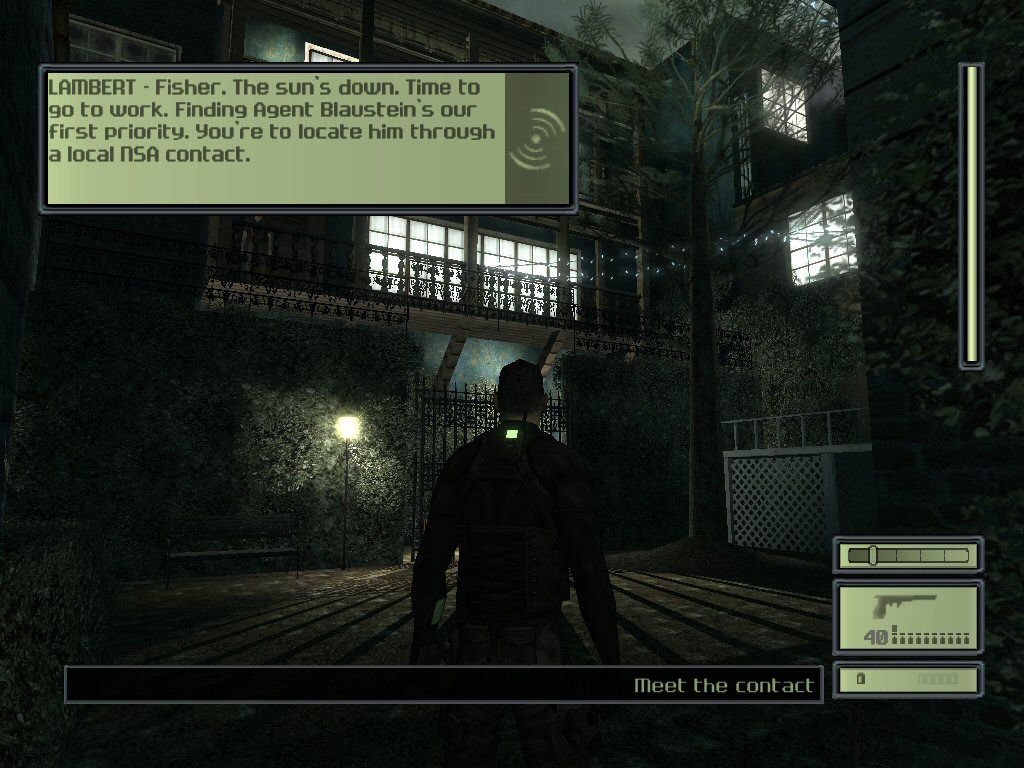
1. Communication Box: Appears at the top of your screen when you receive a communication.
2. Interaction System: This system appears when you can interact with an object or a person in the environment.
3. Life Bar: Sam's health/life.
4. Objective bar: Displays the next goal to reach in your mission.
5. Objective Icon: Appears when a note is added and when objectives are updated.
6. Stealth Meter Bar: Represents the amount of light in Sam's area.
7. Noise Meter Bar: Indicates how much noise Sam is making and how noisy the environment around Sam is.
8. Selected Weapon, Gadget, Item, and Ammo: Displays the name of your current selection. Displays how much ammo you have in one magazine, as well as your total ammo.
9. Timer: Appears when a timer is triggered. When the timer reaches zero, it's a sign of bad news.
10. Alarm Indicator: On the HUD above the visibility bar, this indicates the number of alarms that have been triggered during the mission. Each alarm sounded creates global repercussions, so be careful.
In-Game Pause Menu
During the game, press START to pause the game and access the Game menu.
•
Resume: Continue playing. You can also resume by pressing START again.
•
Save Game: Save your current game session on the Memory Card in Slot A.
•
Load Game: Load a previously saved game.
•
Restart Mission: Restart the currently played level from the beginning.
•
Option Menu: Adjust the sound, video, and Controller settings.
•
Quit: Quit your current game session to go back to the Main Menu. Note that you will be asked to confirm this choice.
Briefing Screen
In this screen you will be informed
 (Disc 1).png)

_2.png)
 (Disc 1).png)
