Starting the Game
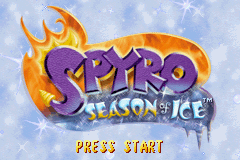
Insert the Spyro: Season of Ice™ Game Pak in the Game Boy® Advance and turn the system on. Press START on the Title Screen to begin the game. Once the main menu has appeared, you will have four choices: New Game, Continue Game, Options, and Dragonfly X.
Select New Game to begin playing Spyro: Season of Ice™. If you have a previously saved game, choose Continue Game. Choose Options to adjust music and sound effects as well as view the game credits.
Dragonfly X is locked, but you never know what will happen once you save all the fairies and collect all the gems!
Home Worlds, Realms and Portals
Spyro begins his quest in the Seasonal Home World of the Fairy Realms. From here, Spyro will be able to access the other worlds in the Realms through Portals. Some areas will only open after a certain number of Fairies have been rescued.
Portals
Entering a Portal will transport Spyro to a world where he will meet creatures troubled, bothered, and annoyed by the invading Rhynocs. Helping these creatures will make an exit Portal appear, allowing Spyro to return to the Home World. To enter a Portal, just walk or fly into it.
Spyro will instantly transport to another realm.
Spyro's Health
Thanks to Sparx, Spyro can sustain more damage than on his own. Sparx acts as Spyro's health meter. Spyro begins the game with four hit points and four lives. You can be attacked four times before you lose a life.
Each time you're attacked, you lose one hit point. Sparx takes care of Spyro's hit points so every time you're attacked, Sparx changes colors. If Sparx loses all his hit points, Spyro is on his own!
Sparx Colors
•
No Hits: Yellow (Full Health)
•
After 1 hit: Blue (Getting Shaky)
•
After 2 hits: Green (Going...Going...)
Fodder
You can keep Sparx nourished with a healthy diet of butterflies. Those cute little bunnies and sheep wandering the Realms are fodder for dragonfly snacks! Flame or charge them to release a butterfly which will restore Sparx's health by one point.
Sometimes, you may be able to find a full-life butterfly, which gives Spyro an extra life.
The Atlas
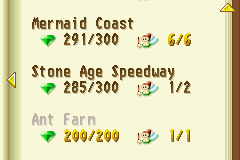
The Fairy Realms are vast and Spyro could easily miss a frozen fairy. By pressing SELECT, you can access the Atlas where you can keep track of many important details, such as:
•
Your current fairy and gem count or see how many are left to find.
•
See the worlds you have visited and those which you have yet to explore.
•
Turn the page by pressing the Control Pad left, right, or up, down to scroll.
•
Check the completion percentage for the worlds you have visited.
The Atlas can also be accessed through the pause menu.
•
Autumn Fairy Home: 0/200 Fairies, 1/5 Gems
•
Market Mesa: 180/200 Fairies, 5/6 Gems
•
Lava Prairie: 20/300 Fairies, 3/6 Gems
The Pause Menu
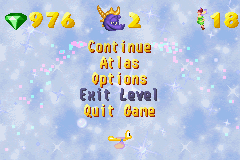
From the Pause screen you can:
•
See how many gems and fairies you have collected so far
Saving and Loading Game Data
Leaving a world will automatically save your game. You can also save game data on the Options screen of the Pause Menu.
Press START to pause the game. Select OPTIONS SAVE GAME and press the A Button. Your progress will be automatically saved.
To load a saved game, choose Continue Game from the Main Menu screen. You will begin your game from the last fairy home where you saved. Or you can erase a saved game and start over.


 (En,Fr,De,Es,It).png)
.png)
