How Do You Make It Bigger?
The basic rule is to roll your katamari around and make it grow bigger. As you progress through the game, you'll encounter some fans that have different requests.
•
1 This is the current size of your katamari
•
3 Try to reach the target size
•
The object you've just picked up
Let's Get Rolling!
•
{Roll forward} left analog stick ↑ + right analog stick ↑
Next, Let's Roll It To The Side!
•
{Roll left and right} left analog stick(←) + right analog stick ←(→)
And Backwards Too!
•
{Roll backwards} left analog stick ↓ + right analog stick ↓
And Turn...
•
{Turn left and right} left analog stick (▵) + right analog stick (▵)
Uh-Oh--- An Alligator! STOP!
•
{Brake} Press both sticks in the opposite direction that the katamari is heading.
Faster! Faster! Get A Move On !!!
•
{Dash} Move both analog sticks rapidly back and forth.
•
The longer you keep dashing, the quicker you'll run out of steam.
Secret Actions
Have Fun From The Katamari's Viewpoint
Press the L1 button to perform a Prince Look. It lets you look all around from the top of the katamari. The L2 button shows you the Normal Eye view, and the R2 button gives you the Miracle Eye view.
Use the left analog stick to change your perspective. Press the L1 button once more to return to the game screen.
Look At The Katamari & Enjoy
Press the R1 button to perform a Royal Look. The Prince will fly high in the air so he can check out the katamari from all angles.
Use the R2 button to zoom in, and the L2 button to zoom out. As with the Prince Look, change your perspective using the left analog stick, and return to the katamari rolling screen by pressing the R1 button again. Getting the hang of the Royal Look will give a big boost to your gaming enjoyment!
Climb Over Obstacles!!
When you're facing a wall, push the left analog stick and the right analog stick to go over it. You can climb over walls that are about the same size as your katamari.
If you're clever in how you apply this movement, you'll be able to go up ladders, staircases, and other things too. Try reaching higher and higher places.
Let's Start The Game!!!
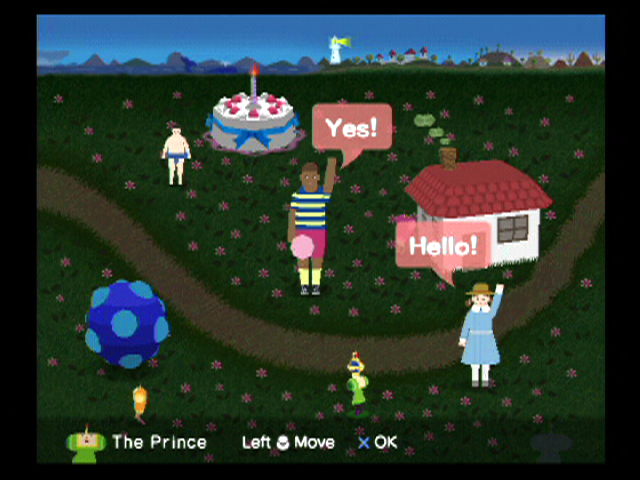
This is the Select Meadow. The Select Meadow serves as the main menu screen, and you can freely roam all over it to talk to fans or view your Collection and other stuff. You can also save/load game data, change various settings, and perform other actions here.
Press the button as you approach various objects. Try wandering wherever you want while pressing the or buttons.
When starting the game for the first time, the Title Screen will be displayed, but if you have previously saved game data, you'll go to the Title Screen after you select the data you would like to load. You can then progress to the Select Meadow.
•
Sound & Vibration... P 35
Select A Request
A Request begins once a fan has told you of their request. Approach a fan in the Select Meadow and press the button. The fans all have different requests, so the tasks they give you will be diverse.
The rules will be explained to you in person by the King, so be sure to pay him close attention. He really does tend to go on a bit though!
The game will end if you cannot fulfill the conditions required to complete the task, but you'll be able to give it another go by selecting "Play Again". Also, even if you have fulfilled the conditions for completing the task, you'll still be able to keep on making your katamari grow until time runs out.
All of the fans' requests are important, so please listen to them with your undivided attention. By the way, you can use the right analog stick in the Select Meadow to choose excellent background music to listen to during the task.
When you finish a Request after having fulfilled its completion conditions, you will be brought to the Results Screen, where the King will greet you in a relaxed mood. The fan and the King will have a little chat, and after a while your katamari may be raised up into the Cosmos.
{Pause}
Press the START button during a Request to bring up the Pause menu, which will present you with two choices. Press the button to start over from the beginning, or press the button to end the Request and return to the Select Meadow.
When you end a Request, you will be returned to the Results Screen first if you have fulfilled the completion conditions. If the katamari you have created doesn't appeal to you, you can re-make it as many times as you like.
Data
Game data can be saved or loaded by visiting the small house in the Select Meadow. Game data will be saved as files identified by "na", "m", or "co
.png)

.png)
_2.jpg)
.png)
.png)
.png)


_1.png)

_1.png)
_1.jpg)
_1.png)
_1.png)