INTRODUCTION
FORTRESS for the Game Boy Advance is a fast action strategy game where players build a variety of unique structures and compete in an all-out war. Hurl Stone Age rocks, engage in cannon fire from the Medieval Times, and energize plasma projectiles in the world of tomorrow.
As combat ensues, humorous Twerp characters aid in the repair of your fortress. You can also unlock the secrets of the Wizards Tower and unleash the power of its Monsters. Play against the computer or enjoy head-to-head competition using the game link feature.
GETTING STARTED
To begin playing FORTRESS, follow these steps:
•
Turn off your Game Boy Advance system, then insert the FORTRESS Game Pak.
•
Turn on the system and wait for the Majesco Logo Screen.
•
After the logo screen, the Introduction Sequence begins. Press START to skip to the Title Screen.
If nothing appears on the screen, turn the power switch OFF. Ensure the Game Pak is inserted correctly, then try again. Always turn the power switch OFF before inserting or removing the Game Pak.
LINKING UP
To enjoy two-player head-to-head action, use a Game Boy Advance Game Link Cable. Both players must own a copy of FORTRESS.
Prepare to link up by following these steps:
•
Ensure both Game Boy Advance systems are off, then plug a FORTRESS Game Pak into each.
•
Connect one end of the Game Link Cable to the EXT port of one system, and the other end to the second system.
•
Turn on both systems. Wait for the Majesco Logo Screen, then the Introduction Sequence.
•
Wait for the intro to finish or press START to go directly to the Title Screen.
•
Press START again to access the Main Options Screen. Select 2 for the number of players.
MAIN OPTIONS SCREEN
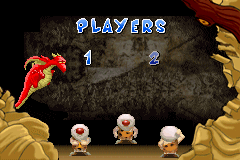
After the Introduction Sequence, press START on the Title Screen to display the Main Options Screen. Here you can choose a one-player game against the computer or a two-player game using the Link Feature.
Select the number of players as follows:
•
Press the Control Pad RIGHT or LEFT to highlight the desired player option.
•
Press START to confirm your selection.
GAME OPTIONS SCREEN
After selecting the number of players, the Game Options Screen appears. You can select the Game Mode and Difficulty setting.
To select the Game Mode:
•
Press the Control Pad UP to highlight the Game Mode option.
•
Press RIGHT or LEFT to select Battle Mode, Tournament Mode, or Blitz Mode.
In Battle and Blitz modes, you may select one of four environments. In Tournament Mode, you must play in each of the four environments sequentially. Blitz mode features more weapons with greater damage, but you will not receive weapon bonuses (only scoring bonuses). Goal scores are also lower in Blitz mode.
To select the Game Difficulty:
•
Press the Control Pad DOWN to highlight the Game Difficulty option.
•
Press RIGHT or LEFT to select your desired setting.
•
Easy Mode: Fewer weapons are available, inflicting slight damage. Many Twerps are available to aid in repairs.
•
Medium Mode: A similar number of Twerps and weapons are available. Weapons inflict substantial damage.
•
Hard Mode: The largest number of weapons are available, inflicting great damage. However, the fewest Twerps are available for repairs.
Press START to exit the Game Options Screen with your displayed settings.
LEVEL SELECTION SCREEN
If you selected Battle Mode, the Level Selection Screen appears. You may choose to play in one of four environments.
•
Press the Control Pad RIGHT or LEFT to display the four possible level choices.
•
Press START to begin the game with the desired level.
PLAYING FORTRESS
The goal of FORTRESS is to build a structure capable of destroying your opponent's structure before they destroy yours. Achieve this by reaching the defined Goal Score first while impeding your opponent by bombarding their Fortress.
At the start of the game, the Goal Score and build time are displayed. During this time:
•
Secure weapons will automatically begin firing when the clock reaches zero.
•
Barracks will release Twerps.
•
Wizards will fly to completed Wizards Towers to summon Monsters.
Tile Pieces appear at the top of the screen for approximately two seconds before falling. Use the Control Pad to manipulate them:
•
Press DOWN to make the Tile Piece fall faster.
•
Press RIGHT or LEFT to adjust its horizontal position.
Build as much of your Fortress as possible before time runs out. If your Fortress grows too high to continue building, press the Left Button to destroy the top three rows. You will be penalized for each individual Block Piece destroyed.
VIEWING THE BATTLEFIELD
In a one-player game, your viewpoint is centered on your building area, with the computer's area to the left. Press the Right Button while using the Control Pad to scroll the camera view and monitor the computer's progress. Releasing the button re-centers the view.
In a two-player game, each player views their own building area. You can view your opponent's progress by pressing the Right Button while using the Control Pad.
THE LEVELS
FORTRESS features four unique settings:
•
Level 1 - Prehistoric: Hurl Stone Age boulders with slingshots. Watch out for a boulder-dropping Pterodactyl and a wandering T-Rex.
•
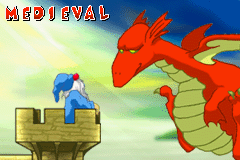
Level 2 - Medieval: Fire cannonballs at stone Fortresses. Avoid fire-breathing Dragons and angry Ogres.

.png)
.png)
.png)

 (En,Fr,De,Es,It).png)
_1.png)
_1.jpg)
.png)