Starting the Game
Set up your PlayStation™ and insert the "JumpingFlash! 2" CD as described in your PlayStation™ manual. It is advised you do not insert or remove Controllers or Memory cards once the POWER is switched on.
Game Start
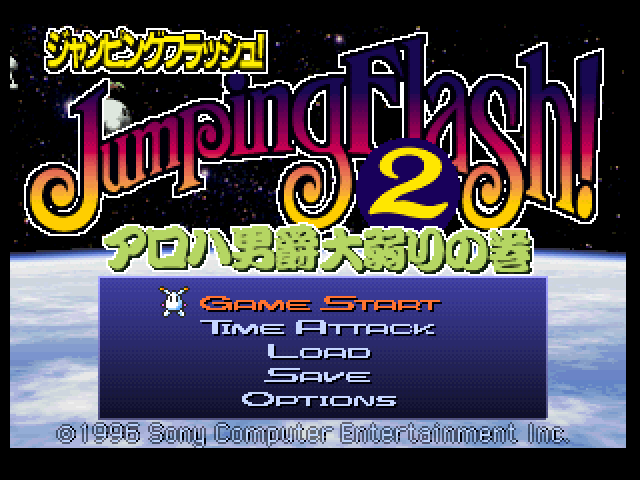
Five items are displayed on the title screen. Select the items as required.
When playing the game for the first time, select GAME START.
•
GAME START: A NORMAL GAME STARTS
•
TIME ATTACK: COMPETE AGAINST THE CLOCK UNTIL THE STAGE IS CLEAR
•
LOAD: LOADS A PREVIOUSLY SAVED GAME
•
SAVE: SAVES GAME DATA OF GAMES YOU HAVE PLAYED
•
OPTIONS: CHANGES GAME SETTINGS
The Main Story
When starting a new game, select GAME START. When you return to the title screen after playing a game, or when you load data from a previously saved game, the WORLD NUMBER will be displayed on the right above the GAME START title.
The WORLD NUMBER can be changed using the Left and Right Directional buttons. Confirm your choice of WORLD NUMBER by pressing the button or button. For example, when you complete WORLD 3, you can start a game from WORLDS 1, 2 or 3, and you can save the data on a Memory card.
Option Functions
In the OPTIONS SCREEN you can change the control buttons and item buttons used during the game, as well as switching the sound between STEREO and MONO, and playing or skipping the on-screen MOVIE function as you please.
In addition, you can save any settings you make using the Memory card, and when you load the game next time, the same game settings will be loaded too.
View Control
The initial settings are:
•
REVERSE: R1/R2+ Directional buttons (THE Up Directional button MOVES THE VIEW DOWN, WHILE THE Down Directional button MOVES THE VIEW UP)
•
NORMAL: THE OPPOSITE OF THE "REVERSE" SETTINGS
Controller
Initially, the controller is set as TYPE A:
There are 4 control settings, from TYPE A to TYPE D. Choose the one you find the easiest to operate.
Screen Mode
The initial SCREEN MODE setting is NORMAL.
•
NORMAL: SUPPORTS ORDINARY TV MONITORS
•
WIDE: ALTERS THE SETTINGS FOR WIDE-SCREEN TV MONITORS
Sound Mode
The initial sound setting is STEREO.
•
MONO: CHANGE TO MONO SOUND
Support AI
Initially, SUPPORT AI is the default setting, but as you progress through the game, something seems to happen...
Movie Mode
Initially, the game movie is set ON. Changing the MOVIE MODE setting to OFF cuts the movie scenes from the game.
Movie Scene
The initial settings is OPENING. After playing a game, you can watch a replay movie of the screens you have cleared.
Performance
PERFORMANCE cannot be set in the initial settings, but if you get any medals, you move on to medal display screen. You get medals for satisfying certain conditions during the game.
After collecting all 12 medals you gain the option to view the Rap La Muu Muu from the Performance screen.
Display Screen Notes
•
STATUS: DISPLAYS THE CURRENT PLAY STATUS
•
DATA 1-3: THE DATA NUMBERS WHICH YOU CAN LOAD AND SAVE
•
NEW DATA: WHEN YOU START A NEW GAME
•
EXIT: WHEN YOU WISH TO RETURN TO THE TITLE SCREEN
•
NO DATA: WHEN THERE IS NO DATA TO LOAD OR SAVE
•
WORLD 1-6: THE NUMBER OF WORLDS AVAILABLE TO BE LOADED
•
COMPLETE YOUR STATUS AT THE END OF THE GAME: (AFTER CLEARING THE FINAL STAGE, WHEN THE ENDING IS OVER, YOU CAN GO BACK TO THE TITLE SCREEN AND SAVE, AND THE COMPLETE DISPLAY WILL APPEAR)
•
NEW GAME: THE GAME START STATUS
Game Over
When your HP falls to 0, when you fall off the continent, or when you run out of time, you lose a life. If you have lives remaining, you start again from the beginning of that stage. If you have no lives left, GAME OVER!
Continue
If you select YES before the counter reaches 0 in the GAME OVER screen, you can continue (you can continue a game any number of times continue is unlimited).
If you continue a game, ROBBIT is armed as at the beginning of the game, and starts again from the beginning of that world.
•
IF YOU SELECT YES BEFORE THE COUNTER REACHES 0, YOU CAN CONTINUE YOUR GAME
•
IF YOU SELECT NO IN THE GAME OVER SCREEN, YOU WILL BE RETURNED TO THE TITLE SCREEN.
Other Functions
Functions in the Pause Mode
Pressing the START button during a game pauses the game. During PAUSE, the following selections are possible.
•
CONTINUE: CONTINUE THE GAME
•
TRY AGAIN: START THE GAME AGAIN FROM THE BEGINNING OF THE STAGE (LOSE ONE LIFE)
•
RETIRE: FINISH THE GAME (LIVES GO 0) AND GO TO GAME OVER SCREEN
Functions in the World Select Mode
Pressing the button in the WORLD SELECT SCREEN makes the following selections possible:
•
CONTINUE: CONTINUE THE GAME
•
RETIRE: FINISH THE GAME AND GO TO THE GAME OVER

_1.png)

 (Disc 2) (Claire-hen).png)
 (v1.1).png)




.png)
 (En,Ja) (Disc 2).png)
_1.png)
_1.png)
.png)