START
A young man named Stahn Aileron dreamed of becoming the greatest Master Swordsman. He traveled to Seinegald aboard a Draconis, which was attacked by monsters.
He was saved by the "Swordian" Dymlos, found on the Draconis. From that moment, Stahn's destiny changed forever.
BEGINNING the Game
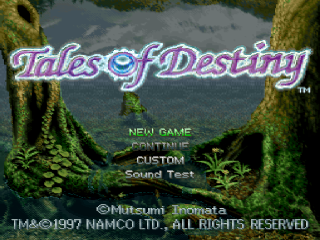
Use the Directional Buttons to choose a mode on the Title Screen, then press the Button to confirm. Use the Button to return to the Title Screen from various modes.
New Game
First, choose a name for your character. To accept the default name, select "OK" with the Directional Buttons, then press the Button to begin playing.
How about making yOUR OWN Name?
•
Move the cursor to the name input box with the Directional Buttons, then press the Button.
•
Once the cursor is in the letter window, select letters one by one with the Directional Buttons, and press the Button to enter each letter.
•
After you're done, press the Button to move the cursor back to the name input box.
•
Select "OK," then press the Button to begin play.
•
To erase a letter, press the Button to move the cursor to the name input box, then press the Button again.
You can also use a RANDOM Name
Select "Random" and then press the Button to display a random name. Keep pressing the Button until you find a name you like, then choose "OK" to select it.
CONTINUE
If you have a saved game, select one of the three save files with the Directional Buttons, and press the Button to continue.
•
Directions for saving games are given on Page 38.
Custom
Here you can make changes to various game settings. See Page 15 for more details.
SOUND TEst
Here you can listen to the game background music, sound effects, and voices. See Page 16 for more details.
Customize
Here you can alter game settings. To change a setting, press Up or Down to select a menu, then Left or Right to make changes.
To return to the default settings, select "Restore" and press the Button. Press the Button to return to the Title Screen when done.
•
Message Speed - Determines the speed messages are displayed. As you move the cursor over a number, a sample will be displayed to show actual speed.
•
Controls - Sets actions for Buttons.
•
Sound - Switches between MONO and STEREO.
•
Verify Encounter - When set to ON, the screen will scroll automatically when you encounter enemies to show you the whole field of battle.
•
Verify Target - When set to ON, the screen will scroll automatically to confirm target changes.
•
Voice - Turns voices heard during battle ON/OFF.
•
User Window Color - Changes the color of the windows. Use the (R)ed, (G)reen, and (B)lue color bars to create your own color scheme.
•
Enemy Window Color - Changes the color of the enemy windows.
•
Adjust Screen - Press Start to select the Adjust Screen option. Adjust the screen position with the Directional Buttons. Press Select to reset to the default position. Press Start to exit.
SOUND Test
In the Sound Test, you can listen to the game background music and change sound settings. To make a change, press Up or Down to select a menu, then Left or Right to change songs and other settings. Press the Button to play the sound effects and music.
•
BGM - Plays the background music in the game. Select the song with the Directional Buttons, then press the Button to play. Use the VCR-like controls to pause, skip, etc.
•
SE - Plays the various sound effects.
•
Play Type - "Normal" lets you select the songs to play, "Continue" plays the songs in order, and "Random" plays the songs randomly.
•
BGM Volume - Sets the volume for the background music. Move the bar to the right to increase volume.
•
SE Volume - Sets the volume for sound effects. Move the bar to the right to increase volume.
•
Pan - Sets the left and right speaker balance for Stereo Mode.
•
Reverb Mode - Makes settings for reverberation effects. You may choose between ROOM STUDIO A STUDIO_B STUDIO_C HALL SPACE. Also, use the "Depth" setting to change the depth of the sound quality.
•
Voice - Lets you listen to the voices of the characters.
Playing the Game
Playing Tales of Destiny involves moving the hero Stahn Aileron and his party through their adventures. There are 3 main types of screens in the game. These screens change automatically according to what is happening. You begin by moving the characters around on the map, traveling to different lands and listening to what the people you meet have to say. Gradually, you will figure out what is happening in the world, and what you have to do about it.
There will also be plenty of enemies to fight and puzzles to solve on your journey. By guiding your party through their encounters and battles, you help them gain invaluable experience. Now, join Stahn in the unraveling of his destiny!
Map SCREEN
There are 2 kinds of Map Screens to view the characters and their environment. On the GSM (Global Sphere Map), you view the world from a wide angle as the characters move about from town to town. You can also see how they
.png)


.png)

 (Disc 2) (Claire-hen).png)
 (v1.1).png)




.png)
 (En,Ja) (Disc 2).png)
_1.png)

.png)



.png)




.png)