Starting Up
Set up your PlayStation®2 computer entertainment system according to its Instruction Manual. Ensure the MAIN POWER switch (located on the back of the console) is turned on.
Press the RESET button. When the power indicator lights up, press the open button to open the disc tray.
Place the SILENT SCOPE®3 disc on the disc tray with the label side facing up. Press the open button again to close the disc tray.
Attach game controllers and other peripherals as appropriate. Follow on-screen instructions and refer to this manual for information on using the software.
If a memory card (8MB) (for PlayStation®2) containing saved data is inserted into MEMORY CARD slot 1 when the PlayStation®2 is turned on, the game data will be automatically loaded and you can continue your game from where it was last saved.
Console Ports
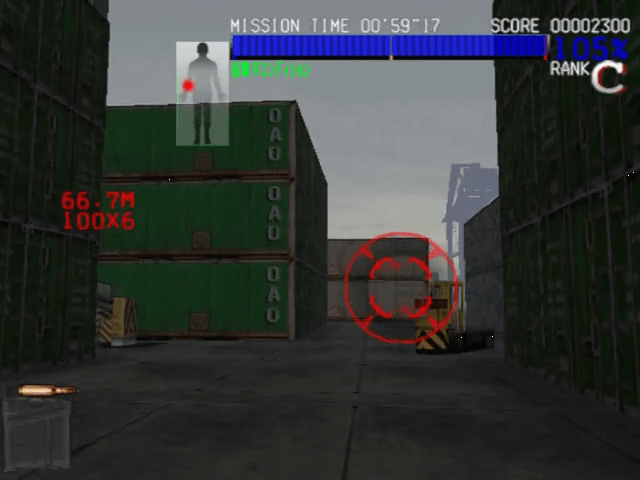
Heads-Up Display
•
Magazine: Remaining bullets (reloads automatically)
•
Scope: Toggle ON/OFF with buttons
Basic Controls
Use the Scope ON/OFF button to switch the scope display on the screen on and off. Turn the scope off to move the sight quickly, and turn the scope on to pinpoint targets.
You can fire regardless of whether the scope is on or off. Far away enemies can be targeted more easily by reducing scope speed.
View Rotation System
In SILENT SCOPE 3 the view can be rotated from specific spots during gameplay. When enemies attack you from behind or escape outside the game screen, rotate the view to find them and then attack.
The view can be rotated when a light blue arrow appears on both edges of the screen, or by pressing the L2 or R2 button.
Mode Selection (SILENT SCOPE EX)
Select SILENT SCOPE EX from the Main Menu to advance to the Mode Select Screen. Move the sight with the left analog stick or directional buttons to select a mode and press the button to enter.
•
GAME START: Start the arcade version of the game.
•
FREE PLAY: Freely select and play a stage from stages that you have already cleared.
Game Start (SILENT SCOPE EX)
Select GAME START to advance to the Mode Select Screen. Move the sight with the left analog stick or directional buttons to select a mode and press the button to enter your selection.
Story (SILENT SCOPE EX)
The story unfolds as you clear the missions you have been assigned. The game is over when your life becomes zero.
Your life decreases over time, so it is imperative that you take out enemies quickly. Your life also decreases when you are hit by enemy fire or when you accidentally shoot an innocent bystander.
Your life will slightly recover by defeating enemies, and will significantly recover if you defeat an enemy by exploiting its weakness or by finding Life-up Girls that appear during the game.
Mode Select
Shooting Range
Aim and shoot each of the targets as they appear. If you defeat all the targets within the time limit, the drill is completed. If you go over the time limit, the session ends in failure.
Upon completion of the drill, any remaining time is added to your score. Only aim for targets that are armed. The number of points varies depending on the accuracy of your shot.
Mistakenly shooting an ordinary civilian will result in a large penalty to your score.
Game Start (SILENT SCOPE 3)
•
Start the original home version of the game.
•
FREE PLAY: SELECT and play a stage from stages that you have already cleared.
New Game (SILENT SCOPE 3)
Start a game in the story mode. Select GAME START to start a new game, and when you have successfully completed the first stage, the area selection screen will be displayed. From there, select the area that is displayed on the map to advance to the next stage.
Note that by selecting NEW GAME you will erase the saved gameplay data for the story mode.
Continue (SILENT SCOPE 3)
Continue playing from where you left off previously. Current gameplay progress will be erased when the power is turned off. Please save game data before turning off the power. (P.13)
The storyline unfolds as you clear the areas that are displayed on the overall map. The game is over when your life reaches zero.
Your life decreases when you are hit by enemy fire or when you accidentally shoot an innocent bystander, but it will not decrease over time. Your life will slightly recover by defeating enemies, and will significantly recover if you defeat an enemy by exploiting its weakness or by finding Life-up Girls that appear during the game.
Options Menu
From the OPTIONS menu, you can make adjustments to the various game settings. You can switch pages by aligning the sight onto the left and right arrows that are displayed on the screen and pressing the button to confirm.
Game Settings
Adjust the various game settings.
•
DIFFICULTY: Set the difficulty level of the game.
•
STARTING CONDITION: Set the amount of life provided at the start of the game.
•
CONTINUE: Set the number of continues. The number of continues only applies when playing in SIL
.png)

.png)
