Battle Arena Toshenden Remix
STARTING UP
1. Set up your Sega Saturn system as described in its instruction manual. Plug in Control Pad 1. For two-player games, plug in Control Pad 2. 2. Place the Battle Arena Toshenden™ Remix disc, label side up, in the well of the CD tray and close the lid.
3. Turn on the TV or monitor and the Sega Saturn. The Sega Saturn logo appears on screen. If nothing appears, turn the system off and make sure it is set up correctly before turning it on again. 4. If you wish to stop a game in progress or the game ends and you want to restart it, press the Reset Button on the Sega Saturn console to display the on-screen Control Panel. Important: Your Sega Saturn CD contains a security code that allows the disc to be read. Be sure to keep the disc clean and handle it carefully. If your Sega Saturn system has trouble reading the disc, remove the disc and wipe it carefully, starting from the center of the disc and wiping straight out toward the edge. GETTING STARTED
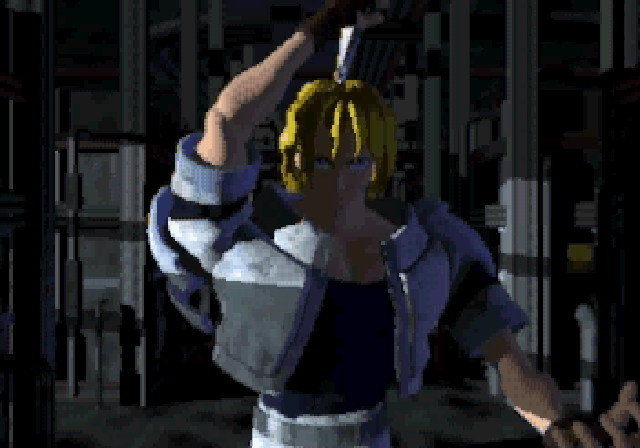
After the Sega and Takara® logos, the game intro begins. Press Button A, B or C or Start during the intro. From the Title screen, press Start to forward to the Mode Select screen, or to watch the demo, simply wait a few moments. During the demo, press Start at any time to bring up the Title screen.
TITLE SCREEN
From the Title screen, press Start to forward to the Mode Select screen.
MODE SELECT
Select one of the game modes from the Mode Select screen. Press the D-Pad UP/DOWN to highlight, and Button A or C or Start to select.
•
Story Mode: Will your character's hopes be fulfilled? Your performance in the tournament determines that.
•
1P Game: Fight all other opponents one at a time. There's no story in this mode.
•
VS Human: Let your friend find out the hard way that you rule the ring. Both players can select the same character if desired.
•
VS Computer: Having trouble getting the moves down? Select VS Computer and train until you're good and ready to take on any challenger.
•
Options: Change features of the game.
OPTIONS
Access the Options screen from the Mode Select screen, or while playing a game. Press the D-Pad UP or DOWN to highlight an option, and LEFT or RIGHT to change the setting.
•
LEVEL: Select the difficulty level of computer-controlled fighters.
•
BOUT TIME: Set the length of a round. Choose 00 for no time limit.
•
SET POINT: Use this feature to select the number of rounds a character must win to be the winner of the match. Choose from 1 to 5 set points.
•
STRENGTH: This feature is for the VS Human mode. The higher the number you select, the less damage an enemy's attack inflicts on your character.
•
AUTO DEFENSE: When this option is enabled, your character will automatically defend against most attacks. This feature is useful especially when first learning to play Toshinden, as it allows you to concentrate on attacking.
•
CONTROL TYPE: Set the functions of your Control Pad controls. 32 configurations are available!
•
CAMERA ACTION: Select the viewing angle of the battle.
•
Normal: Puts you right in the heat of the battle.
•
Long: This view sets you at a distance from and slightly above the battle.
•
Overhead: This angle places you right over the heads of the fighters. So close you almost see the sweat flying!
•
Sky: Bird's-eye view of the game.
•
SOUND TYPE: Select either STEREO or MONAURAL.
•
EXIT: Press any button when EXIT is highlighted, or press Start or Button B at any time.
About Level and Control Pad
Depending on the game level and control pad configuration you choose, your control pad functions are different.
If you select the Very Easy or Easy level, you can perform Special Attacks with the SPECIAL Buttons. Depending on the button configuration you select, you can access up to four SPECIAL Buttons.
Note: In all game levels you can perform Special Attacks by pressing the D-Pad and other buttons in certain sequences.
GAME MODES
Player Select Screen
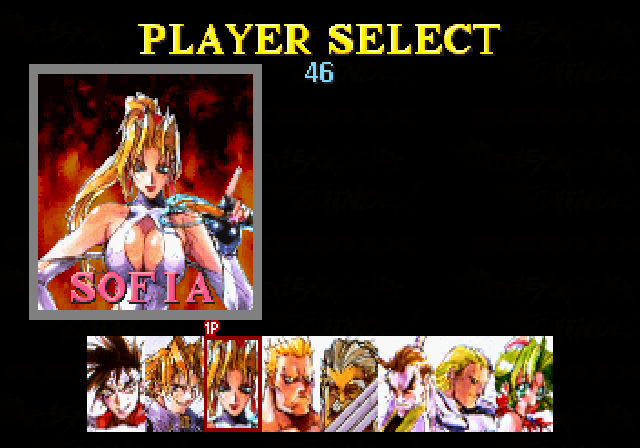
From this screen choose a contender to lead you to victory. Press the D-Pad LEFT or RIGHT to highlight the desired fighter and press any button except Button L or R to select. If the timer reaches zero, the highlighted character is automatically selected.
In the VS Computer mode, select your computer-controlled opponent after you have selected your own fighter.
Story Mode
Some of what your opponent says is boasting, but the rest helps reveal what yet awaits your character.
Note: Press Button A, B or C or Start to skip the character intro or a conversation and head directly into battle.
Continue: Should you lose a match, all is not yet lost! The Continue screen appears. Press Start before the timer reaches zero to continue from the start of the match you previously lost.
1P Game
Defeat a fighter and the computer selects the next. If you get far enough, some unexpected fighters might start showing up!
If you lose a match, CONTINUE appears on the screen. Press Start before the timer reaches zero to continue.
A second player can join this mode if desired. While the first player is battling against the computer, press Start on the Control Pad not currently being used.
VS Human
Blast your friend out of the ring! For this mode,
.png)

.png)

.png)
.png)
.png)
.png)
.png)
.png)
.png)