Getting Started
Press the power switch of your 3DO Interactive Multiplayer to turn it on. Open the CD drawer, and set the CD in the drawer label side up. Close the CD drawer. The game demo will automatically begin. Press the X button to bypass the demo. Select the mode you wish to use with the directional pad from the following, and then press the X button:
Game Speed
There are 3 levels of game speed to choose from: SLOW, 1, and FAST.
Super Moves
The Super Move Gauge increases each time you do a special move. When it is full, you can enter in special command and unleash a deadly Super Move!
The special move written in red for each character is the Super Move.
Super Battle
This is the normal game mode. First, choose your game speed from 3 levels with the directional pad and push the A button to select.
Then choose your character and battle computer opponents for the championship. The color of your character's clothing will change depending on which button you press.
If you push the P button immediately after the player selection, the key configuration screen will appear. As in the Option Mode, you will be able to change the buttons to your taste.
Versus Battle
This mode allows two players to have a series of matches. After the completion of each match, a record of the competition so far will be shown and the player select screen will appear. Stage select and handicap features are also available.
As in SUPER BATTLE mode, choose your game speed from 3 levels and then select your character. After character selection, HANDICAP screen will appear and allow you to set the following items. Press the P button to switch between the items:
•
Handicap: Use the directional pad to change the number of stars.
•
Stage Select: Use the directional pad to select a stage.
After you have completed all the settings, press the X button to start the game. When the P button is pressed at the end of the VERSUS battle mode, the VERSUS configuration screen will appear and allow you to choose from the following options:
•
CONTINUE: Return and continue the VERSUS battle.
•
EXIT: Exit the VERSUS battle and return to the title screen.
•
RESET RECORDS: Reset the competition record.
Screen Descriptions
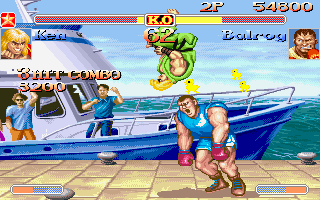
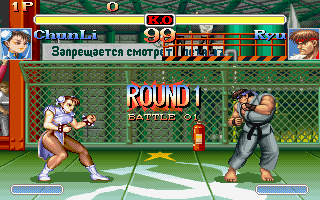
In SUPER BATTLE mode, the screen displays the following:
1. 1P Score: The current score of player one.
2. 2P Score: The current score of player two.
3. High score: The highest score recorded so far.
4. Win mark for 1P: Indicates one round won by player one.
5. Win mark for 2P: Indicates one round won by player two.
6. Health Gauge for 1P: The gauge decreases when player one receives damage.
7. Health Gauge for 2P: The gauge decreases when player two receives damage.
8. KO mark: The mark will flicker when either player loses all his health, thus losing the round.
9. Timer: Shows the time remaining in the current round.
In VERSUS BATTLE mode, the screen displays the following:
10. Face graphics: The face of the character is shown.
11. Super Move gauge: This gauge increases each time you do a special move or when your opponent blocks a punch, kick, or special move. When the gauge is full, the Super Move is available.
12. 1P wins: The number of total wins of player one.
13. 1P successive wins: The number of successive wins of player one.
14. 2P wins: The number of total wins of player two.
15. 2P successive wins: The number of successive wins of player two.
Option Mode
By selecting OPTION on the title screen, the following setting can be changed.
•
Difficulty: The computer opponents have 8 levels of difficulty. Use the directional pad to highlight the stars. The more stars you highlight the more difficult the opponents will be to defeat.
•
Time limit: The time limit can be turned off. The timer will be replaced by an infinity mark.
•
Key configuration: Each player can assign the buttons A, B, C, L, P, and R to any punch or kick. For example, if you want to assign Medium Punch to the C button, move the cursor to "Medium Punch" and press the C button. After you have completed all the settings, press the X button to exit.
Continuing and Joining In
Continue and Game Over
The game will end and the continue screen will appear (the competition result screen will appear in VERSUS battle mode), when the player loses 2 out of 3 rounds, or when the winner is not decided after 4 rounds. Pressing the X button before the countdown is zero will continue the game, otherwise any other button will end the countdown and the game.
Joining In
A second player can join in and fight the first player anytime during the SUPER BATTLE by pressing the X button on the vacant controller.
Rules
The match consists of 3 rounds, each is limited to 99 seconds. (The time limit can be deactivated in the Option mode.)
The fourth round is the final round and the winner of this round will continue. If a winner is not decided (Double KO or Draw), the game will end.
If a winner is not decided by KO within the time
.png)

_2.png)
.png)

 (En,Ja).png)


