Starting the Game
Turn on the 3DO system and insert the *Alone in the Dark* CD. After the 3DO logo vanishes, several credit and logo screens will appear. You may press the A, B, or C buttons to advance immediately to the Title screen, and then again to reach the Start/Continue Game screen. If the game does not load properly, ensure you have placed the disk in the machine correctly and that the power is turned on.
Character Movement
You can move the character in any direction using the directional pad. To make the character run, release the directional pad while walking and then quickly press it again in the direction of travel, or hold down the C button while holding down the direction of travel.
Options Screen
To carry out specific actions or use objects found during play, you must switch to the Options screen by pressing the "B" button. This screen displays three main windows:
•
Window 1: Located at the top, this contains the items you have found.
•
Window 2: Located at the bottom left, this shows your character with Life Points, or a selected item with available reloads or cartridges.
•
Window 3: Located at the bottom right, this offers a choice of actions available for the character or details what can be done with a selected item.
Items in your possession or available actions are displayed in green, while your current selection appears in white. To use an item or action, select it using the directional pad and press "A" to confirm, which will switch you to Window 3. Use the directional pad to scroll and choose an action, then press "A" again to confirm and return to the game. To return to Window 1 while in Window 3, press Left or Right on the directional pad. Character Actions
You can perform specific actions like Fight, Open/Search, and Push whenever you wish. Other actions are directly linked to items in your possession.
•
Fight: Press and hold the "A" button to ready your character to attack. Press Left or Right on the directional pad to punch with the left or right fist, press Down to kick, or press Up for a head-butt. Ensure you keep both the "A" button and the relevant arrow pressed down during the attack.
•
Open/Search: Place the character near the item, door, or container you wish to interact with, then press the "A" button. Keep the "A" button pressed long enough for the character to search or open the item.
•
Push: To move large objects or furniture, keep the "A" button pressed and use the appropriate direction on the directional pad.
Using Items
There are two ways to take an item. If an item is visible and you are beside it, a window will ask if you wish to take it. If the item is invisible or hidden, you must use the Open/Search option.
To use an item from your possession, select it from the list in the Options screen. Then select the desired function (such as Reload, Eat, Drop, or Throw) in Window 3 and confirm. A message will appear upon returning to the game to confirm the action. Combat Controls
Your character can use weapons or engage in hand-to-hand fighting. To fight with your body, select the Fight option in the Actions command.
•
Left: Punch with the left hand.
•
Right: Punch with the right hand.
Keep both the "A" button and the directional pad pressed long enough for the blow to be delivered correctly.
Menu Options
•
Detail Level: The 3DO version operates at High detail level only. •
Quit: To quit the current game and return to the main menu, press the "A" button.
How to Start Playing
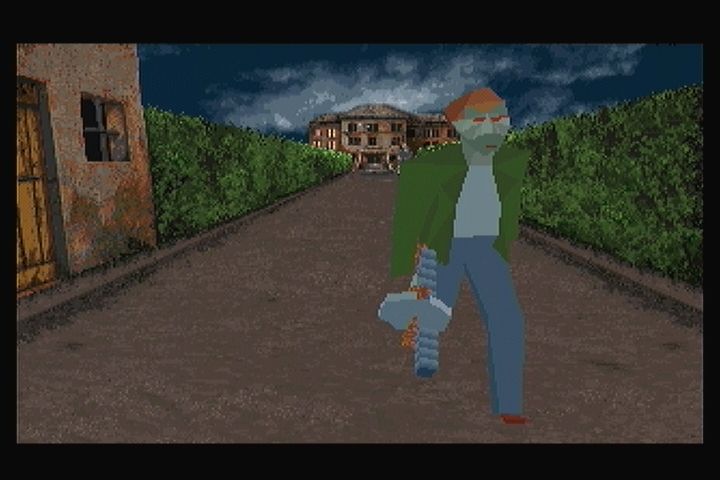
The game begins with your character arriving by taxi cab and blowing open the front gates to the estate. After this automatic scene, you will stand over an unconscious man with a Tommy Gun. Press "B" to enter the Inventory screen. Choose the "Actions" option and highlight "Fight" to engage the man.
Once the man regains consciousness and attempts to shoot you, press "A" and move the cursor to attack:
You must be close enough and aiming in the right direction for the attack to succeed. Upon defeating the opponent, he will drop a Tommy Gun, a Loading-Clip, and a Flask. Walk over the items and choose "Take" from the menu. The Flask will heal ten points of health; use it by entering the inventory screen and choosing "Eat/Drink."
Reload your Tommy Gun by selecting the Loading-Clip in the inventory and choosing "Use." You can then equip the Tommy Gun or a Revolver and choose "Use." Press "B" to exit the inventory and move up the walk toward the house. You may run by pressing the "C" button. Beware of two armed men waiting near the house.
To fire a weapon, press "A" and "Up" on the control pad. Success depends on aiming correctly and judging when your shot will hit the enemy. Once you have defeated the enemies, you can explore the outside of the house, though the doors remain sealed. You will notice two large statues and a stone bench blocking the pathway into the hedges.

_2.png)
.png)

.png)

