Health and Game Over
If a soldier is hit by weapon fire or touches an enemy, their health decreases. If a soldier's health reaches zero, you lose that soldier for the rest of the game. If the second soldier also loses all health, the game ends.
Two-Player Games
In two-player games, players can trade items. If one soldier loses all health, the other can revive them by giving "medicine."
Two-player games are cooperative; both players work together to infiltrate the fortress. Characters are not "tethered" and can maneuver into different areas of the stage. You will always see your soldier, but your partner's soldier only appears when both are in the same room.
Game Environment
The playing field is a maze with locked doors, traps, dead ends, and darkened rooms. Some rooms require you to defeat enemies before an exit appears. Some doors open only with discovered keys.
Special Items
Some enemies drop special weapons when eliminated. Crates also reveal special weapons, keys, or powers when hit. These items are essential for infiltration.
Passwords
After finishing a stage, a password appears when your soldiers lose all health. This allows you to continue the game from that stage instead of starting over. Passwords are only given in one-player games.
We wish you luck in the Fortified Zone.
GETTING STARTED
•
Place the Fortified Zone™ Game Pak into your Game Boy™ (label side out) and turn on the unit.
•
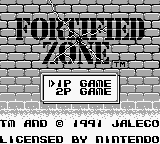
After introductory graphics, the title screen appears. Press START to skip introductory screens.
•
Fortified Zone can be played as a one-player (1P) or two-player (2P) game. Move the selection arrow on the title screen by pressing down or up on the Control Pad or by pressing SELECT.
ONE-PLAYER GAME
•
For a one-player game, align the selection arrow with "1P" on the title screen and press START (or the A button).
•
In a one-player game, you operate both the male and female characters, but not simultaneously. Switch between them on the STATUS screen, described later.
GAME MODE SELECT SCREEN
•
After the title screen, the GAME MODE SELECT SCREEN appears. Move the selection arrow by pressing down or up on the Control Pad or by pressing SELECT.
NEW GAME
•
To begin a NEW GAME, align the selection arrow with "NEW GAME" and press START (or the A button). Press START again when "START" appears.
PASSWORDS (One-Player)
•
In a one-player game, passwords are given whenever you complete a level. Passwords are not given in a two-player game.
Music Themes (Fragmentary)
•
process for up to eight themes.
•
If you want fewer than eight themes, just press START when you have programmed as many themes as you want.
•
Next, use up or down on the Control Pad to align the selection arrow with either THROUGH PLAY or REPEAT PLAY and press the A button.
•
In THROUGH PLAY, all of your selections play through once, and then the program automatically takes you back to the NORMAL PLAY/PROGRAM PLAY screen.
•
In REPEAT PLAY, your group of selections plays continuously until you stop them by pressing SELECT (you can pause the music and restart it by pressing START).
Status Screen (One-Player)
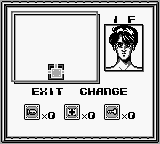
Press SELECT to bring up the STATUS screen. This screen allows you to switch characters. The woman can jump over some walls and obstacles the man cannot. The man can pick up and fire special weapons the woman cannot.
The STATUS screen also shows your character's location on a map of discovered rooms. It displays the number of WEAPON UPS, MEDICINE, and KEYS in your inventory.
How to Switch Characters
•
Press left or right on the Control Pad to align the selection arrow with CHANGE.
•
The selection arrow will now be aligned with EXIT. Press the A button (or SELECT) to leave the STATUS screen. The new character will appear in the same place as the old character.
•
To exit the STATUS screen without changing characters, press SELECT.
TWO-PLAYER GAME
•
For a two-player game, you will need two Game Boys connected with a Game Link™ cable.
•
Two-player games require a Fortified Zone cartridge in each Game Boy.
•
Both players must ensure the selection arrow on the title screen is aligned with "2P."
•
Then, both players must press START (or the A button) on their respective Character Select Screen.
Character Select Screen (Two-Player)
In a two-player game, the CHARACTER SELECT SCREEN appears after the title screen. One player controls the male character and the other controls the female character.
•
One player (it doesn't matter which one) should press left or right on the Control Pad (or SELECT) to move the selection box to the character they want to control.
•
Then press the A button (or START) to select the character. The other player automatically controls the other character.
Give and Take Screen — Exchanging Items in a Two-Player Game
In a two-player game, characters can exchange items in their inventory. For example, if the man loses all health, the woman can revive him by giving "MEDICINE" if she has it.
The three exchangeable items are WEAPON UP (restores firepower to maximum strength), MEDICINE, and KEYS. The GIVE AND TAKE screen also shows a map of discovered rooms and each character's whereabouts. The man's location is a flashing diagonal line, and the
.png)

.png)

 (SGB Enhanced).png)

_1.png)


.png)