Main Menu
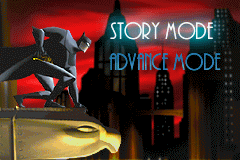
On the main screen, you will see two options: Story Mode and Advance Mode. Use the Control Pad to move up and down to your selection and press the A BUTTON to confirm.
Story Mode
In this mode, Batman and his team will have to go through Gotham City to find clues that will enable them to defeat all villains and save Gotham City. Once Story Mode is successfully completed, you will gain access to Advance Mode.
Advance Mode
In this mode, you will have to complete a map within a time limit while completing a goal given by Alfred. Generally, you will have to find three data disks; however, in the Batplane maps, you will have to deactivate The Joker's Pyro Toys. If you succeed, you will gain access to additional bonus maps.
New Game
Starts a game at the beginning of the story.
Password
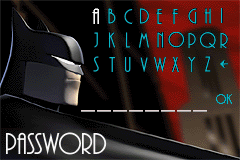
To continue your progress from a previous session, enter your password by moving the Control Pad to highlight a letter. Press the A BUTTON to select a letter and, when completed, validate your password by pressing the A BUTTON on 'OK'.
If you select a letter by mistake, press the left arrow character and the A BUTTON to go back and correct your selection. If your password is correct, you will then play the proper level.
Sidescroller, Puzzle and Batmobile Stage
Available once the Story Mode has been completed. In Advance Mode, you will have to find the three hidden data disks and get to the end of the map to succeed before the timer elapses.
Batplane Stage
In the advance mode, you will have to race against time and deactivate three of The Joker's pyro toys and complete the level in order to succeed.
Time Meter
Displays how much time remains in order to get to the end of the map and find the data disks.
Advance Control Panel
•
Displays how many data disks you have collected.
•
Displays how many of The Joker's pyro toys you have deactivated. When you deactivate all three of The Joker's pyro toys, the panel will flash.



 (En,Fr,De,Es,It,Nl).png)


 (En,Fr,De).png)





.png)

.png)



_1.png)
.png)



.png)
.png)