Getting Started
Ensure that the system is completely switched off. Never insert or remove the Game Pak when the system is switched on. Insert the "CT Special Forces" Game Pak into the slot in the Game Boy® Advance, making sure it is the right way round. Press firmly down to lock the Game Pak in place. Switch on the system.
Choose your language with the Control Pad and confirm by pressing the A Button. When you see the "CT Special Forces" screen, press START for the main menu.
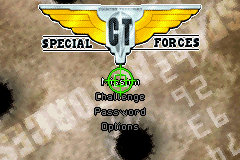
Main Menu Navigation
Choose your selection using the Control Pad and confirm by pressing the A Button. The B Button lets you de-select or go back.
•
Mission: This is the main mode in the game for carrying out your missions and putting an end to the terrorist menace.
•
Challenge: With this mode, two of you can play at the same time by linking two Game Boy® Advance systems via a Game Boy® Advance Game Link® Cable.
•
Password: Passwords are obtained at the end of each successful mission. To carry on playing, select the appropriate numbers.
•
Options: Change the different configurations of the game and display the credits.
Challenge Mode Instructions
This mode works with 2 Game Paks and lets 2 players compete at the same time. Link two systems with the Game Boy Advance Game Link Cable and select Challenge mode in the main menu.
•
Player 1 presses the A Button to confirm the selection.
•
The L and R Buttons are used to choose your character.
•
The Control Pad lets you choose a map.
Note: It is not possible to choose the same character.
Control Panel Information
The following indicators vary by game mode:
Platform Mode / Helicopter Mode
•
Type of ammunition selected
•
Amount of ammunition available
•
Number of lives of your character
Parachute Jump Mode
•
Radar: The red zone is your landing area
•
Altimeter: The red zone is the best range to open the parachute
Sniper Mode
•
Number of terrorists eliminated
•
Number of hostages to rescue
Multi-Player Note
This game Pak includes a multi-player mode which requires a Game Boy Advance Game Link Cable.

 (En,Fr,De,Es,It,Nl).png)
_2.png)
 (En,Fr,De,Es,It,Nl).png)
 (En,Fr,De,Es,It,Nl) (Beta).png)
 (En,Fr,De,Es,It,Nl).png)
