Chess Rules
The object in chess is to checkmate your opponent's king. Checkmate, or just "mate," occurs when the king cannot escape capture on the next move.
Chess is played by two players. In Dexter's Laboratory Chess Challenge, a player's pieces are differentiated by Character Set or by color (black and white).
White is always first to move, and players take turns alternately moving one piece at a time. Each type of piece has its own way of moving, as described later.
A piece may be moved to another position or may capture an opponent's piece. This is done by landing on the appropriate square with the moving piece and removing the defending piece from play.
Pawn Movement
A Pawn can only move forwards one square at a time. However, if it is the Pawn's first move, it can move two squares.
The Pawn captures differently from how it moves. It captures diagonally only one square ahead.
If a Pawn gets all the way across the board to reach the opponent's edge, it will be promoted and may become a different piece.
Setting Up
1. Turn OFF the power switch on your Nintendo Game Boy Advance. Never insert or remove a Game Pak when the power is on.
2. Insert the Game Pak of Dexter's Laboratory Chess Challenge into the slot on the Game Boy Advance. To lock the Game Pak in place, press firmly.
3. Turn ON the POWER switch.
View Options
For all play modes, there are two different views: Cartoon and Standard. The Cartoon View displays the chess board from the side, showing the pieces as your favorite characters.
The board can be turned around when playing a match in this view. Pressing the L Button and the R Button will flip the board around 180°, making it easier to see the pieces and positions you can move to.
The game can also be viewed in Standard View by pressing SELECT. This gives a top-down view of the board with standard pieces and board coordinates.
Pressing the L Button or the R Button in Standard View will switch between the game and the Options Menu.
Tournament Mode
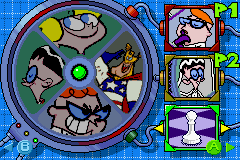
Tournament Mode allows you to choose to play as one of the four characters: Dexter, Mandark, Dee Dee, or Major Glory. Once you have chosen the difficulty setting and your character, you will face the other three characters.
Once the 'HARD' difficulty setting has been won, you will open up the 'BOY GENIUS' setting where only the smartest will survive.
To quit the tournament, you must exit the game from the Pause Screen. See the PAUSE section for more details.
In-Game Controls
To select a piece, move around the board using the Control Pad and then press the A Button to select the highlighted piece. Move to the square of choice and press the A Button again to move the piece.
By pressing the B Button, you can cancel the move.
Move Highlights
When a square is highlighted, it will change color to indicate its status.
In Cartoon View, the colors are:
•
Yellow: Shows the current highlighted square.
•
Blue: Shows a selected piece.
•
Green: Shows a destination square you are free to move to.
•
Red: Shows a destination square you cannot move to.
In Standard View, the colors are:
•
Yellow: Shows the current highlighted square.
•
Purple: Shows a destination square you cannot move to.
•
Green: Shows a destination square you are free to move to.
Movies
If this option is set to ON, each piece taken will result in a mini-animation of that battle being shown on screen.
If you are playing the game in the Standard View, the mini-animation will not play.
Take Back
With the difficulty level set to EASY, simultaneously pressing the B Button and Left on the Control Pad will result in the last move being undone.
The Take Back option can result in the game being 'taken back' to the beginning if you wish by continuously pressing the buttons.
Passwords
Once a game is finished, you will be shown a Password Screen which stores your current game status for both Tournament and Puzzle Modes.
To enter your password to continue from where you left off, you must choose the 'Password' section in Options.
If a valid password has been entered under the Options Screen, you have the choice of playing the password settings under this mode.
Pause Menu
Pressing START will bring up the Pause Menu. Pressing Left and Right on the Control Pad will switch between 'YES' and 'NO' as a response to quitting the game.
Pressing the A Button or START will confirm your choice, while pressing the B Button will return you to the game.
If you QUIT, you will be returned to the Main Menu.
Puzzle Mode
In Puzzle Mode, you will be placed in a chess scenario and must find the solution to the puzzle you have chosen.
The puzzles change and increase in difficulty as you progress, offering challenges such as 'Achieve checkmate in 5 moves.'
Puzzle Mode is always played in the Standard View and plays in the same way as the regular game.
When each puzzle is completed, you will be closer to unlocking more puzzles. The two pieces behind the puzzle must be completed before you can advance. A completed puzzle piece will turn from green to yellow, and an open puzzle piece will change from red to green.
Each completed puzzle offers a new password allowing you to store your progress. To enter your password to continue from where you left off, choose the 'Password' section in Options.
Versus Mode
You can play against human opponents in


.png)
 (En,Fr,De,Es).png)
.png)
.png)


 (En,Fr,De).png)


