Getting Started
•
Turn OFF the power switch on your Nintendo Game Boy Advance. Never insert or remove a Game Pak when the power is on.
•
Insert the Game Pak of Hello Kitty Happy Party Pals into the slot on the Game Boy Advance. To lock the Game Pak in place, press firmly. •
Turn ON the POWER switch. The legal and logo screens will appear (if you don't see them, begin again at step 1).
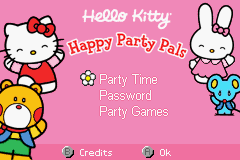
When the main menu appears, start a new game by moving the flower cursor. Press Up on the Control Pad to highlight “Party Time” and press the A Button to select.
Menu Options
•
Party Time: Selecting this allows you to explore 5 fantastic scrolling worlds: the park, the neighborhood, the shops, the beach, and Hello Kitty's house and backyard. •
Password: After a successful party, you will receive a password. Write this down to proceed to a more advanced party in future sessions.
•
Party Games: This option takes you directly to a menu of 13 games where Hello Kitty solves puzzles and prepares for her party. Scroll through the choices with the Control Pad and press A to select. Party Time Game Mode
The goal is to throw a successful party. At the end of each party, you receive a "party rating." A high enough rating allows you to continue to the next party level.
To move Hello Kitty and explore: •
Press Up on the Control Pad to walk backward.
•
Press Left to turn left.
•
Press Right to turn right.
•
Press Down to walk forward.
When facing someone, press the A Button to bring up a dialog box. Use the Control Pad to highlight an action and press A to select. Press A again to close the dialog. Press the B Button at any time to cancel your selection and return to the previous screen.
Game Goals
Invite Friends
Hello Kitty can invite friends by talking to them directly or by mail. •
Direct Invitation: Walk up to a character and press the A Button. Use the Control Pad and A Button to select an invitation choice from the dialog.
•
Mail Invitation: Write a note using the stationary on her desk.
Collect Objects
Items are acquired by finding them in the world or winning them in games.
•
Walk up to an item and press the A Button to pick it up.
•
The item will appear over Hello Kitty's head briefly after being picked up. •
To give an item to a character, use the Control Pad to choose the item from your inventory and press A.
Keep People Happy
Friends have a "Happy Meter" that affects your party rating. Actions that affect the meter include:
1. Talking with friends
2. Giving items to friends
3. Playing games with friends
4. Inviting friends to the party
5. Planting flowers in designated beds
6. Picking up garbage and recycling it
Be careful, as some picky friends may have a negative Happy Meter reaction to certain items.
Decorate the Party Area
There are 6 party areas throughout the game. Decorate them with balloons, a tablecloth, and a banner to improve your rating. For example, you can decorate Hello Kitty's backyard. Throw a Party
Go to the party area for the current level (e.g., Hello Kitty's house for the first level). Walk up to the chalkboard and press the A Button. When prompted with "Ready to start the Party?", use the Control Pad to highlight your choice and press A:
•
"Not yet. I still want to get a few more things."
After starting, friends will arrive. Keep them happy during the party by:
1. Playing music
2. Feeding friends
3. Giving gifts
4. Playing games
5. Talking with friends
6. Ensuring adequate decorations
Note that not all items are available for every party. When the timer reaches zero, you receive a rating and a password if successful.
Party Games Menu
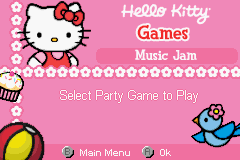
Select "Party Games" from the Main Menu to access 13 specific games.
•
Scroll through games with Up/Down on the Control Pad and press A to select.
•
Press START to Pause, Continue, Retry, or Quit.
Shop Hop
Grab party items at the top of the screen while avoiding shopping carts. Use the Control Pad to move Left, Right, Up, and Down.
Music Jam
Press the correct button as it scrolls across the screen. Match the button moving over the circle rainbow to keep the music and stars going. The buttons correspond to A, B, L, and R on the Game Boy Advance.
Music Memory
Repeat the bird tweets in the order you hear them. Use the Control Pad to select a bird. The bottom meter indicates how long the sequence will continue.
Friendship Notes
Invite friends by sending invitations. Hold B while pressing Up/Down to choose a tool, then use Left/Right to select an option. Press or hold A to draw with stationary or pencil tools. Functions include:
1. Address (picture)
2. Select stationary background (Warning: switching paper after drawing may lose your work)
3. Select a sticker
4. Select a stamp
5. Select stamp ink color
6. Erase (clears page)
Press the Control Pad and A Button to stamp symbols. Highlight the "send" button on the


 (En,Fr,De,Es).png)
 (En,Fr,De,Es).png)
.png)
.png)


 (En,Fr,De).png)



 (En,Fr,De,Es,It).png)