Introduction
Everything about a monster truck is BIG. From the towering steel chassis and the massive tires, to the thundering roar of the engines, everything about them seems larger than life.
And then there are the legends themselves. With names like Blue Thunder®, Wolverine®, and Grave Digger®, they meet in arenas - steel-clad gladiators of a new age, poised for battle.
Now, in Monster Jam®: Maximum Destruction™, you control your own destiny. Get behind the wheel of your favorite monster truck, and battle your way to the ultimate Monster Jam championship! Along the way, you'll find:
•
8 different arenas, from Junkyard to Hollywood
•
Championship Mode with upgrades for your monster trucks
•
Special power-ups to cause maximum mayhem
Well, what are you waiting for? Start your engines!
In general, you select things with the A Button and move back with the B Button. The Control Pad controls your choices, either Up-Down or Left-Right.
Game Options
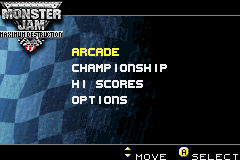
Use Control Pad Up and Control Pad Down to move between the selections. Then use the A Button to select the following options:
•
ARCADE: This lets you play one knockout match in any level of difficulty, with any unlocked truck, on any unlocked arena. It's perfect when you have an urge to smash up a few trucks in a hurry.
•
CHAMPIONSHIP: This is where you really get into the heart of Monster Jam competition. Play through divisions in any level of difficulty-and the better you do on the championship circuit, the more improvements you can make to your Monster Jam truck. •
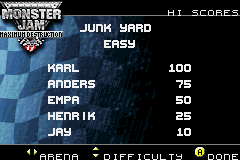
HI SCORES: View high scores here.
•
OPTIONS: You can reset high scores and delete saved games here.
Selecting Difficulty Level
Use the Control Pad Up and the Control Pad Down to move between the selections. Then use the A Button to select the following options:
•
EASY: Your opponents are not as likely to benefit from the mistakes you make while learning the rules of the Monster Jam arena. •
NORMAL: The competition gets tougher, and you'll have to learn fast if you want to earn a true Monster Jam reputation. •
HARD: Those who live for a stiff challenge will enjoy this level of play, designed with the most demanding Monster Jam fan in mind. Selecting Your Truck
Use the Control Pad Left and the Control Pad Right to move between the selections. Then use the A Button to select your truck. Note that additional trucks are unlocked during the game as you win.
Selecting Your Arena
Use the Control Pad Left and the Control Pad Right to move between the selections. Then use the A Button to select your truck. Note that additional arenas are unlocked during the game as you win.
Entering the Arena
Use the A Button to enter the arena that you have chosen. Or, use the B Button to go back. The menu presents the arena that you are about to enter and the trucks in the competition. Once you enter the arena, your truck is always the blue-marked truck.
Selecting Your Driver
Use the Control Pad to step between selecting and deleting drivers. Use the A Button to select a driver or to delete a driver. Use the B Button to go back. If you choose a new driver, you can name him or her whatever you like.
Deleting a Driver
If you choose to delete a driver, you will be asked to confirm this. Use the Control Pad Up and the Control Pad Down to select YES or NO. Use the A Button to select or the B Button to go back.
•
NO: Do not delete driver.
Creating a Name
Use the Control Pad in any direction to step between letters of the alphabet. Use the A Button to select each letter, or choose "DEL" to delete a character. Step to and choose "END" to end the menu. Use the B Button to go back.
Championship Options
Use the Control Pad Up and the Control Pad Down to step between the selections. Use the A Button to select. Use the B Button to go back. The menu also shows you the current funds, the current division you are competing in, and the current arena.
•
CONTINUE: Enter the next competition.
•
GARAGE: Go to the garage.
•
LOAD OR SAVE: Load or save the game.
Entering a Division
Use the A Button to enter a particular Championship division. The menu presents the arenas played in that division and the prize money available.
Visiting the Garage
Use the Control Pad Up and the Control Pad Down to step between the options. Use the A Button to select and the B Button to go back. This menu also presents the current funds you have available for upgrading your Monster Jam truck. •
ENGINE: Buy better engines.
•
GEARBOX: Buy better gearboxes.
•
BODY: Buy a better truck body.
•
TIRES: Buy better tires.
•
SHOCKS: Buy better shocks.
•
TRUCK: Trade for a better truck.
Upgrading Your Engine
Use the Control Pad to step between the engines. Use the A Button to buy an engine and the B Button to go back. The menu also shows your current funds.
•
TOP LEFT ENGINE: Gives +1 over your original engine statistics.
•
TOP RIGHT ENGINE: Gives +2 over your original engine statistics.
•
BOTTOM LEFT ENGINE: Gives +3 over

.png)
.png)
