Getting Started
Make sure the power switch is OFF. Insert the SHREK the THIRD™ Game Pak into the Game Boy® Advance slot as described in your Nintendo Game Boy® Advance instruction manual. Turn the power switch ON.
To skip the introductory sequence, press START (only after a game has been started).
Game Boy® Advance Controls
Item Collection
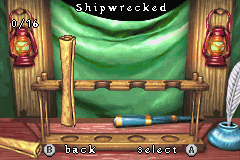
The icon in the top right corner represents the type of Item that needs to be collected within the level. The first number shows the number of Items collected, and the second number shows the total number of Items to be found.
Talking to Others
If a character wants to talk to you, the B Button will appear above the character. Stand next to the character and press the B Button to begin talking. Press the A Button to move to the next page or press START to finish talking immediately.
Pause Menu
If START is pressed during gameplay, the Pause menu will appear. This menu contains the following options:
•
Resume - Press the A Button when this is selected to go back to your game.
•
Quit Level - Choosing this will ask for confirmation. If you choose to quit, the game returns to the level select screen.
•
Sleep - Sleep Mode conserves battery power without losing current progress. To enter Sleep Mode, highlight the Sleep option and press the A Button. To wake the Game Boy® Advance, press the SELECT + L + R Buttons simultaneously.


 (En,Fr,De,Es,It,Nl).png)
.png)


 (En,Fr,De).png)


