Starting the Game
Insert the "Super Robot Taisen: Original Generation" Game Pak into the Game Boy Advance and turn the power ON. When the Title Screen appears, press START. Game Start Screen Options
•
NEW GAME: Start from the beginning.
•
LOAD: Resume the game from an intermission.
•
CONTINUE: Resume the game from the map on which you saved.
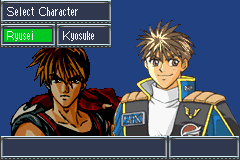
Character Select
You can select the character you'd like to play as (Kyosuke or Ryusei) at the beginning of the game. Select one, and the game will begin. Scenarios will vary depending on which character you choose.
The Game at a Glance
•
Scenarios: Characters appear on screen to advance the plot and explain objectives for each map.
•
Maps: Battlefields are displayed at certain points in the game.
•
Battle Preparations: Equip weapons or parts and modify them if necessary depending on the situation.
•
Unit Select: Select the pilots/mechs you want to use in the upcoming battle. If you have many units, you may not be able to deploy them all.
•
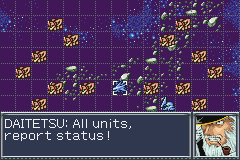
Battle: Your units are displayed in blue and enemy units in red. Each map has different campaign objectives, and you decide how your units are utilized.
•
End Scenario: A scene relating to the outcome or previewing future encounters plays after completing a battle.
•
Intermission: Customize your mech, change equipment or mechs, and save your progress.
Battle Preparation
After a map appears, you'll have the opportunity to prepare for battle. Make sure you select your units carefully and properly equip them.
1. Unit/Info: View the status of a unit.
2. Unit/Customize: Customize a unit.
3. Unit/Parts: Equip a unit with parts.
4. Weapon/Equip: Select weapons for a unit.
5. Weapon/Customize: Customize a unit's weapon.
6. Pilot/Info: View a pilot's status.
7. Pilot/Training: Improve a pilot's ability or learn special skills by using Pilot Points.
8. Pilot/Assign: Change pilots for a particular unit.
9. Team/Select: Finalize preparations and proceed to Team Select.
10. Deploy: Shows the number of required mechs (yellow) versus selectable mechs to be deployed.
Team Select
When the Team Select Screen appears, select the units you wish to deploy from the list. Usually, they'll be boarded onto a battleship. Certain units may be required to participate, while others may not be selectable, depending on the situation.
•
1 Unit List Page (Use the Control Pad to change pages)
•
5 Number of Deployable Mechs
Select a unit you want to deploy using the Control Pad, and then press the A Button. An indicator to the left of the unit will be lit, signaling that the unit is ready to go. Press the A Button again to cancel. The farther into the game you get, the more units will be at your disposal. Be sure to select your team members carefully.
Battle: Movement
Move the cursor over a unit on the map and press the A Button to display the options available for that unit. If the unit is far away from the enemy, you can select "Move" to move it closer. Press the B Button to check the status of the unit, and from that screen, press the A Button to see the character's Special Skills.
How to Move Your Units
When you select "Move," the unit's range of movement will be indicated. Select your destination and press the A Button. Then, select "Standby," or if the enemy is in range, "Attack."
Environment
There are many different types of environments on the maps. Mountains and seas will limit the mobility of your units. To see the effect of an environment, place the cursor on any given spot and press the B Button.
Enemy Status
By placing the cursor on an enemy and pressing the A Button, you can see its range of movement. To see its status, press the B Button. Pressing the A Button from there will allow you to see its special skills. If you have not yet engaged a unit, its data will not be available.
Board
If a battleship highlighted in blue is nearby, you can move to its location and board it. Your ammo will be replenished, and your HP and EN restored if you remain there long enough. Your unit can be redeployed by selecting "Deploy" from the commands available for the battleship. The pilot's "Will" will decrease by 10, but won't go below 100.
Battle: Attacking
If your unit is close enough to an enemy unit, you can attack. The unit challenged attacks first. There are three ways to attack: attacking an adjacent enemy, attacking from a distance, or attacking a particular area.
How to Attack
Select “Attack” from the available commands, and a list of weapons will appear. Weapons in red cannot be used for various reasons (not loaded, lack of EN/Range/Will, environment effect). The weapon's range will be indicated. Select a target using the cursor and confirm your choice by pressing the A Button. You can also select a target by pressing the L Button or R Button.
Attacking an Adjacent Enemy
Move in close to an enemy and then attack.


.png)
.png)
.png)


 (En,Fr,De).png)



_1.png)