Quick Start
This mode gets you straight into the action. You can choose an opponent from the gallery and set the game duration to 5, 10, 20, or 30 minutes. These are K.O. speeds where the player who exceeds the allocated time loses the game. The 5-minute mode is widely used for blitz chess. You can also choose the custom mode to define the characteristics of your opponent.
•
Select your opponent with the Control Pad.
•
Select the duration of the game with the Control Pad.
•
With the Control Pad, select either the white or the black pieces.
•
Confirm by pressing the A Button.
Versus Mode
This mode allows you to play against someone on the same Game Boy® Advance (choose Versus) or to play against someone via the Game Boy® Advance Game Link® Cable (choose Single Pak Link).
How to Play With the Single Pak Link
1. Make sure the power switch is in the OFF position.
2. Connect the Game Boy® Advance Game Link® Cable.
3. Carefully insert the Virtual Kasparov Game Pak into your Game Boy® Advance.
4. Turn the power ON.
Tutorial
There are about 50 lessons with the comments of Garry Kasparov in this section. To choose a lesson, move the cursor with the Control Pad. The tutorial contains the following main topics:
Expert Analysis Options
The following tutorial options include expert analysis:
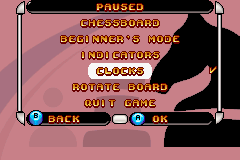
Pause Menu
Access this menu by pressing START during the game.
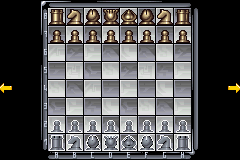
Setup Position
This option is only available in Quick Start mode. It allows you to start a new game by changing certain parameters:
•
Change position: Allows you to remove and place any piece anywhere on the chessboard.
•
Black/White to move: Decide who starts the game (White or Black).
•
White Queenside: Determines whether or not the White camp is allowed to castle on the Queen's side.
•
White Kingside: Determines whether or not the White camp is allowed to castle on the King's side.
•
Black Queenside: Determines whether or not the Black camp is allowed to castle on the Queen's side.
•
Black Kingside: Determines whether or not the Black camp is allowed to castle on the King's side.
•
Ok: Confirm setup and start the game.
•
Cancel: Cancels the changes made in the setup position mode.



 (En,Fr,De,Es,It).png)
