PLAYING CHESS
STARTING A NEW GAME
To start a game of chess, select "New Game" from the main menu.
SELECTING A LANGUAGE
Select "Languages" from the main menu. You have a choice of English, French and Spanish.
MEMORY CARDS
It is advised that you do not insert or remove peripherals or MEMORY CARDS once the power is on. Make sure there are enough free blocks on your MEMORY CARD before commencing play.
This game requires 3 blocks per save game. Only MEMORY CARD slot 1 is used to load and save game data.
SELECTING THE PIECES, BOARDS AND BACKGROUNDS
You have a choice of 8 types of 2D chess pieces, and 8 styles of 2D board. You can also change the type of screen background used for your chess game.
•
SELECT button + L2 button: To change the background
•
SELECT button + R1 button: To change the 2D pieces
•
SELECT button + R2 button: To change the 2D chessboard
If you prefer, you can also play in 3D. Select the "Board" option from the main menu to make your choice.
•
3D/2D View: Switches from 3D to 2D
You have a choice of 6 types of 3D chessboard.
•
SELECT button + L1 button: To change the 3D chessboard
You can modify some 3D parameters:
•
SELECT button + Up directional button or SELECT button + Down directional button or SELECT button + Left directional button or SELECT button + Right directional button: to modify the orientation of the board
•
SELECT button + △ button or SELECT button + X button: to modify the size of the board
SETTING THE PARAMETERS FOR A GAME OF CHESS
This chess simulation lets you edit a game according to your own parameters. From the main menu select the "Game" option to access the parameter settings menu.
The edit parameters available are listed below:
•
Human/Computer White: Determines who plays White
•
Human/Computer Black: Determines who plays Black
•
Openings library: Garry Kasparov's openings are among the best and most imaginative in the world. From the library choose the types of opening you want, taken directly from Kasparov's repertory.
•
There are two different classifications: category and date.
•
Normal mode: The Normal mode provides access to a more varied type of openings than the tournament mode.
•
Tournament mode: In this mode, the best possible move is played, i.e. the move Kasparov would have played.
•
Blitz mode: This mode offers a wide variety of styles as well as special traits, specific to Garry Kasparov.
•
Beginner mode: If, as a beginner, you select this mode, the computer will indicate on the board all the different moves that are possible for each individual piece.
•
Indicator: If you are playing with one of the 2D boards, this option lets you display the last move made on the board.
•
Clocks: Activates or deactivates the chess clocks during the game.
•
Set up position: Allows you to arrange pieces on the board in whatever configuration you want, to remove pieces (see buttons and Functions/buttons during a change of position), and to activate the following menu:
•
Change Position: Returns to the "Edit Position" menu
•
White/Black To Play: Determines who starts the game. During a game, determines whose turn to play.
•
White Castles Queen's Side: Determines whether White is allowed to castle on the Queen's Side.
•
White Castles King's Side: Determines whether White is allowed to castle on the King's side.
•
Black Castles Queen's Side: Determines whether Black is allowed to castle on the Queen's Side.
•
Black Castles King's Side: Determines whether Black is allowed to castle on the King's side.
•
OK: Confirms your choice and starts the game.
•
Cancel: Returns to the game by cancelling the choice of parameters.
LOAD/SAVE GAME MENU BUTTONS
During the Load/Save Game menus, you can use the following buttons:
•
A button: to cancel an action
•
X button: to validate an action, or select a game
•
Up or Down directional buttons: to select "Yes" or "No", or move the cursor up or down
SELECTING A PLAYING LEVEL
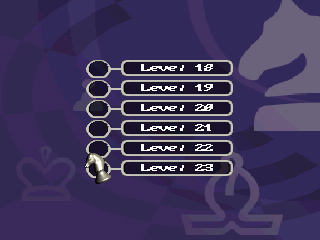
You have a choice of 23 playing levels.
SETTING PREFERENCES
Select "Preferences" from the main menu to set the general parameters for chess simulation.
•
Sound volume: Sets the volume level for the sound effects
•
Music volume: Sets the volume level for the background music
•
Music: Selects from the choice of music available
•
Subtitles: Adds subtitles to the video sections.
TUTORIAL
Select "Tutorial" from the main menu to access the virtual way of learning chess with Garry Kasparov.
This chess simulation features a Tutorial with some fifty lessons on the basic aspects of chess: the chessboard; the pieces; the rules of the game; starting a game; tactics and strategies; main checkmating positions; and the end game.
Practice under the watchful eye of Garry Kasparov, who will certainly intervene and comment your ability
 (En,Fr,Es).png)

.png)
 (En,Fr,Es).png)
.png)



.png)

.png)
.png)


.png)







.png)


_1.png)
.png)
