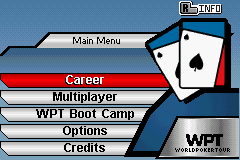
Main Menu
On the Main Menu press Select to view the WPT All Time Leaders lists. Scroll through the leader boards with the L and R Buttons. Here you can track your own poker career against the top poker players in the world.
Career Mode
Ever wanted to be a professional poker player? Think of the fame and money you will earn as you battle your way to the top in Career mode. Start out playing local small games and earn enough money to make it to the big tournaments in Career mode.
Multiplayer Mode
The Multiplayer option allows you to set up a quick game of poker with up to five opponents. Select between human players and AI players of varying skill.
Selecting a Game
Use the following steps to select a game type:
•
Use the +Control Pad to highlight a game type.
•
Press the A Button to select that game type.
Quick Draw
Out of cash? Need to earn some money? Use the Quick Draw table to earn quick cash. Quick Draw modes allows play in a single event and is free to buy-in.
Casino Mode
Play in a real casino game where you can play until you've lost your buy-in money or have won 5 times the buy-in amount!
Multiplayer Options
The multiplayer Options screen lets you set the Starting Stack amount, the Blind amount, the Limit and the game table design. Use the following controls to adjust settings:
•
Press the +Control Pad Up/Down to highlight the desired feature.
•
Press the +Control Pad Left/Right to change the feature.
•
Highlight “Start Game” and press the A Button to advance.
WPT Player of the Year Points
Compete against ten professional players throughout the season by earning points for finishing in the top seven places in a WPT tournament. Do you have what it takes to become the #1 WPT Player of the Year?
WPT Boot Camp
Select WPT Boot Camp to learn how to play any one of the four poker styles available in World Poker Tour: No Limit Texas Hold'Em, Limit Texas Hold'Em, Limit Omaha High, and Crazy Pineapple. You can also learn about poker strategy with the WPT Boot Camp tutorial. Finally, a glossary of poker terms is available in the tutorial menu.
Game Options
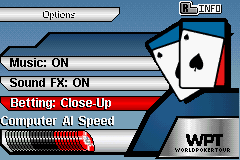
Use this screen to adjust the Music Volume, Sound FX Volume and Computer AI Delay. The Computer AI Delay adjusts how fast the AI characters will make their moves. Betting View is an option that lets you set the betting view in the game between Top down (default) and Close up betting view.
Blinds
At the start of each hand two “Blind” bets are put up or “posted.” The player immediately to the left of the dealer posts the small blind which is usually half the minimum bet. The Player to the left of the small blind posts the big blind, which is equivalent to the minimum bet for the table. As the dealer rotates around the table so do the blinds. Blinds are posted to assure that at least two players have an investment in each hand.
The Flop
After the first betting round is complete, the dealer puts three cards face up in the middle of the table. These cards are called “the Flop” and are community cards to be used by all players. Another betting round begins with the player to the left of the dealer.
The Turn
Once betting has ended for the Flop, a fourth card is placed face up in the middle of the table, next to the Flop. This is called the “Turn”. Betting then resumes from the player to the left of the dealer.


 (En,Fr,De).png)
.png)
