How to Play
Use your clown to grab, catch, and throw the balloons falling from the top of the screen. Destroy balloons by creating a vertical link of three or more balloons of the same color.
The game ends when the balloons fill up the screen and squish your character.
Start Menu
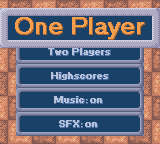
Push START at any time during the introductory sequence to display the Start menu. Select an option by highlighting your choice with the Control Pad and pressing A, B, or START.
•
One Player: Start a single player game.
•
Two Players: Start a 2 player game.
•
Music: Turn the music on and off.
•
SFX: Turn the sound effects on and off.
Two Player Game Setup
To start a 2 player game, use the Game Link Cable to connect two Game Boy Colors, each with its own Magical Drop cartridge. Both players should turn on their Game Boy Colors and go to the Main Menu. When one of the players chooses the 2 Player option, the Game Boy Colors will link and automatically advance to the difficulty menu. The player who started the 2 player game can now choose the difficulty level and becomes the first to select a character.
Game Link Cable Disconnection
If your Game Link Cable gets disconnected during a game, don't worry. Just plug it back in and the game will continue.
If you press and hold START when a "Connection Lost" message appears, you will return to the Main Menu.
Highscores
View the Magical Drop high scores. If you have a Game Boy Printer, you can print your high scores to collect and share with your friends. Connect the Game Boy printer with the Game Link Cable and choose the Print option.
Two Player Game Information
In 2 Player games, the points you get for destroying balloons will be subtracted from your Quota and the balloons will be added to your opponent's Game Boy.
You can win by filling up your opponent's side with balloons or by being the first to reach zero on your Quota Counter.
Difficulty Setting
In a One Player game, use the Control Pad to highlight Easy, Normal, or Hard difficulty levels. Press A, B, or START to select your choice.
Character Selection
In both One Player and Two Players modes, you can use the Control Pad to highlight your character for the game. Each player can only select his own character.
Every character faces MAGICAL DROP challenges based on his/her personality and attack strategy. Discover those individual traits to improve your MAGICAL DROP scores. (Check out the Characters section for more info.)
MAGICAL DROP Balloons
Normal Balloon
There are four types of colored balloons. Destroy balloons by building a vertical combination of three or more balloons of the same color.
Special Balloon
Mix Special Balloons with Normal Balloons of the same color and create a vertical combo of three or more. This will destroy all balloons of that color.
Bubble Balloon
Throwing balloons against a Bubble Balloon can destroy it. You can also make it disappear by simply removing it.
Ice Balloons
Ice Balloons cannot be destroyed but they will convert to the color of neighboring vertical and horizontal balloons when those balloons are destroyed.
Arrow Balloon
The Arrow Balloon points in one of four directions and has the power to change color and destroy the balloons they are pointing at. It can be used like the Rainbow Balloon.
Rainbow Balloon
When combined with three or more Normal Balloons in a vertical group, a Rainbow Balloon will make all balloons of the same color disappear from the screen.
Wipe Out Balloon
When a Wipe Out Balloon is destroyed, all other balloons on the screen will be destroyed as well. The Wipe Out Balloon can be used like a Rainbow Balloon.
Chain Reaction Balloon
When a player creates a series of chain reactions that exceeds the number icon displayed in the Chain Reaction Balloon, the balloon will be destroyed together with its surrounding balloons. Descend Button
When you have mastered the Chain Reaction, try using the Descend button. It increases your danger by lowering the bank of balloons, but it also increases the number of balloons on the screen and the number of balloons you can involve in a Chain Reaction. How many Chain Reactions can you create?
•
USING THE DESCENT BUTTON BY PRESSING DOWN ON THE CONTROL PAD. IT INCREASES YOUR DANGER.
.png)



 (En,Fr,De).png)
.png)
