Security Level and the Radar
Infiltration Mode
As long as Snake has not been discovered by enemy personnel or security cameras, he remains in the Infiltration Mode.
Discovery by the Enemy
Alert Mode
The Alert Mode refers to the mode in which Snake has been spotted by enemy personnel or security cameras.
Evasion Mode
In the Evasion Mode, enemy personnel have left their usual posts and rounds to look for Snake.
Once the enemy has been shaken from Snake's trail, the countdown begins; the Evasion Mode starts when the count returns to 0.
Frequency Jamming
The radar is inoperable due to electronic interference. Electronic devices such as security cameras and remote-controlled missiles are also rendered useless.
Enemy Activity During the Infiltration Mode
In the Infiltration Mode, enemy soldiers patrol specific paths. They conduct visual and auditory sweeps of their patrol routes, looking for anything out of the ordinary.
Enemy sentries in the Infiltration Mode will leave their rounds to investigate whenever they hear any noise. This contingency is referred to as the "Noise Mode". When they are satisfied that the area is clear, the sentries return to their patrol routes. It is possible to intentionally make noise to decoy a sentry away from his post.
Enemy Activity During the Alert Mode
In the Alert Mode, sentries will call for backup and launch an offensive against Snake. Once Snake has shaken off their pursuit, the Evasion Mode will begin.
The "Noise Mode" is not available when in Alert Mode.
Enemy Activity During the Evasion Mode
The sentries will continue to search for Snake.
The "Noise Mode" can be used during the Evasion Mode and in Infiltration Mode, and can be used to lure enemy personnel away.
The Codec
To display the Codec Screen, press SELECT to open the Menu Screen during the game and then press START.
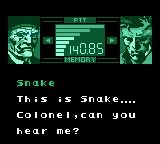
The Codec allows Snake to keep in touch with his team and acquire hints for solving various problems and mysteries during the game.
How to Use the Codec
1. Adjust the frequency by pressing the Control Pad ←→.
2. Press the A Button after adjusting the frequency to begin transmission. If an incorrect frequency has been selected, a "No Response" message will be displayed.
Selecting Assigned Frequencies from the Memory Window
Push the Control Pad ←→ when adjusting frequencies to display a Memory Window (a list of all persons who have received Snake's transmissions in the past). Select the person to raise by pressing ↑↓ on the Control Pad.
About CALLS
Whenever Snake receives a call, the CALL sign will be displayed under the radar. Switch to the Codec Screen to receive the transmission. Many of these calls contain valuable hints and should not be missed.
Saving
Saving is accomplished by communicating with Mei Ling. Only one data record can be kept for the Story Mode.
In order to resume the game from the point at which it was last saved, select "CONTINUE" from the Main Menu.
In "Metal Gear Solid", saving refers to the preservation of conditions that existed at the time the player passed through the Continue Point (points that serve as junctions in the game such as the beginning of a stage or before a boss battle) immediately preceding the save. Game Over
The game is over once Solid Snake's life runs out. In addition, the game will be over if Snake falls in certain traps or pitfalls.
[CONTINUE]
Continue the game from the location immediately preceding Continue Point (*). There is no limit to the number of Continues.
[EXIT]
Return to the Title Screen.
Frequency List
•
Campbell 140.85: As the mission controller, he provides hints relevant to the game's progress.
•
Mei Ling 140.96: A student who serves as Snake's technical support, she is in charge of saving.
•
Weasel 141.80: A mercenary who provides information regarding enemy bosses and weapon use.
•
McBride 141.52: The Director of Operations, African Affairs, CIA. An expert on Gindran affairs.
Stage Select
Replay a previously cleared stage.
[NORMAL]
Play any stage with the same mission objective as in the Story Mode.
[SPECIAL]
This option becomes available after clearing the Story Mode. Each stage can then be played with a mission objective different to the Story Mode.
After selecting the Stage and Mission number, press the A Button to display the mission objectives and begin the game.
VR Training
Each mode has a "PRACTICE" and "TIME ATTACK (time limited)" mode. However, only "PRACTICE" may be selected from the beginning.
Clearance Rate (is the number of stages cleared/160 (total number of stages)).
[SNEAKING MODE]
Practice your infiltration techniques.
NO WEAPON
Head for the goal without being discovered. The training is terminated if Snake is discovered.
Five-seveN
The goal point materializes once you have taken out all enemy personnel. The training is terminated if Snake is discovered.
[WEAPON MODE]
Practice your weapon skills. The goal point materializes once you have taken out all targets. Some options are not available for selection at the start.
[ADVANCED MODE]
Practice both infiltration techniques and weapon skills. The goal point materializes once you have taken out all enemy personnel. Discovery by the enemy does not end the training session
.png)





 (En,Fr,De,Es,It).png)
.png)



_1.png)


_1.png)



_1.png)
















.png)