GETTING STARTED
Using the Nintendo GameCube™
Set up your Nintendo GameCube™ by following the instructions in the Nintendo GameCube™ instruction booklet. To save your game progress, you will need a Nintendo GameCube™ Memory Card. Insert the Memory Card correctly into Memory Card Slot A (this game does not use Slot B) before turning on the console. If you turn off the console after playing without a Memory Card, your progress and records will not be saved. You will need 8 blocks of memory to save your progress. You can delete unneeded files to clear up any empty space if you do not have enough memory. Please refer to the Nintendo GameCube™ instruction booklet (pages 18-20) for directions on how to format and erase Memory Card files. •
Press the OPEN Button to raise the Nintendo GameCube™ Game Disc cover. •
Correctly place the Crash Nitro Kart™ Game Disc into the Nintendo GameCube™. •
Close the Game Disc cover.
•
Press the POWER Button to turn on the Nintendo GameCube™. •
Follow on-screen instructions and refer to this manual for more information about playing Crash Nitro Kart™. Avoiding Damage to the Nintendo GameCube™ Game Disc or the Optical Disc Drive
•
Insert only Nintendo GameCube™ Game Discs in the console. •
Never use oddly shaped discs, such as star-shaped or heart-shaped discs.
•
Do not apply labels, stickers or other foreign objects to game discs.
Using the Nintendo GameCube™ Controller
Insert the Controller into Controller Socket 1 on the front of the console. Follow on-screen instructions and refer to this manual for more information about playing Crash Nitro Kart™. •
B Button - Brake/Reverse
•
Z Button - Look Back/Rear View
•
Either L or R Button - Hop/Boost
•
C Stick Left/Right - Change View
•
C Stick Up/Down - Toggle Map/Speedometer
•
Start Game/Begin Play: START/PAUSE or A Button
•
Select Options: Control Stick or +Control Pad
This game is designed to work with the Game Boy® Advance handheld video game system. To connect the Game Boy® Advance to the Nintendo GameCube™, you will need a Nintendo GameCube™ Game Boy Advance cable (sold separately). See the instructions that come with the cable for additional connection information. RACE MODES
Crash Nitro Kart™ has six racing modes. Some of them are free-for-all, and some can be played as a team. ADVENTURE
In Adventure mode, you race through all the different tracks and arenas, collecting as many Trophies, Relics, Boss Keys, CNK Tokens, and Gems as you can. This mode is single-player only.
RACE TIME TRIAL
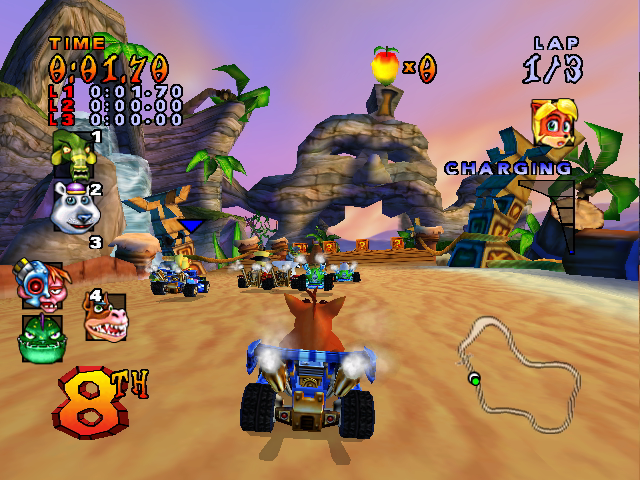
Race Time Trial is a one-player mode where you try to set the best time on any of the tracks in the game. In this mode, there are no other racers to slow you down, and no crates to help you out. Jump and boost your way through three laps as fast as you can.
After you finish the race, you can save your "ghost" (a replay of your race). The next time you play, you can load a ghost or challenge your friends to beat your best time. Beat the best times to unlock and challenge the galactic champions' saved ghosts. This mode is single-player only.
LAP TIME TRIAL
This mode is just like Race Time Trial, except that you're racing to get the best time for a single lap around the track. After you finish a lap, your "ghost" will appear. The ghost is a replay of your fastest lap. Whenever you get a better time on a lap, the old ghost will be replaced by the faster one. This mode is single-player only.
QUICK RACE
A Quick Race is the fastest way to get your race on. Just pick your racer, select a track, and race! You can also adjust the computer players' skill level, as well as the number of laps. This mode is single-player only.
TEAM RACE
Join forces with a computer-controlled buddy to win the race! Stay close to your teammate to charge up your Team Meter. When it's full, press the Y Button to activate team frenzy—then blast your opponents and take the lead! This mode is single-player only.
CUP TOURNAMENT
In a Cup Tournament, you compete against other racers on three different tracks. At the end of a track, the racer in first place gets nine points. The second place kart is awarded six points. Third place gets three points. Fourth place gets a measly one point. At the end of the three tracks, the player with the most points wins the cup. This mode can be played by up to four players.
BATTLE MODES
In Battle Mode, instead of racing on tracks you speed around battle arenas, collecting weapons and attacking your opponents. There are five battle modes in Crash Nitro Kart™. Each mode can be played by two to four players. LIMIT BATTLE
In this game, the object is to hit your opponents with weapons





 (En,Fr,De,Es,It,Nl).png)






_1.png)



_1.png)