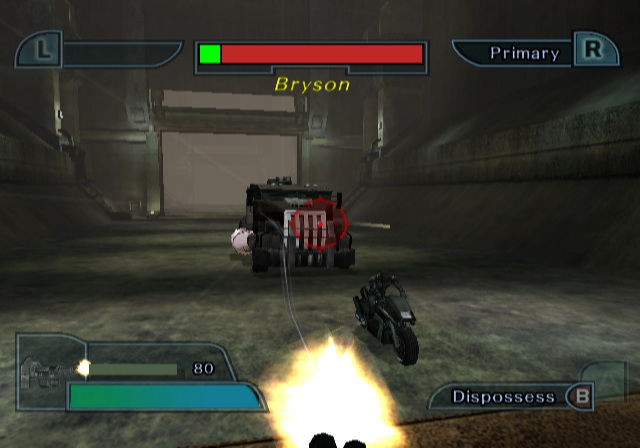
SCREEN LAYOUT
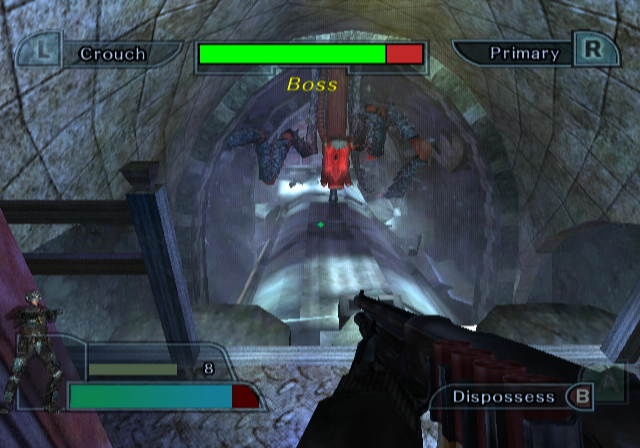
In Possession of a Host
•
Special ability of This host.
•
The health of The possessed.
•
Who you have possessed appears here.
As a Ghost
Lose all your energy and you no longer have a spiritual presence in this realm.
TIP
While you explore the world as a ghost, your energy fades as you are pulled toward the afterlife. In order to continue your progress you will need to find and possess animals, people, and objects to quickly replenish your energy. You can also drain certain types of vegetation for small energy boosts.
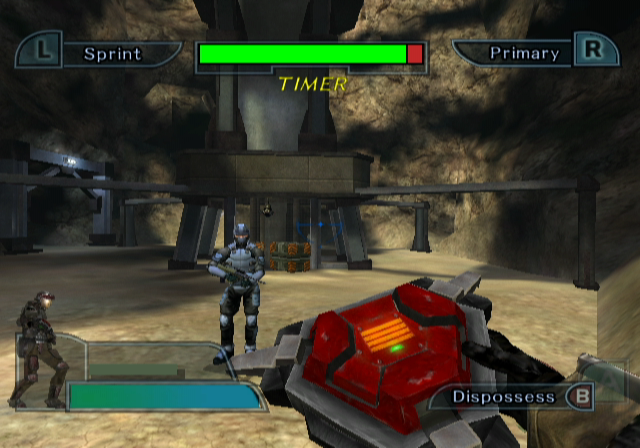
In Possession of an Object
•
Your energy as an object
•
The function you can perform while in possession
POSSESSION
Once you become a ghost you can explore your surroundings. When you find an object worth investigating your cursor will turn into an eye.
Press The A Button To learn more about The object.
If the object is something you can possess it will start to glow with a reddish aura. A possession icon will appear if you center the cursor on the object.
After possessing an object you may interact with the object using the keys shown on the Heads Up Display.
Animal and People Possession
Animals and people can only be possessed when they are in a scared or excited state. You will need to find objects in the environment that you can use to scare them and make them susceptible to possession.
Sometimes you can only make your target uneasy, in which case their aura turns from white to yellow.
If you can find something else to scare them and turn their aura red then you can possess them.
PAUSE MENU/OPTIONS
Control Options
When you first start your game you will be given the option to adjust your control settings.
•
Style: Shade/Wraith Adjusting the control style will change whether the Analog or Control Stick is used for strafing or aiming.
Advanced Controller Configure
•
Invert Pitch: On/Off Toggle the Y axis when looking up and down.
•
Swap Control Sticks: On/Off Swaps the function of the Analog Stick, and the Control Stick.
•
Rumble: On/Off Toggle the Rumble function in the controller.
Pause Menu
•
Resume Game: Return to the game.
•
Options: Lists options to customize your game.
•
Restart Level: Activate to replay the level.
•
Save Menu: Save the game up to the most recent checkpoint.
•
Quit to Main Menu: Activating this will quit your game and return you to the starting menu.
Options
•
Screen Mode: Switch between a Standard (4x3) or Widescreen (16x9) display.
•
Brightness: Adjust the brightness of the picture.
•
Rumble: On/Off Toggle the Rumble function in the controller.
•
Subtitles: On/Off Toggles whether the subtitles are displayed during cinematics. (only available from the Title Screen option menu)
•
Music Volume: Change the Volume using the slider.
•
Effects Volume: Adjust slider to the desired level.
•
Audio Mode: Choose to play the sound in Mono, Stereo, or Surround.
•
Control Options: Use to switch between the two control modes and provide access to more advanced control options (only available in the Options Menu accessed from the Pause Menu).
MULTIPLAYER
First select how many people will be playing. Once everyone has chosen their control scheme press START.
There are three multiplayer game modes to choose from.
Possession Deathmatch
Possess hosts to fight opponents. For each opponent eliminated, one point is added to your score. Objects can be possessed and used to kill opponents for points, but you are vulnerable while inside an object.
If you dispossess a human host, that host will remain vulnerable for two seconds. Other players can sweep in and destroy a vulnerable host for an easy kill point.
Hosts have limited ammunition, so once the ammo is depleted, you will have to find a new host to possess or a reload station.
Capture The Host
Possess hosts and leave their body on a Base to score points. Each host is worth one point. Score extra points by collecting kills with your host before dropping them on the Base.
If your host is killed while carrying points, all the points are lost. Just like Death Match, Hosts have limited ammo so be careful!
If the Key Mode option is enabled, the Base will have a color-coded shield protecting it. To lower the shield you must find the Key located somewhere in the level. Key-carrying players can only lower the shield when it turns their team's color.
If the Dropped Points option is turned on, hosts that are killed while carrying points will leave them behind for other players to collect.
Hunt
Human hosts use anti-spirit weapons to track and kill enemy Ghosts. Ghosts kill Human opponents by possessing them and forcing them into Hazards (pits, spikes, fans, etc.).
Humans can quickly tap the A Button to eject a ghost from their body or use their grenades (the alternate fire of the anti-spirit weapon) to knock a ghost out of a possessed teammate or themselves. The first team to deplete all the lives of their opponent wins.
MULTIPLAYER
Next choose a level. You will be able to access more multiplayer levels and options by finding and collecting secrets in the single player game.
Once your level has been selected you can choose which team you will be on, as well as your handicap setting.
Multiplayer Handicap
There are five Handicap settings. Those settings are -2, -1, 0, +1, +2. The default is 0.
When you select a
.png)




_1.png)




.png)