GETTING STARTED
Put the Star Fox: Assault Game Disc into the Nintendo GameCube and insert a Memory Card into Slot A. Close the Disc Cover and press the POWER Button. MAIN MENU
Press START/PAUSE or A on the Title screen to display the Main menu. This is where you choose the game mode you want to play.
Use or to choose a game mode and press A to confirm.
OPTIONS
Select Options to view records and adjust Controller and sound settings.
SINGLE MODE
In Single mode you clear missions to progress through the story. There are three different styles of game play here: Story, Mission, and Survival.
Survival will become available once you have cleared the Story mode.
VS. MODE
Up to four players can compete in Vs. Mode. There are many different stages available and the rules can be changed to suit your mood.
BONUS GAME
After you've collected all of the silver badges, you can come here to play the bonus game, Xevious.
ABOUT SAVING
In order to save Star Fox: Assault game data you will need to insert a Memory Card into Slot A that has at least 1 file and 5 empty blocks available. Single-mode data will be saved after the results screen is displayed.
Changes made in the Options menu and Vs. mode results will be saved automatically.
Please do not touch the Memory Card or POWER Button while data is being saved, as this may damage the Nintendo GameCube or the Memory Card. To learn how to manage Memory Card files or format a Memory Card, please see the Nintendo GameCube Instruction Booklet. SINGLE MODE BASIC RULES
These are the rules used in Single mode. Whether the missions are shooting stages or all-range stages is predetermined.
Take control of Fox and complete missions to clear individual stages and proceed through the game. If you're hit by enemy attacks or run into obstacles, you will take damage.
If your life gauge or shield drops to zero, you will lose a life or ship and begin the mission again.
GAME OVER
If you have no remaining lives or ships and your life gauge or shield drops to zero, the game will end and the Title screen will display.
SWITCHING VEHICLES
On all-range stages, you can use both Arwings and Landmasters. You can change vehicles at any time.
GROUP BONUS AND BLAST BONUS
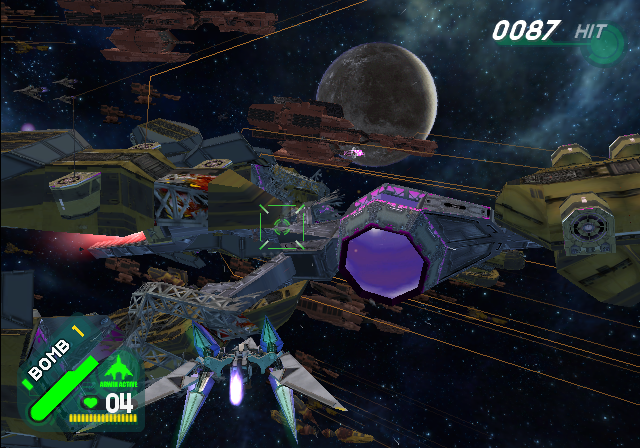
On shooting stages, you can receive group bonuses for taking out entire squadrons of enemy ships. You can also get blast bonuses if you destroy five or more enemies with a single attack.
When you get bonuses you receive more hit points than normal. Blast bonuses are relative to the number of enemies you destroy, so the higher the number, the bigger the bonus.
COMBO BONUS
On all-range stages, a red gauge will appear when you defeat an enemy. If you topple another enemy while the gauge is still displayed you'll receive a combo.
For every 10 enemies in a combo, you'll add a bonus to your hit score.
PAUSE MENU
Press START/PAUSE during missions to display the Pause menu.
•
To continue from the Pause menu, select Continue with or, then confirm by pressing.
•
To quit, select Quit and confirm the same way.
The Pause menu also displays the amount of time you've spent on the current mission and any special flags you've acquired.
SINGLE MODE GETTING STARTED
Select Single on the Main Menu, then choose New User to move to the Name Entry screen.
NAME ENTRY
Enter your name and create your player data file here. Player data files contain your game progress, Vs. records, and other information.
Use or to select letters, then press A to confirm. Select Done when you are finished to complete the name-entry process.
Press to delete the previous letter, and use or R to shift character sets. Once a name has been entered it can never be altered.
DETAILED SETUP
After you choose your Controller setup, you will see one more screen of setup options. Press Up and Down with or to select a menu option, then press Left and Right to change the setup. Select Done to finish.
•
Invert Y Axis Arwing: Choose whether or not to invert the Y axis for Arwing control.
•
Invert Y Axis Landmaster: Choose whether or not to invert the Y axis for Landmaster control.
•
Invert Y Axis Pilot: Choose whether or not to invert the Y axis for character control.
•
Rumble: Choose to enable or disable the Rumble Feature.
CONTROLLER SETUP
Next, you will choose the Controller configuration you want to use. Use or to select a type then press to confirm.
You can press to see details on each Controller setup.
SELECT PLAYER
Choose which player data to use. Use either or to select player data and press to confirm. You can view the player's progress on the right side of the screen.
SELECT GAME
Choose from Story, Mission, and Survival with either or then confirm your selection with A.
SINGLE MODE STORY
Fox and his team face off against the destructive power of the enigmatic aliens known as aparoids. Clear each mission to progress to the next.
BEGINNING/CONTINUE
Choose from either Beginning or Continue to start playing. Select Beginning if you're just starting or Continue if you already have saved game data available. Use or to make your selection and press A to confirm.
If you have saved game data and choose Beginning, your old saved game data will be overwritten once you complete the first mission
.png)




_1.png)