inhuman eyes the size of street lamps glared from above and glowed with white hot fury. Just then, a large gloved hand grabbed the child like a doll and lifted her onto the massive shoulders of a mighty, metallic-skinned mutant. Out of the shadows of the X-Jet, a ruby-quartz visor burned fiery hot, and almost instantly six razor-sharp adamantium claws extended, reflecting the monster's yellowish gaze.
"Not tonight, bub..."
X-Men Legends
The X-Men are brought to life in a high-action role-playing game that takes you and your favorite heroes through their most dangerous adventure yet. Get ready to take control of a team of X-Men, travel to exotic locations and embark on daring missions in a quest to save the world from a new face of evil.
X-Men Legends allows you to live the adventure as an entire team of heroes. Choose the most suitable heroes for the mission, customize your heroes and launch them into a story of epic scope. It's up to you to decide the fate of the world!
"Jean, I want a bubble around everyone on the team! Storm, take out the Acolytes!"
—Cyclops™
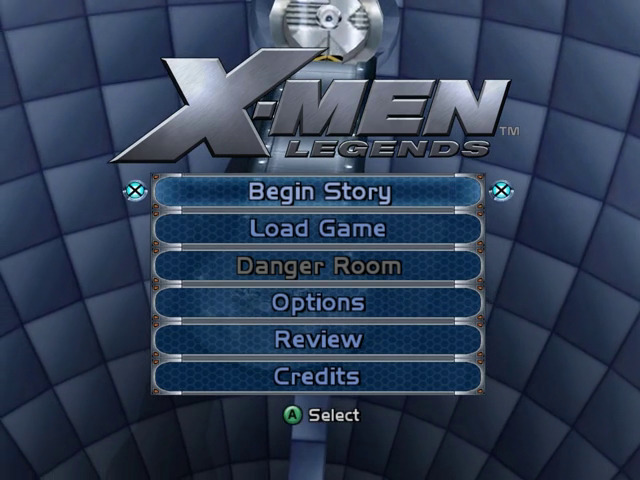
Main Menu
Welcome to the Xavier Institute™. From the Cerebro™ Room, you can access the Danger Room™, modify your options, view unlocked cinematics or begin a fresh game with a new stable of mutants. The choice is yours!
•
Begin Story—Start a new game.
•
Load Game—Continue an existing saved game from your last save point.
•
Danger Room—Access a variety of multiplayer modes and training missions.
•
Options—Set your sound, camera and Nintendo GameCube Rumble options. You can also view the Controller layout. •
Review—View unlocked cinematics, comics and artwork.
•
Credits—View the game credits.
Teaming Up
X-Men Legends is all about building your very own team of Super Heroes™. The first mission puts you in control of Wolverine—simply put, the best at what he does. As you unlock more heroes, you'll be able to choose a team to take on each mission.
You'll also be able to change your team composition at Xtraction Points, but these blue X icons don't appear around every corner, so pick your team wisely. Once in the game, your allies will follow you; use their powers and pick out targets to attack.
If at any time you want to bring your allies to your side, simply press the Call Allies button. During combat, press the Call Allies button to command your allies to attack your currently targeted enemy with their selected power.
Unique Power Combos
There are many unique power combinations, which earn extra damage as well as bonus experience. Practice various combinations using the Call Allies button to call for specific ally attacks!
For Example:
Optic Beam + Freeze Blast
Lightning + Psychic Shout
Heads Up Display (HUD)
The HUD is optimized to allow control over your entire party. The faces that appear in the HUD are configured in 4 positions, each represented by a direction on the + Control Pad. Pressing any direction on the + Control Pad instantly gives you control of the corresponding X-Men character.
•
Health Meter—Shows the health of the currently selected X-Men character.
•
Energy Meter—Shows the energy of the currently selected X-Men character.
•
Experience Meter—Shows how close your X-Men character is to the next level of experience.
•
Xtreme Meter—Fill up the 4 segments within the HUD to light up the extreme meter. This indicates that the Xtreme power is enabled.
•
Enemy Meter—Displays the health of your currently selected target.
•
Automap—Your automap is an invaluable tool that helps you find unexplored areas and objectives.
•
Tech Bits—Useful for purchasing items and more, these can be an important collectable.
•
Health Packs—Shows your current number of Health Packs. Health Packs, like all items, are stored in a team inventory pool, usable by your entire team.
•
Energy Packs—Shows your current number of Energy Packs.
•
Level Indicator—Displays the level of your currently selected hero.
•
Power HUD—Displays currently available powers for the active X-Man when the Superpower Selector is held.
HUD Elements
•
Experience Meter (gray bar)
Xtraction Points
Xtraction points are save points which appear throughout the game. Activate an Xtraction point by pressing the X Button to change your team, save a game, load a game or visit the Danger Room™.
Besides changing your team, you are also able to revive fallen team members using tech bits, and purchase items from Forge and Healer.
Note: During Flashback missions in the Danger Room, you will be unable to revive your fallen teammates.
Attributes & Skills
Leveling up is part of any RPG experience. When you've accrued enough experience, your character gains a new level. You'll know that a character has leveled up when you see a double-helix pattern around the selection icon at the character's feet. Don't hesitate
.png)


.png)




_1.png)