SETTING UP
To play adidas® Power Soccer 98 on your PlayStation® game console: •
Set up your PlayStation® game console in accordance with the instruction manual supplied with the system. •
Follow your system directions to open the Disc cover and place the Disc onto the bed of the drive, ensuring the printed side faces upwards.
•
Close the Disc cover. If the unit is switched off, press the POWER button to begin play. If the unit is already on, press the RESET button.
•
Now follow on-screen instructions to start the game.
USING A MULTI-TAP
A Multi-tap allows up to 4 players to join a game. Connect the Multi-tap to Controller port 1 on the PlayStation® game console. Make sure that there is always a Controller inserted into Controller port 1-A. It is recommended that any additional Controllers are inserted sequentially (1-A, 1-B, 1-C etc.).
NOTE: Do not insert or remove peripherals into your PlayStation® game console during a game. FOREWORD FROM BRIAN MOORE
"No other computer soccer series has come close to the adidas® Power Soccer range for playability, longevity and fun. And with the launch of adidas® Power Soccer 98, Psygnosis has re-invented the computer soccer experience as we know it. adidas® Power Soccer 98 really is the only game worth putting in your Trophy Cabinet!"
BALL WINNING
Speed Burst
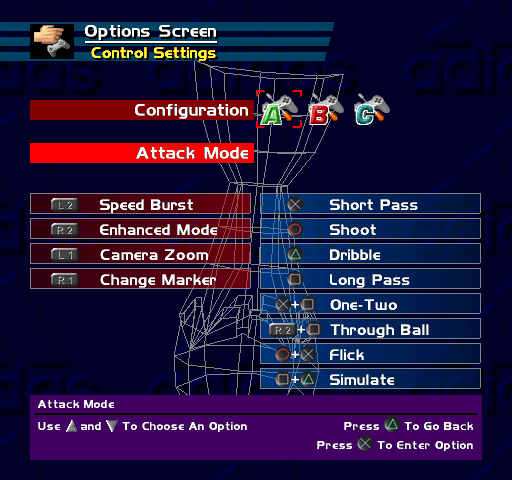
Press and hold the L2 button to chase for the ball that much faster!
Tackle
Press the Ⓧ button or the Ⓞ button to get those challenges in.
Header
Press the △ button to connect with a cross using a header. The type of header will depend on the height reception of the cross.
SET PLAYS
For corners, goal-kicks and free-kicks, a transparent arrow is displayed on-screen. Use it to guide the angle, direction and height of the kick. Experiment with this function to perform banana shots, benders, curlers and really skillful kicks. Maximize your talent.
NOTE: During a match, press the L1 button to cycle through the different camera angles.
MENUS
USING MENU SCREENS
Use the Directional buttons to highlight required options. Press the ☑ button to confirm. Press the button to return to the previous menu.
Following a short cinematic sequence, the adidas Power Soccer 98 title screen will be displayed.
Note: You can also access the title screen during a match by holding the SELECT and START buttons simultaneously for two seconds.
Press the START button to quick start a match or press the or SELECT button to access the MAIN MENU. The MAIN MENU will then be displayed:
•
Tournaments: Go to Tournament Menu
•
Seasons: Go to Season Menu
•
Friendly Match: Go to Friendly Match Menu
•
Practice Mode: Go to Practice Mode Menu
•
Options Screen: Go to Options Screen Menu
•
Memory Card: Go to Memory Card Menu
QUICK START OPTION
Press the START button to access the Pre-Match Menu and launch directly into a Friendly Match. The teams will be selected at random by the computer.
adidas® POWER SOCCER SECRET SQUADS
Win the different tournaments and unleash the might of the hidden adidas® Power Soccer Secret Squads!
NOTE: Don't forget to save your progress in order to keep the Secret Squads available the next time you play the game!
Tournament Menu
Use the Directional buttons to access each tournament and press the button to confirm.
For country-based tournaments, use the Directional buttons to highlight a National Flag and press the X button to confirm, then press the START button to continue. For club-based tournaments, use the Up and Down Directional buttons to highlight the name of a soccer club from the list. Press the ☑ button to confirm, then press the START button to continue. The first round matches will then be displayed. Press the X button to access the Pre-Match Menu (see Pre-Match Menu for further details).
World Cup 98
The Qualifiers are over and your country has made it to the most prestigious soccer competition the planet has ever known. Now it is up to you to guide your country to the title. Your nation's pride is at stake here, but are you up to the job?
32 National Flags represent the 32 competing nations. Use the Directional buttons to highlight your nation's flag and press the button to confirm. Then press the START button to continue. The match list will then be displayed.
The Official Draw
Champions League
The premier European club competition is split into two formats. The first phase of the Champions League is a league where competing clubs are divided into groups
.png)

.png)


.png)
.png)