The Enemy
A privately run paramilitary force and all its weaponry have been overtaken. An alien infection has spread from an underground laboratory to other parts of the base.
The infection brings forth three separate, very painful stages of a gruesome alien transformation. The human body is used as an incubator to grow a new combination of human and alien DNA. The product of this alien transformation is now our enemy.
Mission Briefing
This file was drafted by a highly trained soldier in the last hours of his life. It describes a detailed method of invading the base to attempt an extermination of the alien presence. Follow the instructions in this file to the letter.
Portions of the document have been edited by S.T.A.A.R for security purposes. The fate of humanity hangs in the balance.
Good Luck.
G. Ilovewar
LGEN, USMC
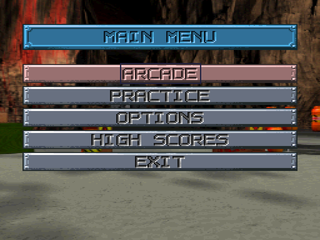
Main Menu
From the opening demo sequences, press START to exit and view the Title Screen. Press START again to exit the Title Screen and go to the Main Menu.
Make a selection from the following options:
Arcade
Throw yourself right into the action. You'll go to the Battle Selection Screen. Practice
Select this option to prepare yourself for your suicide mission. Aim and fire at the targets to get used to your weapon's accuracy.
Options
Make this selection to view options that may give you a chance against the Kronomorphs.
High Scores
Select this option to view the names and accomplishments of the men and women who performed best in battle against the enemy.
Exit
This option quits the game and returns you to the Demo.
Battle Selection
You have two choices: You can begin the mission at the Beginning or Warp Ahead to get right in the thick of the Alien Forces.
When you make your choice, move the crosshair over the selection, then click the Left Mouse Button. You'll be dropped right into some heavy gunfire.
Options
The following options will let you carefully plan your attack on the military base. Study each option and make the changes that best suit your ability. In most cases you will be sent to succeeding pages to effect your changes.
Options Menu
Player Select
This option lets you make control modifications to your Controller, Mouse or Gun.
Sound Options
You can modify the sound configuration for the game.
Arcade Options
Select from various options to configure the game the way you want.
Reset Options
Click here to reset your ARCADE OPTIONS to their defaults. Exit
Select EXIT to get back to the MAIN MENU.
Player Select Configuration
Make modifications to your controller. Here are the choices:
Select this option to configure your Controller, Mouse or Gun. The configuration screen will change based on whether the gun, mouse or controller is plugged into the port you select. For example: If your gun is in controller port 1, select Configure P1 to view the Configure Gun Screen.
Arcade Options
Area 51 has five different difficulty levels to choose from. Select from Novice, Easy, Medium (default), Hard and Expert. Set the amount of Lives you can have to make things really difficult. Select from 3 to 5 lives. You'll continue to play until all of your lives are gone.
When you run out of Lives, the game will stop. You'll be prompted to Continue the game. If you have credits left, press START to continue the game. Select from 1 to 7 credits to extend your game. When you're out of credits, the game ends. Note: When you use your credits to Continue a game, your current score is reduced by 25%.
Set this option to On, and the game will loop to the beginning, once you've completed the entire game. Your accumulated points, weapons and ranking will carry over. Select Off to have the game end when you've saved the world.
Turn this option to Off to play the game without entering any Secret Rooms. Default is On.
Turn this option Off for no blood. Default is On.
Select to return to the OPTIONS menu.
Sound Options
You can modify the sound configuration for the game. Select the STEREO/MONO option to toggle between the two settings. You can also set the EFFECTS and MUSIC volumes the way you want.
Select EXIT to accept the changes and return to the Options Screen. Use your Controller to move the slide bar and change the setting. Changes will occur as you raise or lower the volume.
Primary Targets
It may sound irrational, but you are under orders to shoot the paintings, too. For some reason, they may give you grenades or access to secret rooms.
Destroy all computer equipment and any other items on desks and tabletops. We need to cut off their contact to the outside world.
AREA 51 has many of these rooms. Unfortunately, there's no information available at this time regarding their location and quantity. We strongly suggest that you shoot everything in sight. The rooms will present themselves if you've hit the right combination of targets.
 (Rev 1).png)


 (Rev 1).png)
