Game Setup
To return to a previous screen, press A.
Use these controls to navigate menus throughout Diablo. Default options appear in bold in this manual.
Starting a New Game
1. Select NEW GAME from the Main menu. The setup sequence begins.
2. Select the number of players: Select ONE for a One Player game or TWO for a Two Player game. The Choose Class overlay appears.
In a multiplayer game, players are restricted to the same screen. If your weapon strikes your ally, it inflicts damage.
3. Select a character class: Select WARRIOR, ROGUE, or SORCERER. (For descriptions, see Characters on p. 10.) The Enter Name overlay appears.
4. Enter a name: D-Button to highlight symbols and press to select. When the name is complete, press START to continue. The Choose Difficulty overlay appears.
5. Select a difficulty level: Select NORMAL. Only high-level saved characters can enter NIGHTMARE (Character level 20) and HELL (Character level 30). The game loads and your character appears in the town of Tristram.
Game Screen
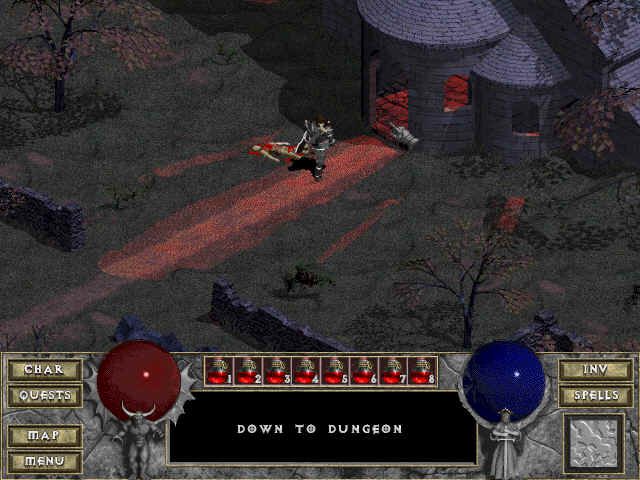
The game screen displays items stashed in your belt and your level of mana (used to cast spells) and health.
The identifies configured object.
For a quick boost, you can press L1 to consume one health potion or R1 to consume one mana potion. You must have potions in your pack or belt.
To use a belt item, press SELECT, then access your Inventory from the Options menu. (See Inventory on p. 21.)
To access the AutoMap (Labyrinth only), press R2.
When your armor durability is low, a symbol of the armor appears onscreen to warn you that it needs repair.
Interacting with the Townsfolk
Talk with the townsfolk to learn their individual trades. They can oblige you with gossip, quests, or merchandise.
To initiate a conversation, press when a character is highlighted. The Conversation menu appears.
•
D-Button to highlight an option, then press to select.
•
To return to the game screen, press .
Artisans and Merchants
If one merchant can't meet your needs, seek another. All merchants do business similarly to Griswold the Blacksmith.
To purchase a basic item from Griswold the Blacksmith:
1. Press when Griswold is highlighted. The Conversation menu appears.
2. Select BUY BASIC ITEMS.... A second menu displays items and prices.
•
D-Button to scroll items in his shop and press to select.
•
Gold is automatically subtracted from your total amount.
•
If an item is highlighted red, you can purchase it but cannot use it until you meet its requirements.
•
If an item is highlighted blue, it has been magically enhanced.
You must be able to afford the purchase, and your pack must have space for the new item (see Inventory on p. 20).
Quests
Townsfolk sometimes request a favor of you in the form of a quest. Completing a quest often provides a reward as well as experience.
Access your quest log to review unfinished quests:
1. Select the QUEST LOG from the Options menu. Quest names are displayed.
2. D-Button to highlight a quest, and press to review the details.
In the Labyrinth
As you progress deep into the labyrinth, you encounter hordes of creatures. Collect crucial items, learn magic, and fight to destroy these dark beasts.
To fight, press x. (To learn more about fighting, see Combat on p. 17.)
AutoMap
Use the AutoMap to guide you through the dark, intricate halls of the labyrinth.
•
To access the AutoMap press R2.
•
represents your location.
To scroll explored areas of the AutoMap, press R2 + D-Button.
Combat
Every monster you slay brings you one step closer to Diablo.
Attack
Your effectiveness in combat depends on factors such as strength and dexterity. Understand your attributes before charging into combat. (See Characters on p. 10.)
•
To attack the nearest creature with the weapon in your hands, press when the creature is highlighted.
•
To pick up an item and place it in your pack or open a door, chest or sarcophagus, press. (To learn more about items in the labyrinth, see Collect Items on p. 20.)
•
To cast a prepared spell, press. (To learn more about sorcery, see Magic on p. 18.)
The fragile remains of slain warriors rarely travel alone.
Magic
Magic is a powerful force. Invoke magic when brute force is not enough. Some creatures are immune to certain spells. Do not use magic indiscriminately.
A spell consumes mana when cast—more powerful spells require more mana. Consume a potion to replenish your supply.
Spells
Learn spells from books or scrolls you find in the labyrinth or buy them from Adria the Witch. Three classifications determine the manner in which a spell is cast:
•
AREA: Spell originates from caster and radiates outward (e.g., Flash spell).
•
DIRECTIONAL: Spell is cast directly at a targeted creature. If no target appears, spell is cast in the direction caster is facing (e.g., Firebolt spell). When you prepare a Directional spell, a round highlight marks potential targets.
•
TARGETING: Spell is cast
 (En,Fr,De,Sv).png)

 (En,Fr,De,Sv).png)

_1.jpg)