GETTING STARTED
Set up your PlayStation game console according to its Instruction Manual. Make sure the power is off before inserting or removing a compact disc. Insert the FINAL FANTASY VIII disc and close the Disc Cover. Insert game controllers and turn on the PlayStation game console. Follow on-screen instructions to start a game. BEGINNING A NEW GAME
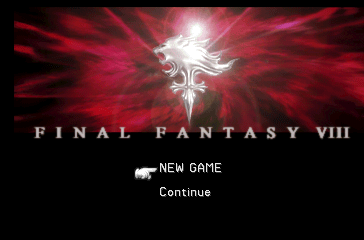
Press the button at the Title Screen to enter the screen shown on the right. To start a new adventure, select <NEW GAME> using the directional button and press the button.
CONTINUE GAME FROM SAVED DATA
To continue a game from Saved Data, select <Continue> and press the button. When the screen shown on the right is displayed, select the MEMORY CARD slot using the directional button and press the button.
Select the file to be loaded with the directional button and press the button again to execute.
CAUTION DURING DISC CHANGE
As the player progresses throughout the adventure, the <change DISC> display will appear on the screen. When changing DISCs, follow the instructions displayed on the screen without turning the power OFF.
SHOPS & COLLECTING INFORMATION
It will be necessary to stop at cities to gather information and to use shops in order for the player to complete the game successfully. To speak to a character, press the button. The party can also buy and sell useful items at shops located throughout the world (shop types are listed below).
Modify weapons and increase their power. Refer to "Modifying Weapons" described below.
Buy or sell items.
Restores HP and removes Status Abnormalities for both characters and GFs by staying overnight. Saving is also possible at this location.
Gather various information related to the game. It would be best to use the study panel along with this instruction manual.
MODIFYING WEAPONS
Characters may sometimes receive items such as rods or screws after winning a battle. Not useful by themselves, these items or parts can be taken to a Junk Shop where together with the proper specifications, they can be used to modify and upgrade a character's weapon for a fee (the stronger the upgrade, the more expensive the cost will be).
The specifications for making modifications can be found in magazines located throughout the world. As modifications become more powerful, the parts needed for the modification will become harder to find. Modified weapons increase in Attack Power and Hit Rate.
RECEIVING SALARY
After Squall becomes a SeeD member, the player's party will be entitled to a salary based upon his SeeD rank. The disbursement of this salary will be credited to the party automatically at regular intervals.
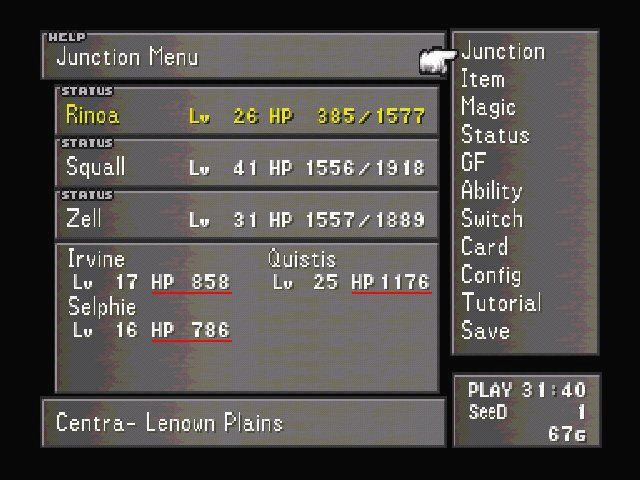
Press the button to display the Menu Screen. On this screen, the player can check the level of each character, their current HP and maximum HP, and the location.
The right side of the screen displays various menu headings, the length of playtime, and the amount of money in possession. When Squall becomes a member of SeeD, his SeeD rank will also be displayed here. Use the directional button to select a menu heading and open it by pressing the button. To exit the Menu Screen, press the button.
LEARN TO USE THE MENU HEADINGS
There are a total of eleven menu headings in the Menu Screen. With the exception of <Junction> and <GF>, nine of the menu headings will be explained below.
•
Junction (Refer to page 24)
•
Guardian Force (GF) (Refer to page 26)
1. Item - Using Items
The Item menu heading provides access to the Item Screen that lets the player use recovery items on injured characters or organize items in inventory. When the Item Screen is displayed, the player can select <Use>, <Rearrange>, <Sort> or <Battle> using the directional button and execute the command by pressing the button.
Since <Item> is also a Command Ability (see page 28), it needs to be Junctioned so that it can be used during battle. Descriptions of the commands in the Item Screen are as follows.
Select the item to be used with the directional button, and press the button to execute the command.
Rearrange the order of items manually.
Organize the order of items automatically.
Designate how the order of items appears when the <item> command is selected during battle.
MENU SCREEN
2. Magic - Using Magic
The Magic menu heading provides access to the Magic Screen, in which the player can use recovery magic such as Cure and Esuna on injured characters. Other commands in this menu allow the player to rearrange the order of magic in the Battle Window or to exchange magic between characters.
Characters who have not junctioned the <Magic Command Ability (see page 28) will not be able to use magic during battle.
Select the magic to be used with the directional button and execute the command by pressing the button.
Exchange magic between characters.
Take all magic from another character.
Designate how the order of magic appears when the <Magic> command is selected during battle.
JUNCTION SCREEN ICONS
STATUS ATTACK/DEFENSE
A key to various
 (Disc 1).png)

 (Disc 4).png)
