GETTING STARTED
POWER ON
Place the 'Roadsters' CD into your PlayStation® game console and press the POWER button; the game will then begin to load. Follow the on-screen instructions. MEMORY CARD OPTIONS
Roadsters has an 'Auto-save' feature, which will automatically save your progress and lap data through the game as long as you have a MEMORY CARD inserted into MEMORY CARD slot 1.
If you start the game without a valid MEMORY CARD inserted, the 'Auto Save' feature will be disabled and you will not be able to save your game data.
•
Insert a formatted memory card into MEMORY CARD slot 1 with at least one free block.
•
Press START button to continue.
•
Warning: Continuing will disable the auto-save feature.
GAME OPTIONS
ROADSTER TROPHY
Take part in a Roadster Trophy championship race against 7 competitors, over 3 divisions. Place bets on your final position, buy and sell cars to improve your chances of winning.
Upgrade your vehicle to aid your progression through the divisions. Your progression through this mode will allow for more race options to become available within the other games modes.
MULTI-PLAYER
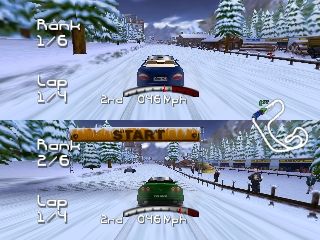
Race a friend, head-to-head on a track that has been opened in the Trophy mode.
QUICK RACE
Compete against 7 computer cars in a single race on a track already visited in the Trophy mode.
Game Type
TIME TRIAL
Learn the racing lines and optimize your braking distance to improve lap times. You can practice on tracks that have been made available in the Trophy mode. Category Selection
Use Up or Down Directional Buttons on the controller to select the category. Press the X button to choose the option.
You must have won a C category Championship to enter Category B and have enough funds. Likewise, you must have finished first in the B category to enter an A Championship. Again, you must have enough money.
Circuit Selection
After selecting your driver and the car of your dreams, the circuit select screen appears. Press Up/Down Directional Buttons on the controller to highlight the desired.
ROADSTER TROPHY
You begin the championship with enough funds to enter Division '3' only. You must first choose a driver, a division and purchase a vehicle to race with.
If you have already raced in a championship and have saved data on a MEMORY CARD, you will have the option to start a new trophy or continue the current one.
DRIVER SELECT
Choose Driver
Press Left/Right Directional Buttons to view the available drivers. Press the X button to select the one you want.
Change Name
Highlight 'Change Name' by using Up/Down Directional Buttons on the controller. Press the X button to begin entering your name.
Pushing Left or Right Directional Buttons on the controller will now change the selected letter. Press the X button to choose the letter.
NEW SEASON
Choose the Division you wish to race in. As a new driver, 3rd is the only division available. You will then enter another screen, Season Table, that shows you the different races, circuits and their directions for this particular season.
RACE INFORMATION
This screen gives you details about the track and the race you will participate in, such as the circuit, weather, and the forecast.
SELECT A CAR
SELECT CAR
Select the vehicle you wish to purchase using the Left/Right Directional Buttons on the controller. You have the choice of having the roof up or down by pressing the button.
You can also change the color of the vehicle by pressing the O button. Pressing the X button will buy the car.
Enter Race
Enter the race. If you intend to make alterations to your vehicle, do so before selecting this option.
Sell Car
Sell your vehicle. You will return to the previous screen in order to purchase a new one.
Upgrade Car
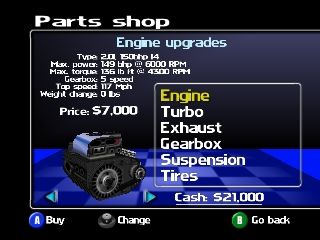
This option allows you to buy parts for your vehicle, depending on the amount of money you have. Engine, turbo, exhaust, gearbox, suspension, and tires are available within this option.
Car Setup
Choose your tires, suspension, gear ratios and transmission type when available.
RACE ENTRANTS & BETTING
This screen allows you to see all the entrants to the race within which you are about to enter - the driver's names, their cars and their wins. You can choose from the three following options:
Enter Race
Start the race. If you intend to make alterations to your vehicle do so before selecting this option.
Bet on Race
As long as you have enough cash after purchasing a car, you can place a bet on your final position from 1st to 3rd. The table below shows the winning combinations:
•
1st - Only 1st Place wins
•
2nd - 1st & 2nd Place wins
•
3rd - 1st, 2nd & 3rd Place wins
Use the Up/Down Directional Buttons on the controller to select the required betting option and Left/Right Directional Buttons to change it. By choosing your final position, the odds will be shown on the screen.
Exit Championship
This option brings you back to the main menu - The GameTypes.
PITS
In either Roadster Trophy or Quick Race modes, you have the opportunity to use a pit stop to change your
.png)

.png)