ARCADE MODE
This is a quick start game mode that lets you try out any of the events. You don't have to qualify or train your athletes; you jump straight in at Olympic Games level.
Two Arcade modes, Classic and Repeat Play, are available from the Game Setup menu. In Classic mode, players complete 12 events, gaining points dependent on performance. Each event can be played only once. Repeat Play mode is similar to Classic mode, with the option of replaying events to gain higher scores.
After selecting a mode from the Game Setup menu, select "Arcade" from the Main Menu.
PLAYER SETUP
Up to eight people can take turns competing against each other and the computer-controlled opposition. Use the Directional buttons to highlight a player slot, then press the X button. Use the following options to create a player profile.
NAME INITIALS
•
Press the X button to select the first initial.
•
Use the Directional buttons to scroll through the letters and to move on to the next initial.
•
Press the X button to proceed.
NATIONALITY
•
Use the Directional buttons to highlight a nationality and to scroll through the nationalities available.
HANDICAP
•
Use the Directional buttons to highlight a handicap and/or to choose a number of stars.
•
This feature affects how many more Power button dishes you must make depending on your skill.
•
Select one star if you are not a very skilled player, or up to five stars if you are highly skilled.
•
You can also set a player as a Computer Competitor by pressing on the fifth stat.
REGISTER
•
Use the Directional buttons to highlight "Finished," then press the X button to accept your player setup.
•
When all players are ready to proceed, highlight OK and press the X button to move on to the Event Select screen.
EVENT SELECT
•
Use the Directional buttons to highlight your chosen event, then press the X button to proceed.
EVENTS
•
100 Meters Freestyle Swimming
•
10 Meter Platform Diving
•
Super Heavyweight Weight Lifting
COMPETING
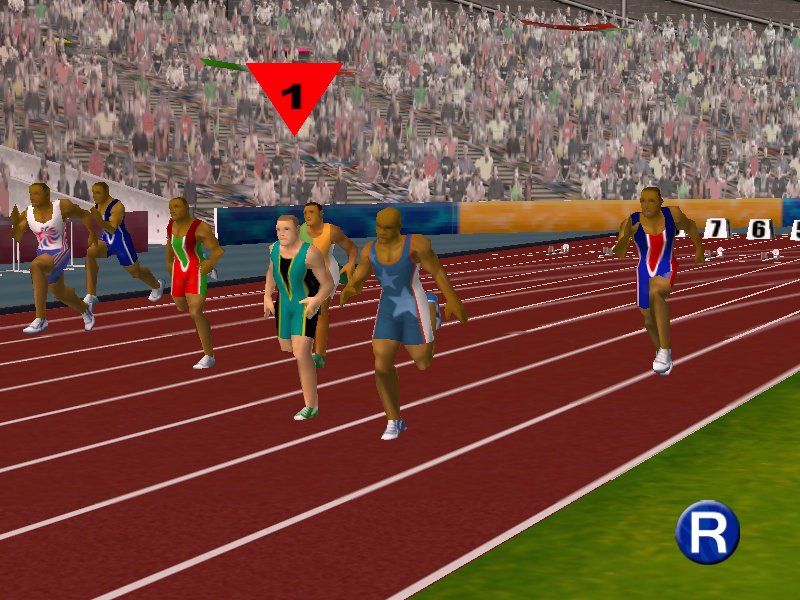
Players take turns participating in a heat for the chosen event. In race events, the player's number is shown in a colored circle above the athlete currently under control.
After each heat, a Results table is displayed. From left to right it shows: ranking, player name, nationality and result (e.g. time, distance thrown, height jumped, etc.). Press the X button to proceed; a replay of the action is then shown on a loop. Press the X button again and the next player, if there is one, gets a chance to compete.
Once all players have competed, a Results table is displayed combining the outcomes of all heats and showing the relative rankings of all players involved. From left to right it shows: ranking, player name, nationality, result and points scored. Press the X button to move on to the Player Standings screen where all players are ranked overall for every event they've competed in so far. From left to right it shows: ranking, player name, nationality and total overall scoring.
Press the X button to return to the Event Select screen.
OLYMPIC MODE
Play as athletes aspiring to reach the finals of the greatest sports event in the world. In each event, you play as a different athlete. Take each athlete through a tough series of training events and qualifying competitions. Do your best to become one of the elite few fit and skilled enough to reach these cyber Olympic Games. On the Player Setup screen, use the ↑/ Directional buttons to highlight these items:
INITIALS
•
Press the X button to select the first initial.
•
Use the ↑/ Directional buttons to scroll through the letters and ←/→ to move on to the next initial.
•
Press the X button to proceed.
NATIONALITY
•
Use the ←/→ Directional buttons to choose a nationality.
OK
•
Press the X button to proceed to the Event Select screen.
LOAD
•
Press the X button to load a previously saved tournament and resume play where you left off.
•
Use the ↑/ Directional buttons to highlight one of the saved game slots, then press the X button twice to make it the current game.
EVENT SELECT
Use the Directional buttons to highlight one of the choices, then press the X button to select. All 12 events are listed. You may choose to qualify for events in any order.
When you begin a game, notice that an icon beside each event lights up when you complete a stage of competition. Select an event from the list and proceed to the Training screen. Once you achieve Olympic qualification in any event, you can select "Go to Olympic Games" and pit your athlete against the world's best.
To save progress, select "Save," highlight a game save block, and press the X button. Use the Directional buttons to enter a name for the saved data, then press the X button twice.
TRAINING
This is where you train your athletes, hone skills, build up physique and morale, and ultimately put them through the qualification process to make the Olympic team. Each event is associated with three forms of training. By working through these training programs, you can see strength, skill and morale improving. This gives you a better chance to win and thereby progress to higher levels of competition.
On
.png)