Getting Started
Set up your PlayStation game console according to the instructions in its Instruction Manual. Make sure the power is OFF before inserting or removing a compact disc. Insert the WCW NITRO™ disc and close the Disc Cover. Insert one or two game controllers in the Controller Ports and turn ON the PlayStation game console. Check out the opening scenes, or press the START Button to go directly to the Title Screen.
Title Screen/Options
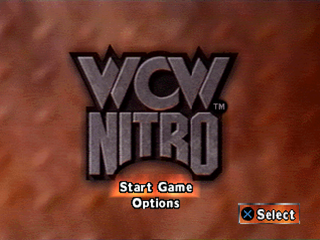
At the WCW Nitro Title Screen, you can choose Start Game or go to the Options Screen to check out your gameplay choices.
Press the Directional Buttons up or down to highlight START GAME or OPTIONS and press the Button to select.
Options Screen
You're about to go up against the toughest wrestlers ever, so you'd better take a minute to find out what your options are. Press the Directional Buttons up or down to highlight an option, then press left or right to modify.
•
Match Length - (default is 5:00) Change the length of each match from 3:00, 10:00 or Unlimited (no time limit), depending on how much punishment you can take!
•
Ringout Time - (default is 20 seconds) The action is just as hot outside the ring, but you can set the maximum time to 20 seconds, 40, 60, or Unlimited.
•
Difficulty - (default is Normal) Choose from Easy, Normal, or Hard - but if you're taking it easy, you probably shouldn't be playing with the Big Boys!
•
Surprise Attacks - (default is Yes) Set this to Yes or No. If it's on, watch out! You never know who might jump into the ring!
•
Ring - (default is Random) Select from all of your favorite settings: Nitro, NWO, WCW, Fall Brawl, American Bash or Halloween Havoc - or try a random selection for each match.
•
Audio - (default is Stereo) Mono or Stereo sound.
•
SFX Volume - Press the Left/Right Directional Buttons to adjust the Sound Effects volume slider.
•
Music Volume - Press the Left/Right Directional Buttons to adjust the Music volume slider.
•
Button Config. - Press the Button to enter the Controls Configuration Window. Choose from the preset Configurations 1, 2 or 3 or make your own. To make a custom controller configuration, select Custom here, then press and hold a button and press Left/Right to change its function. The four changeable functions are: Action, Kick, Chop and Punch. Release the button when done.
•
Memory Card - First, you gotta have a Memory Card inserted in slot 1. Second, make sure you don't pull it out when Saving or Loading data. Press the Button to select from:
•
Load - to load previously saved data. You'll be asked to find the data on your Memory Card.
•
Save - to save your current game options, hidden characters found, etc. You'll need 1 free block to save.
•
Exit - returns to Options Screen.
•
Note: Memory Card slot 2 is not used to save or load operations.
•
Credits - Pay your respects to the people who brought you this close to the squared circle.
Press the Button to return to the Title Screen when you're finished messing with options.
You Got the Courage to Step Into the Ring?
Select Start Game at the Options Screen to enter the Select Mode Screen. Choose from the following ways to enter the ring in style:
•
1 P Tournament - Go for the belt with the single-player tournament! Choose your wrestler, then take on 10 of the baddest brawlers to earn your title!
•
1 P Exhibition - Got a grudge? Or just wanna see who's the best? Pick your wrestler, then call any other opponent into the ring for a single match.
•
2 P VS - You and a friend each choose your contender and see who can dish it out!
•
1 P Exhibition Tag Team - Choose the two members of your team, and match up against any two opponents. During a match, you control one man at a time. Get close to your team member and press the R2 Button to take control of your other wrestler.
•
2 P Exhibition Tag Team - Get ready for awesome action as you and another player each select your 2 baddest boys and see who has the greatest threshold for pain!
Once you select your play mode, the Select Wrestler Screen appears. Use the Directional Buttons to highlight the brawler of your choice. Press the Button to witness the wrestler's Rant. Press the Button to go back to the Select Mode Screen. Press the Button to select a wrestler.
Basics of Play
Each wrestling match consists of one bout. The winner can be determined in four ways:
•
A match can be determined by the bell, if the match is timed - the winner will be the wrestler with the most remaining health when time runs out.
•
A match can be won by pinning your opponent (with the Button) and holding him to the count of 3.
•
A match can be won by default, if an opponent is outside of the ring longer than time allows.
•
Submission (with certain characters).
In a Tournament Game, the winner
.png)

.png)
