Setting Up
Set up your PlayStation®2 computer entertainment system according to its Instruction Manual. Ensure the MAIN POWER switch (on the back of the console) is ON.
Press the RESET button. When the power indicator lights up, press the OPEN button to open the disc tray. Place the Carmen Sandiego™ disc label-side up on the tray. Press the OPEN button again to close the disc tray. Attach game controllers and other peripherals as needed. Follow on-screen instructions and refer to this manual for software usage.
Magic Circles and Targets
Wherever you see a Magic Circle on the ground, a Magic Shield will be nearby. Collect the Magic Shield and return to the Magic Circle quickly, as the Circle is only active while the Magic Shield's power lasts.
When standing on an active Magic Circle, press the L1 or L2 button to use the Blowgun and look around. You will see Magic Targets on the walls. Shoot them quickly by pressing the button; they will turn blue when successfully shot. You must shoot all Magic Targets before the Magic Shield's power runs out.
Some Magic Targets glow orange without a nearby Magic Circle. You can shoot and activate these without standing on a Magic Circle.
Magic Circles are also located directly in front of Main Statues. They glow orange when Cole has destroyed all Statues in the level and are not affected by Magic Shields. To activate one, stand on it, and the Main Statue will release the Compass. Water
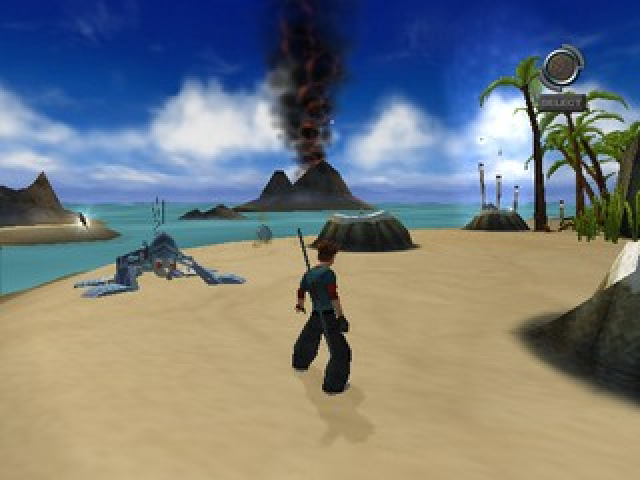
Water can be very troublesome. Cole's Staff sinks in the mud, preventing Pole Vaulting, and Double Jumping from water is impossible. Water Spirits are also a problem, so use extreme caution around water. Birds
Be careful! Getting close to a pigeon will startle it and cause it to fly, often attracting unwanted attention from nearby enemies. Alternatively, you can use your Blowgun to startle a bird and momentarily distract an enemy.
Starting the Game
Starting a New Game
You may begin a new game by selecting New Game.
Load Game
Continue a previously saved game by selecting Load Game.
Vibration
Turn the Vibration function ON or OFF.
Credits
Allows you to view the game credits.
Cole's PDA
Press the START button to pause the game and open Cole's PDA.
Options
Open the Options Menu.
Atlas
The Atlas screen provides useful geographical information about your current Location.
Map Screen
Use the Map Screen for an overhead view of the area. The Map reveals your current Location. In each level, you can find an ACME Pod that updates your map.
After your map is updated, it reveals the locations of: Robots, Statues, the Main Statue, Puzzle Pieces, and the Door to the next level. The right side of the screen indicates the status of your collectibles. It shows what you have collected over the total number available, from top to bottom.
Communications
As you progress, Shadow and Jules will periodically send you video mail with information about Carmen or your current Location. The PDA Alert appears in the upper-right corner of the screen and beeps to indicate an incoming message.
These video mails are saved in this portion of your PDA, so you can view them anytime. You can open this menu by opening your PDA, or you can jump straight to your Communications Screen by pressing the SELECT Button.
Options Menu
Save
Save your game at your current Location.
Audio Setup
Allows you to adjust the Music and Sound Effects volumes.
Vibration
Turn the Vibration function on your controller ON or OFF.
Camera
Choose settings for your First Person View and your Third Person View.
Quit
End the game.
Memory Card
Save or load files on your memory card (8MB) (for PlayStation®2).
Saving a Game
If a memory card with available space is present, you can save your game in the Options Menu at any time.
Multiple Saved Games
You get three save slots to save your games. Make sure you use them wisely. The flag representing the country you are in will appear in the window of your save slot.
Loading a Saved Game
If a Memory Card with a previously saved Carmen Sandiego file is present when the game begins, that game becomes available when you select Load Game from the Main Menu. Locations
Cole's mission to catch Carmen Sandiego will take him around the globe to nine Locations. Each Location contains multiple Sub-Locations. For example, while scouring New York City, you may visit Sub-Locations such as Back Alley, Museum Office, Exhibition Hall, and Docks. Each of the following objectives must be completed to move on to the next Location. Puzzles
Each Location contains one 2-D Puzzle or mini-game. To activate the Puzzle, you must find and collect all of the Puzzle Pieces in that Location. You can check the total number of Puzzle Pieces required and collected on the Map Screen, as well as see the Location of the Puzzle Activation Point. Once you've collected all the pieces in a Location, bring them to a Puzzle Activation Point. Each Puzzle is unique, and instructions will be given at the Activation Point.
Spirit Statues
The Spirits want to protect the Drums and will do so at any cost. The Spirit Statue's
.png)

.png)
.png)
.png)
