PlayStation 2 Setup
Set up your PlayStation®2 system according to its instructions. Ensure the system is on (on/standby indicator is green).
Press the OPEN button to open the disc cover. Place the LUMINES Plus disc label-side up in the disc holder, then close the disc cover.
Attach game controllers and other peripherals as needed. Follow on-screen instructions and refer to this manual for software use.
PlayStation 2 Components
Memory Card
To save game settings and progress, insert a Memory Card (8MB) (For PlayStation®2) into MEMORY CARD slot 1.
You can load saved game data from the same memory card or any Memory Card (8MB) (For PlayStation®2) containing previously saved games.
For LUMINES Plus, the maximum number of save files is 10 per memory card.
Introduction
LUMINES Plus is an inspired, intoxicating, and addictive fusion of block-rocking beats and block-dropping puzzle strategy. It's simple to grasp but may take a lifetime to master.
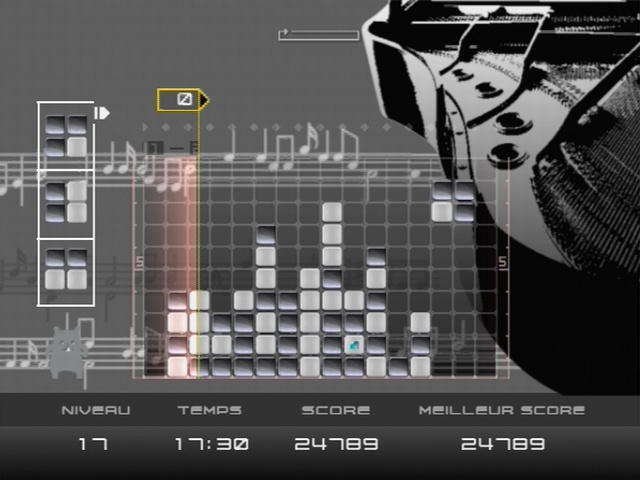
2x2 blocks drop from the top of the screen. You must move and rotate them to create same-color blocks to erase as many as you can.
You also contend with the moving Time Line, which relentlessly crashes your block party, forcing you to make desperate moves to beat your high score.
Playing the Game
When the Title Screen is displayed, press START to begin the game.
Start Menu
Choose from the following game modes and press the button to select:
•
1P Mode (single-player game)
Log-In Screen
Select a Character
Enter your character name of up to six alphabetical characters.
•
Use the ↑ and ↓ directional buttons to scroll.
•
Use the Ⓧ button to confirm.
•
Use the ← directional button to backspace.
Select your character using the directional buttons to scroll and the Ⓧ button to confirm. You can have multiple characters and save scores for each.
Log-In Screen Options
Saving the Game
Your score, ranking, characters, etc., will automatically be saved to the Memory Card (8MB) (For PlayStation®2), sold separately. You will need at least 110 KB of free space.
Insert the Memory Card (8MB) (For PlayStation®2) containing any previous game data before starting the game, as all game files will be loaded automatically.
Never turn off the system or remove or insert the Memory Card (8MB) (For PlayStation®2) while the Save screen is displayed or autosaves are occurring. Autosaves are conducted after each mode is completed and when the game finishes.
1P Games
Challenge Mode
Background skins and music will change as you progress in the game. This game mode does not have a time limit.
Single Skin Mode
Select a background skin and use it throughout the entire game. The background skin will not change unless you select a new one.
If you have not unlocked any skins (e.g., when playing for the first time), only the first skin will be available for selection.
Time Attack Mode
Choose your own time limit for this game: 60, 180, 300, or 600 seconds. Attain as high a score as possible within your chosen time limit.
2P VS Mode
VS games can be played against another player using a second controller.
Each player should select their characters using the directional buttons or left thumbstick to scroll and the button to confirm. You can create multiple characters and save scores for each.
Select Skin
This allows you to select a skin for VS Mode.
VS Mode Rules
The playing field is split in two. The more squares you eliminate than your opponent, the larger your playing field becomes.
As game creator, you'll have the chance to decide which skin to use for your multiplayer VS game.
VS CPU Mode
Survive the battle against several CPU opponents in two-player VS-style gameplay.
Puzzle Mode
Try to solve the different puzzles built into the game.
Puzzle Example
•
it be a different color. Create a small cross within the
Options
Button Configuration
Here you can change the buttons you use to play LUMINES Plus. Switch between various button configurations to rotate your squares.
Options Menu
Options Menu Actions
Score Ranking
View your results from Challenge Mode here.
Character Edit
Change the current character's name and design.
Change Character
Load other character data saved on a Memory Card (8MB) (For PlayStation®2) or create new Log-In data.
Delete Character
Delete characters.
Save
Save your play data.
.png)

.png)
.png)
.png)


 (Europe).png)

.png)
_1.png)


.png)