Setting Up Your PlayStation®2
Set up your PlayStation®2 computer entertainment system according to its Instruction Manual. Ensure the MAIN POWER switch (on the back of the console) is ON.
Press the RESET button. When the power indicator lights up, press the OPEN button to open the disc tray.
Place the "Mortal Kombat: Shaolin Monks" disc on the tray with the label side facing up. Press the OPEN button again to close the disc tray.
Attach game controllers and other peripherals as appropriate. Follow on-screen instructions and refer to this manual for software information.
Menu/Sub-Menu Navigation
Throughout this manual, ↑, ↓, ←, and → signify pressing Up, Down, Left, and Right on the directional buttons.
To navigate game menus (e.g., Options), use the directional buttons to highlight a selection.
Quitting a Game in Progress
During the game, press the SELECT button to display the Pause Menu.
•
Press ↓ to select Exit Game.
•
To confirm exiting, highlight Yes, then press the ✖ button again.
Starting Up
DUALSHOCK®2 ANALOG CONTROLLER CONFIGURATIONS
Mortal Kombat: Shaolin Monks does NOT recommend or support "Analog Joystick" controllers that are not DUALSHOCK®2 analog controllers.
Saving Progress
Mortal Kombat: Shaolin Monks uses a save feature that saves to your memory card (8MB)(for PlayStation®2).
When you start the game for the first time, the game will look for a Mortal Kombat: Shaolin Monks file. If it doesn't find one, it will prompt you to create a file. Once created, the game will load the file the next time you play.
Unlockables and options can be saved every time you exit the game.
KOMBAT
Attack Style
All main character attacks are built around an Attack Style system. Each Attack Style corresponds to a particular attack button, representing a specific kombat property.
All attacks or moves from a button follow the properties of its main attribute, making new attacks or upgrades easy to learn. For example, the button represents the Launch Attack. All attacks or abilities from this button will launch the enemy into the air on a successful attack.
The main characters each have their own unique Attack Styles derived from their individual personalities.
Style/Property List
•
Quick Attacks: Fast, low damage strikes. Special attacks from this type normally hit multiple times or execute extremely quickly.
•
Launch Attacks: All attacks from the character's Launch Attack will pop-up an enemy into the air for juggle kombos.
•
Power Attacks: Slow attacks of great power. Generally single attacks or small strings of slow attacks.
•
Throw/Grapple Attacks: This category contains any attack that throws or holds an opponent.
•
Get-Up Attacks: Allow a player to recover quickly from a knockdown and rise with an attack. Press any attack button while on the ground to perform this attack.
•
Ground Techs: Press the button while you're on the ground to perform a Ground Tech.
•
Air Techs: Mid-air recovery moves. Press the button while in the air to perform this move.
Kombo System
String Kombos
String kombos are sequences of attacks linked together on a series of attack button inputs. They're present in most types of kombat.
In addition to single direction String Kombos, String Kombos can be created by utilizing the multi-directional attack system. For example, when surrounded, attacks can be strung together by attacking with one attack to the left, one to the right, and two to the front.
Sequence Kombos
A Sequence Kombo is a pre-planned kombo built between attack button presses to often perform unique animations, effects, and/or properties. This adds special properties or unique reactions specific to this type of kombo.
This includes setting an enemy on fire, popping the enemy into the air (higher than normal), or hurling an enemy away with greater force. It can also cause the player to automatically follow the enemy into the air after a launch attack, making Air Kombat a breeze. If you perform certain Sequence Kombos, you'll often find Kill Strike attacks. These attacks are often buried 2-3 hits into a Sequence Kombo to visually reward you when you perform them correctly.
Juggle Kombos
A Juggle Kombo is a series of hits levied on an airborne opponent that has been "launched" or "popped up" by the main character's attack. Juggle kombos can be mixed between attack buttons just like String Kombos. Anytime an enemy is in the air, the main character can attempt to juggle him with most any attack.
Kill Strikes
Certain attacks act as Kill Strikes. If a Kill Strike lands on an enemy, a special Kill Reaction will be triggered.
Body Splits
Body Splits cause the body to break into pieces through attacks or background hazards.
Evades
Evades allow you to be resistant to damage as you avoid attacks and pressure.
Air Kombat
You can toss an enemy into the air and then jump into the air to continue your kombo. You can throw them away, or toss them back down to the ground.
Character Health
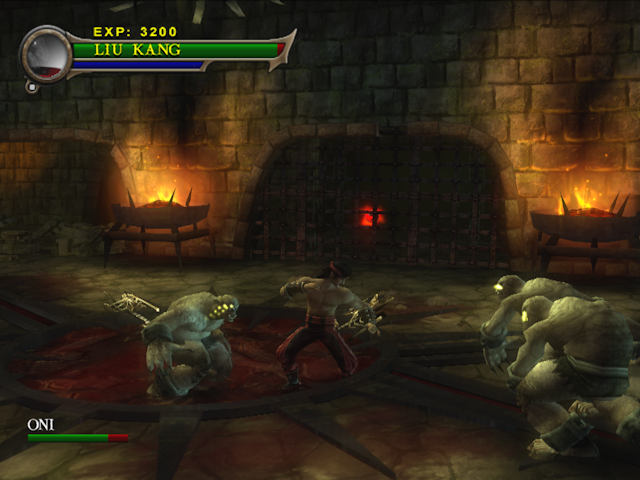
Each character has a Health Meter that governs their ability to sustain damage. This meter can be refilled in two ways: through Kombat and Pick-Ups.
In 2-Player mode, both characters share one Health Meter.
Healing in Kombat
When you defeat an enemy,
.png)

_1.png)
.png)
.png)
.png)

.png)

_1.png)
.png)
.png)


_1.png)





.png)


.png)
.png)