Options
Music Volume
Adjusts the volume of the music.
Effect Volume
Adjusts the volume of the sound effects.
Voice Volume
Adjusts the volume of the voices.
Invert Y Axis
Activate (ON) or deactivate (OFF) this option to configure the up/down commands on your left analog stick (activated by default).
Vibration
Activate (ON) or deactivate (OFF) the vibration function of your DUALSHOCK®2 analog controller.
Adjust Screen
Adjusts the game screen on your television screen.
The Missions
REBEL RAIDERS: OPERATION NIGHTHAWK™ contains 16 missions divided into four chapters along with an introduction.
Mission Selection Screen
From this screen you can select the next mission in which you wish to participate. When you reach a new chapter, the first three missions are accessible. You can carry them out in any order.
The final mission in each chapter does not become available until you have successfully completed the previous three missions. Each time you successfully complete a mission, a screen shows you the missions that have become available.
•
You can replay missions you completed successfully as many times as you wish.
Locked Missions
Some of the game missions are locked. To unlock them, you must successfully complete a challenge (see the CHALLENGES section). The challenge you must successfully complete to unlock the mission is indicated underneath each locked mission.
Aircraft Selection Screen
This screen lets you choose the aircraft that is most appropriate for the mission you are preparing to launch. The planes available in your hangar and adapted to the particular mission will appear.
The weapons each plane is armed with are shown at the bottom of the screen. Use the directional buttons to select the one you prefer and validate with the button to start the mission.
•
In some cases, a single specific plane will be assigned to you.
•
As you progress through the adventure, you will successively be assigned new aircrafts.
•
You may also acquire extra aircrafts as you successfully complete the challenges.
Tutorial
The purpose of this mission is to familiarize you with the commands of the aircraft. Follow the step-by-step instructions given by the instructor to progressively discover how to pilot the planes, operate the weapons, and finally engage in real air combat.
During this mission, an icon will regularly appear on the screen to show you which buttons to press.
The only aircraft available for the tutorial mission is the YV-21. You will be able to learn how to control the basic weapons of the game, the gun, the missiles and the multi-missiles (see the WEAPONS section). •
Other planes available in the game are equipped with different weapons (see the WEAPONS section for more details on how to control the other weapons).
•
Training is indispensable for beginning players to help them learn the commands and enjoy REBEL RAIDERS: OPERATION NIGHTHAWK™ to the maximum.
Challenges
REBEL RAIDERS: OPERATION NIGHTHAWK™ contains 16 different challenges, one per mission.
The Challenges Screen
On the Mission Selection screen, select CHALLENGES to go to the Challenges screen. The purpose of the challenges are to help you advance and learn how to control all the weapons of the game.
Carrying out a challenge involves replaying a mission you have already successfully completed, but under particular conditions, and with a specific goal. Be sure to read the description of each challenge carefully before getting started.
Unavailable Challenges
New challenges will become available as you progress through the adventure. Each time you successfully complete a mission, a screen will show you the challenges that become available. Be sure to regularly go back to the Challenges Screen to check out which challenges you have access to.
Rewards
Each time you succeed at a challenge, you will receive a reward. For most of the challenges you will be able to win new aircrafts. In some cases, successfully completing a challenge will allow you to unlock a mission and to progress in the adventure.
Game Over
You can fail at a mission for several reasons:
•
If damage to your aircraft exceeds 100%.
•
If all your wingmen are shot down.
During a challenge, you can also fail if:
•
You haven't accomplished the objectives of your mission.
AR
•
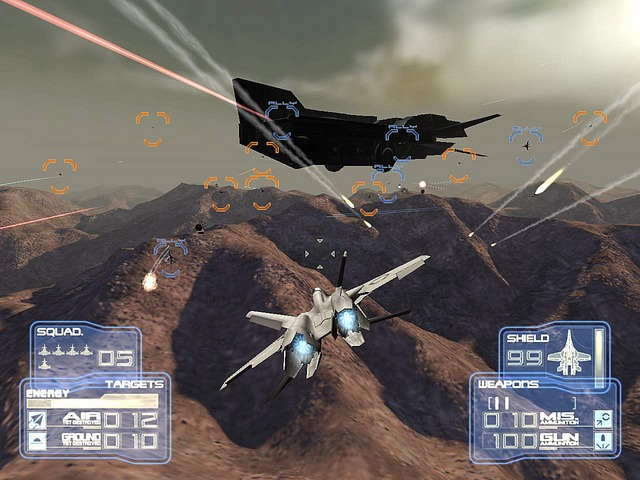
(11) MARKER FOR TARGETS HIT BY GUN STRIKE ONLY: Some targets can only be hit with the gun. In this case, a specific marker indicating "GUN" will encircle them.
•
(12) WINGMEN MARKER: A blue marker with the "ALLY" indicator encircles your wingmen to help you locate them.
•
(13) HAIR CROSS: This indicator lets you aim with precision. Its form changes depending on how you are armed: with Conventional Weapons or Special Weapons.
Pause Menu
Press the START button during the mission to display the Pause Menu and access the following options:
•
RESUME MISSION: To restart the mission where you were when you were interrupted.
•
ABORT MISSION: To immediately terminate the mission and return to the Select Mission Screen.
•
OPTIONS: This menu lets you adjust various game settings.
•
MUSIC VOLUME: Adjusts the volume of the music.
•
EFFECT VOLUME: Adjusts the volume of the sound effects.
•
VOICE VOLUME: Adjusts the volume of the voices.
•
INVERT Y AXIS: Activate (ON) or deactivate (OFF) this option to configure the up/down commands on your left analog stick (activated by default).
•
VIBRATION: Activate (ON) or deactivate
.png)

.png)
.png)
.png)





.png)
